

Changing a button color or adjusting a card’s spacing should be a handy guide a rough job. But when that fluctuate needs to achieve various parts on a internet web page, you’ll be capable of spend time beyond regulation reopening modules and entering the an identical values than deciding how the design should look. For the reason that layout grows, even small revisions can transform a tedious number of edits.
Divi 5’s Prolong Attributes handles that repetition by way of letting you practice settings from one element to others right through your internet web page.
Previous matching repeated modules, you’ll be capable of reuse appropriate settings right through different module types, elevate segment spacing into rows, and lengthen made up our minds on content material subject matter or presets. Listed below are ten good techniques to use those controls on your next internet web page.
How Lengthen Attributes Works
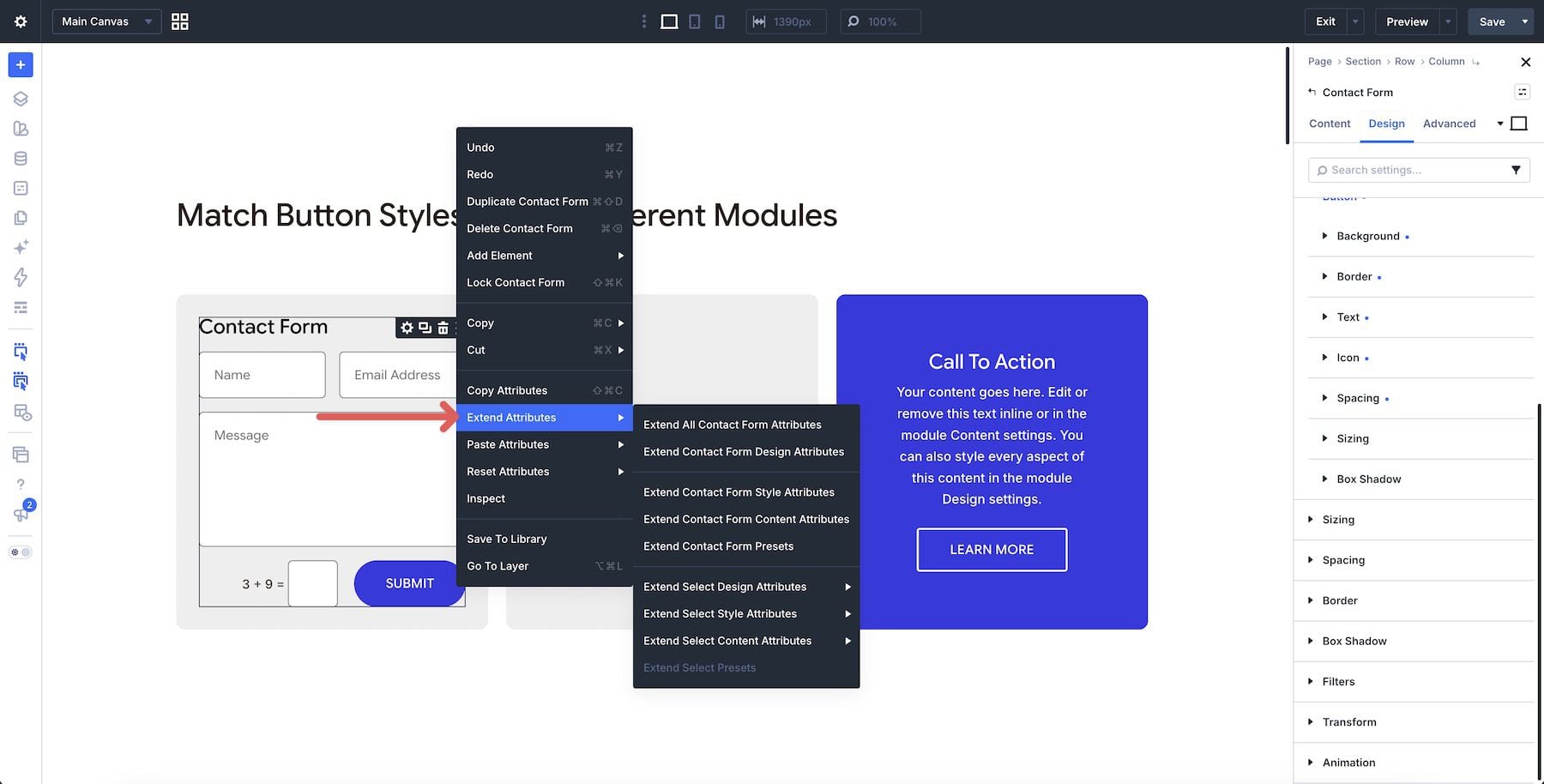
Prolong Attributes makes use of 1 element for the reason that provide for a transformation. To open its controls, right-click that element throughout the Visible Builder and select Lengthen Attributes (you’ll be capable of moreover right-click an products throughout the Layers view or an selection group of workers in a module’s settings). The panel allows you to choose where the business goes and how much of the availability’s configuration to reuse.
Use Lengthen To Location to choose how a long way the extension reaches, akin to the current segment or the entire internet web page. Lengthen To Element Sort narrows the receiving parts at that location. For instance, it’s imaginable you’ll practice a single background color to each row in a bit of while leaving its modules unaffected.
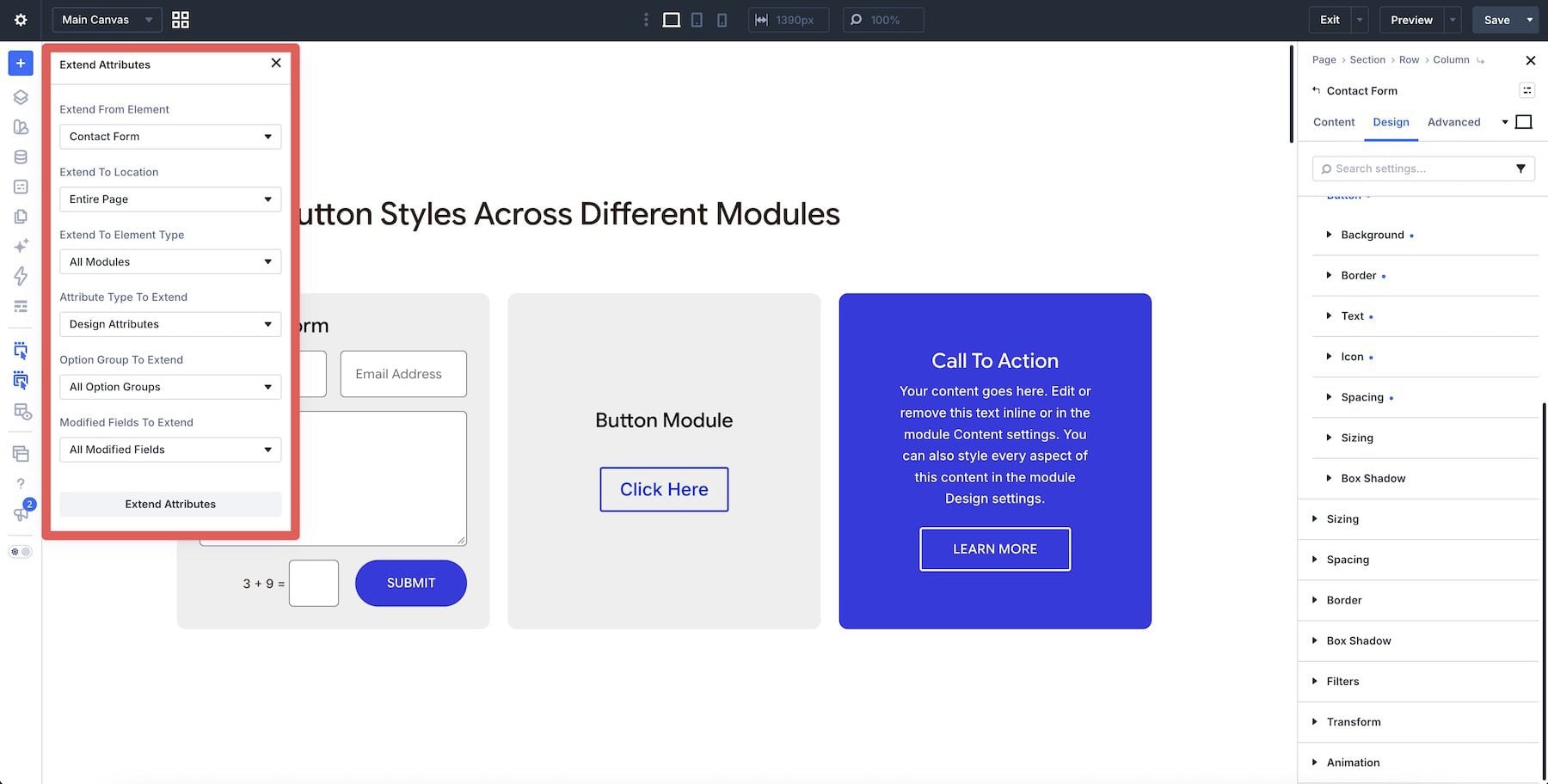
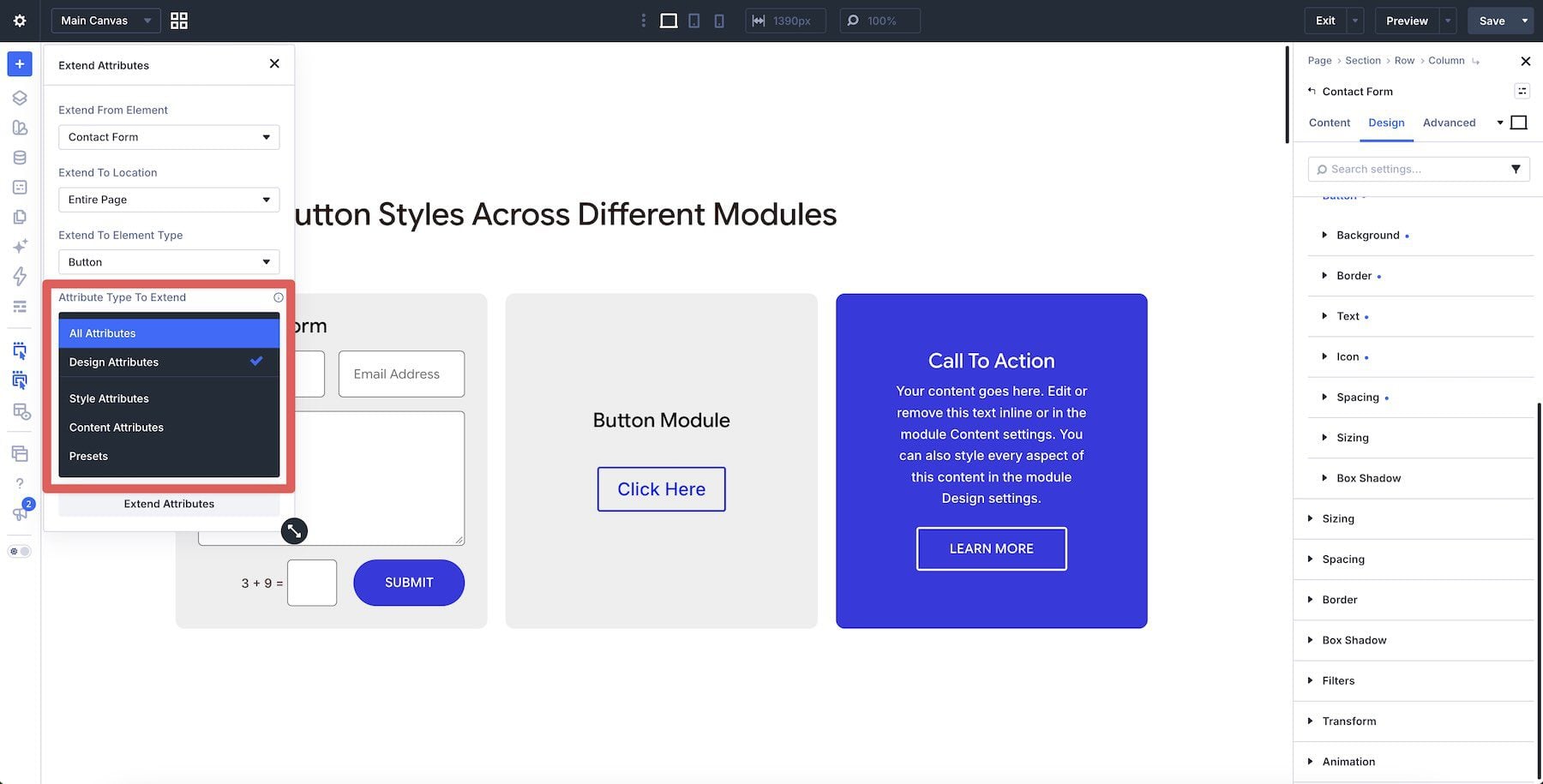
Next, make a choice the Feature Sort To Lengthen. Style Attributes copies modified styling without preset assignments. Design Attributes contains varieties and presets, while Content material subject matter Attributes covers content material subject matter corresponding to text and links. Presets focuses on preset assignments; the preset example underneath uses Design Attributes to modify a Blurb element preset.
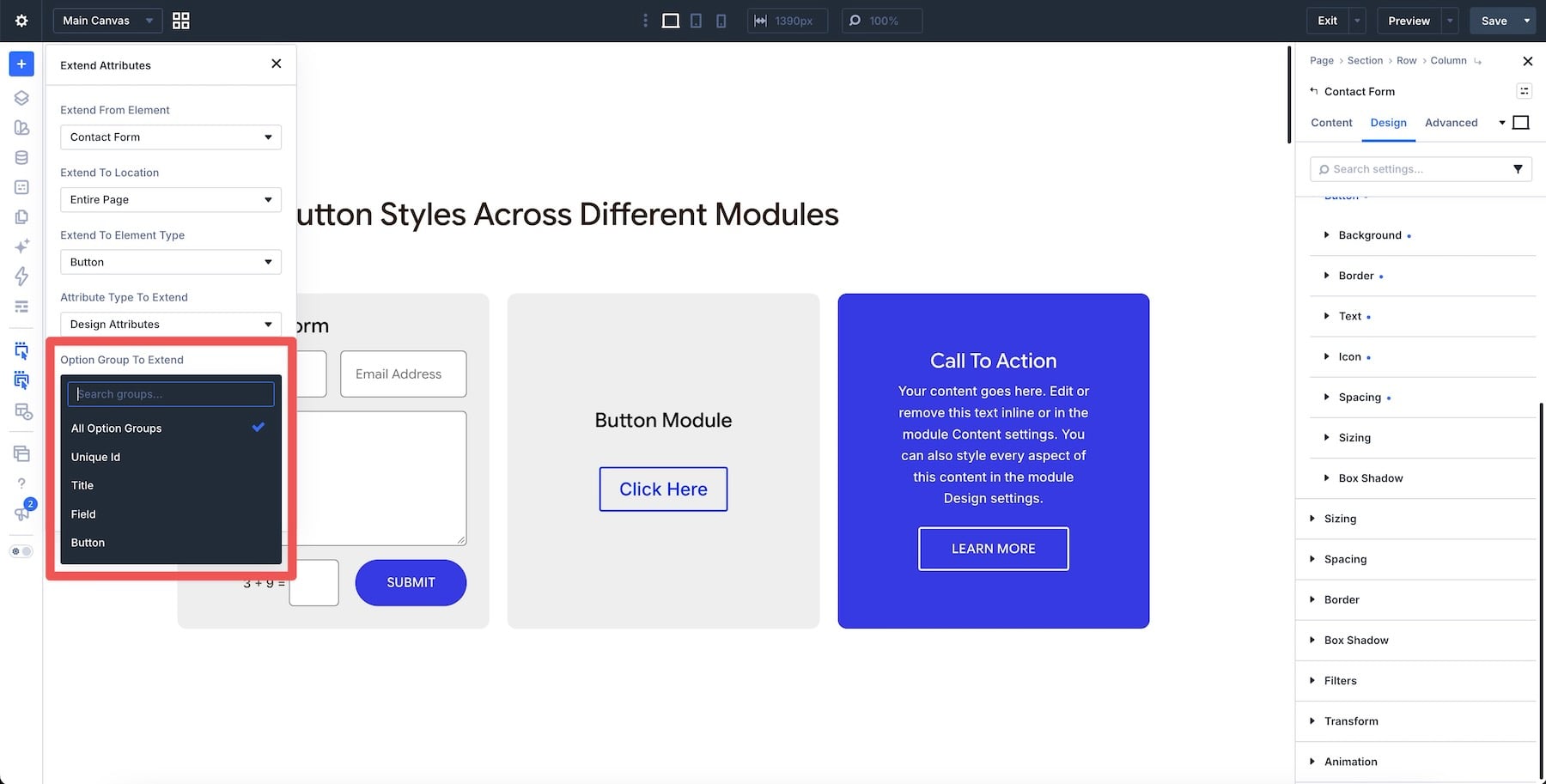
The Selection Group To Lengthen field narrows the operation to similar settings, corresponding to Background, Spacing, or Button. Use Modified Fields To Lengthen to make a choice individual settings inside of that group of workers. All Modified Fields contains earlier customizations on the provide, so assessment the tick list prior to creating use of it. Extending atypical varieties or content material subject matter copies the selected values; long run changes to the availability require any other extension. Shared presets provide a reusable definition for ongoing design updates.
The ones controls artwork together to stick the business specific. Once what should are compatible, you’ll be ready to choose the settings and objectives accordingly. The Prolong Attributes documentation covers the available controls in more part.
10 Ways To Save Time With Lengthen Attributes
The ones examples show recommendations on how you can reuse settings right through not unusual internet web page parts.
1. Are compatible Button Varieties All through Different Modules
Buttons are a good place to start out out given that an identical design eternally turns out in several parts of a internet web page. When those buttons should are compatible, finish the styling on one provide button and lengthen it to the others. This lets you reuse the treatment and not using a want to move into its settings in each and every Button module.
That exact same means moreover works right through modules with appropriate Button selection groups. A Contact Form’s post button, a standalone Button module, and a Identify To Movement button can share a treatment although they bring out different jobs on the internet web page.
To use the Contact Form as your provide, make a choice Mother or father Row, All Modules, and Style Attributes, then select the Button selection group of workers.
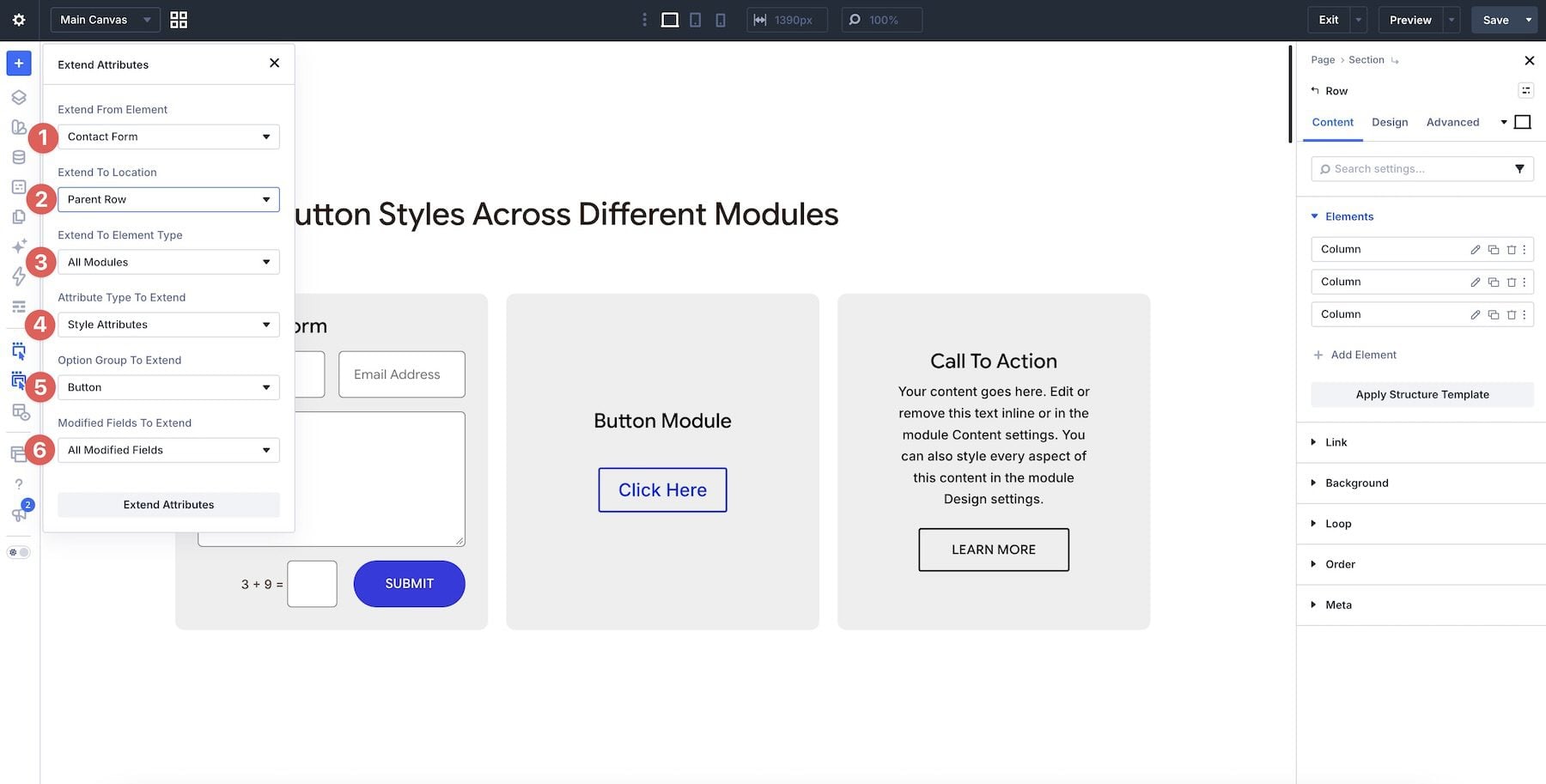
The buttons download the shared color, typography, and rounded corners while maintaining their labels and links. Evaluation padding one after the other when extending right through module types; a standalone Button can need its non-public spacing adjustment.
2. Lift Section Padding Over To Rows
Padding helps determine the spacing building for a internet web page, in particular while you use boxed rows and sections with an identical amounts of inside of space. Whilst you’ve settled on the values for one segment, Lengthen Attributes can elevate them to the rows that should use the an identical spacing.
Right kind-click the segment and make a choice Lengthen Attributes. Inside the panel, select Design Attributes for the reason that feature kind to extend.
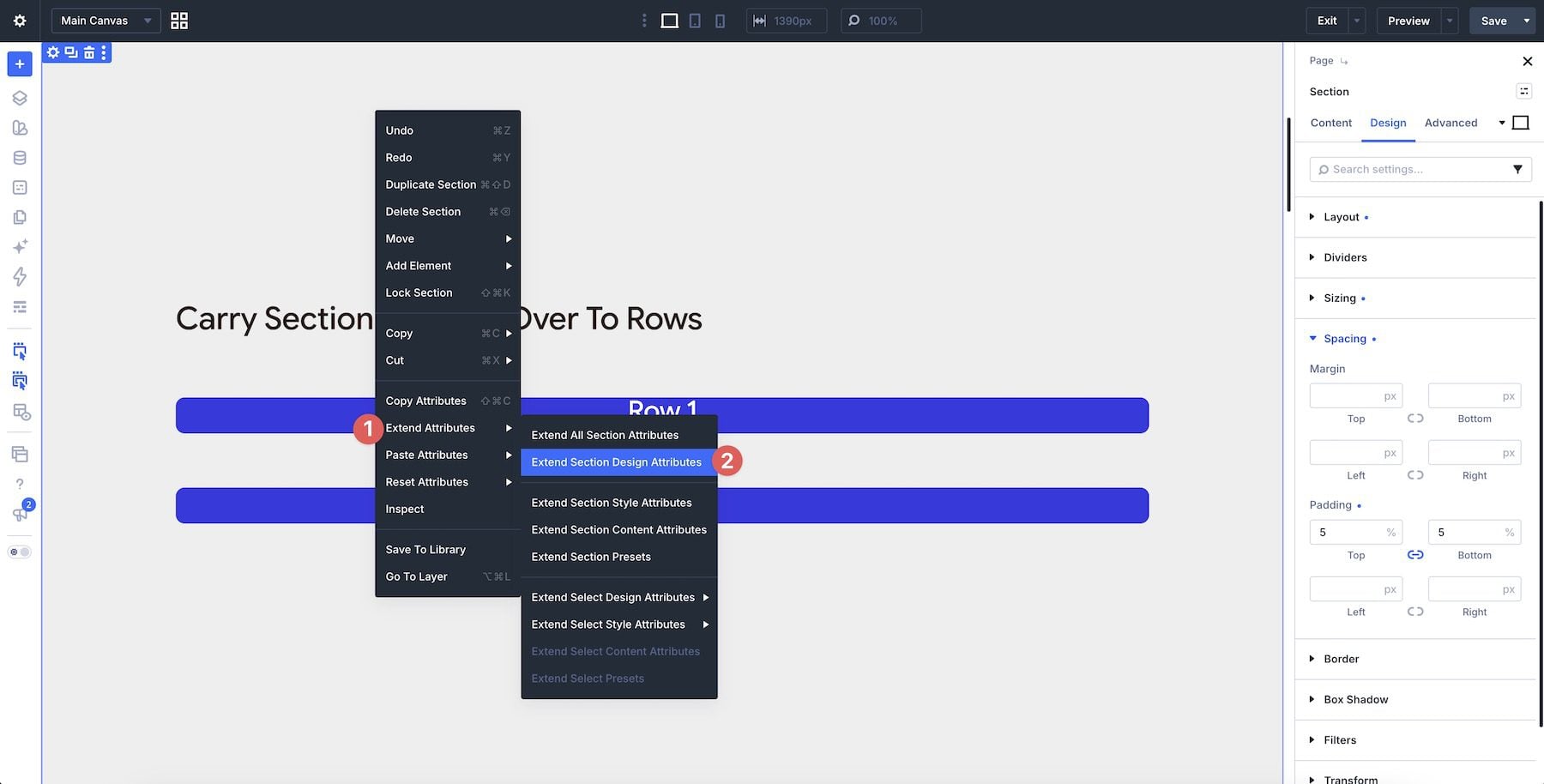
Set Lengthen To Location to Provide Element & Children for the segment’s direct rows, or Provide Element & Descendants to include matching rows farther down its hierarchy. Choose Row, Design Attributes, and Spacing.
In this example, All Modified Fields carries the availability’s similar best and bottom padding of 5%. Take a look at the blended segment and row spacing in a while: the segment keeps its padding, and its rows download their own. Share padding moreover is made up our minds through the receiving container’s width, so matching values don’t want to produce identical pixel spacing.
3. Standardize Rounded Corners All through Packing containers
A rounded segment, a boxed row, and the columns inside it is going to all need the an identical corner treatment. Atmosphere each and every radius one after the other makes it easy to introduce small diversifications, particularly while you assemble those parts of the internet web page at different cases.
Use the container with the finished corner shape as your provide. To carry a row’s corners into its columns, make a choice Provide Element & Children, Column, and Design Attributes. Make a selection the Border selection group of workers and the Border Radius field. That selection copies the corner shape while leaving other border settings outdoor the operation.
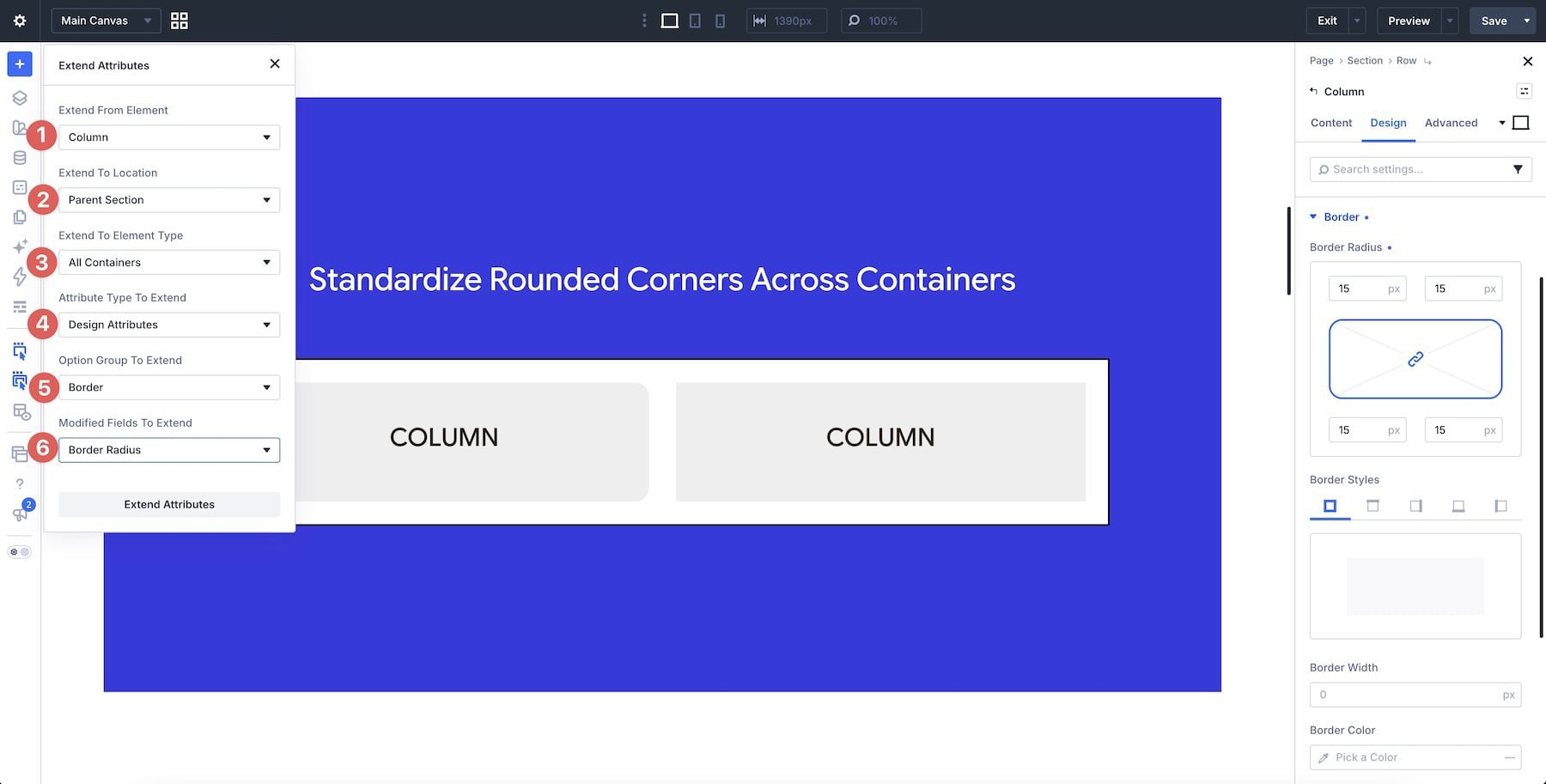
This is useful while you’re bringing an present layout into line with a brand spanking new design direction. You’ll be capable of control one radius and lift it throughout the chosen containers, then take a look at how their backgrounds and pictures meet the rounded edges.
4. Roll Out A Design Change All through Repeated Elements
Lengthen Attributes is also useful all the way through the finishing stage, when a internet web page is built, on the other hand a repeated part should be changed. In our service-card example, one column already has the shadow and border treatment we want the other two to share.
Modify the shadow and border varieties on one card first. For an entire styling are compatible, use its column for the reason that provide, make a choice Mother or father Row and Column, then lengthen Style Attributes with All Selection Groups and All Modified Fields. This copies the availability’s modified varieties right through those columns, along with earlier spacing or background customizations. Their module content material subject matter stays individual, on the other hand this selection covers more than your latest shadow and border edits.
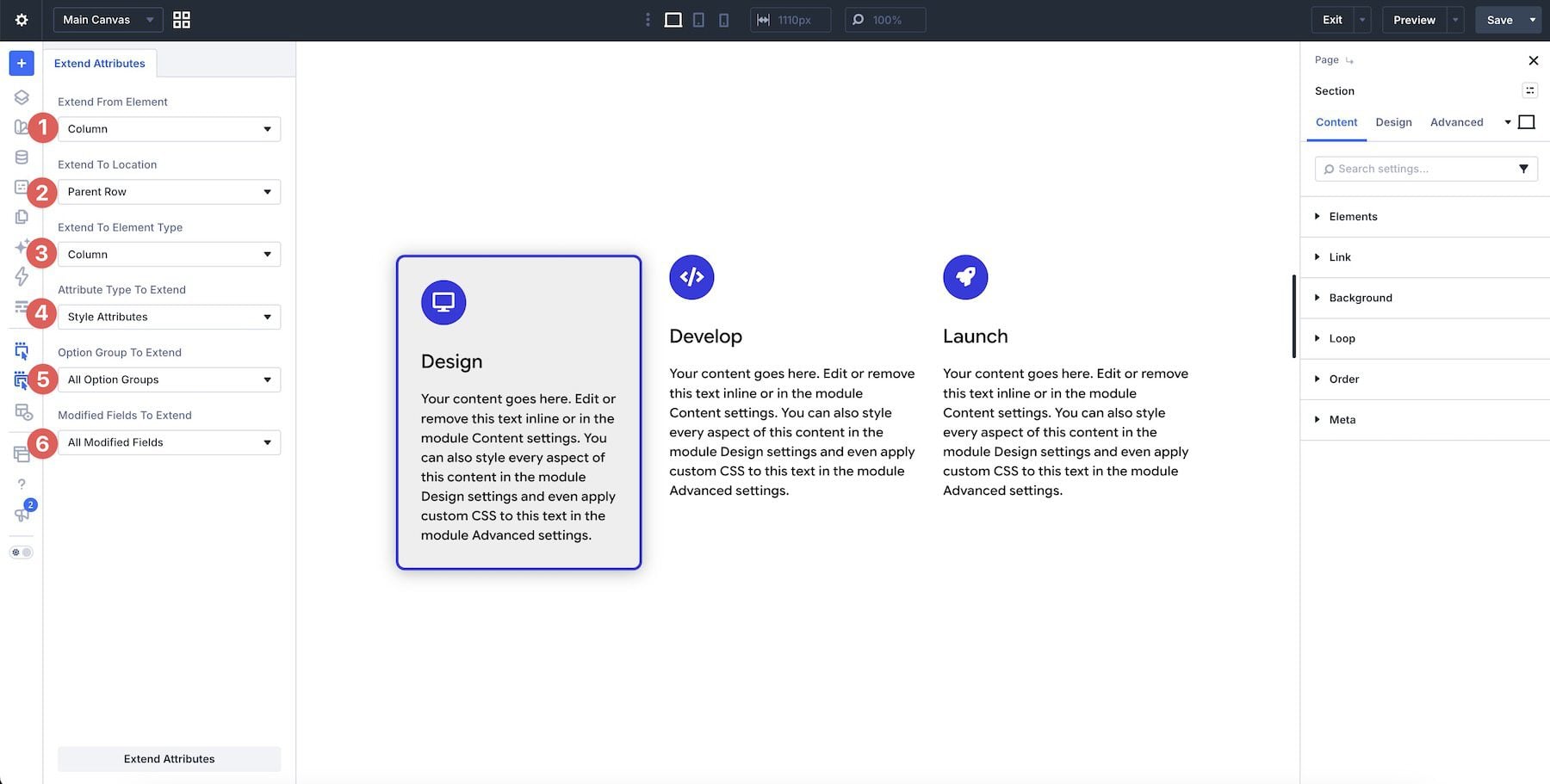
For a shadow-only revision, select Box Shadow as an alternative of all selection groups; lengthen Border one after the other if that also needs updating. Working from one finished card means that you can settle the treatment in context and make a choice how a large number of it the others should share.
5. Reuse Background Varieties All through A Construction
A background treatment can put across a set of enjoying playing cards together without changing their content material subject matter. In our row of three Testimonial modules, the main card’s blue gradient provides a relentless treatment to make use of to the other two, saving any other trip through their background settings.
Use the main Testimonial for the reason that provide, set the web site to Mother or father Row, and make a choice Testimonial for the reason that element kind. Underneath Design Attributes, select Background and keep All Modified Fields made up our minds on to carry all the background treatment to the other enjoying playing cards.
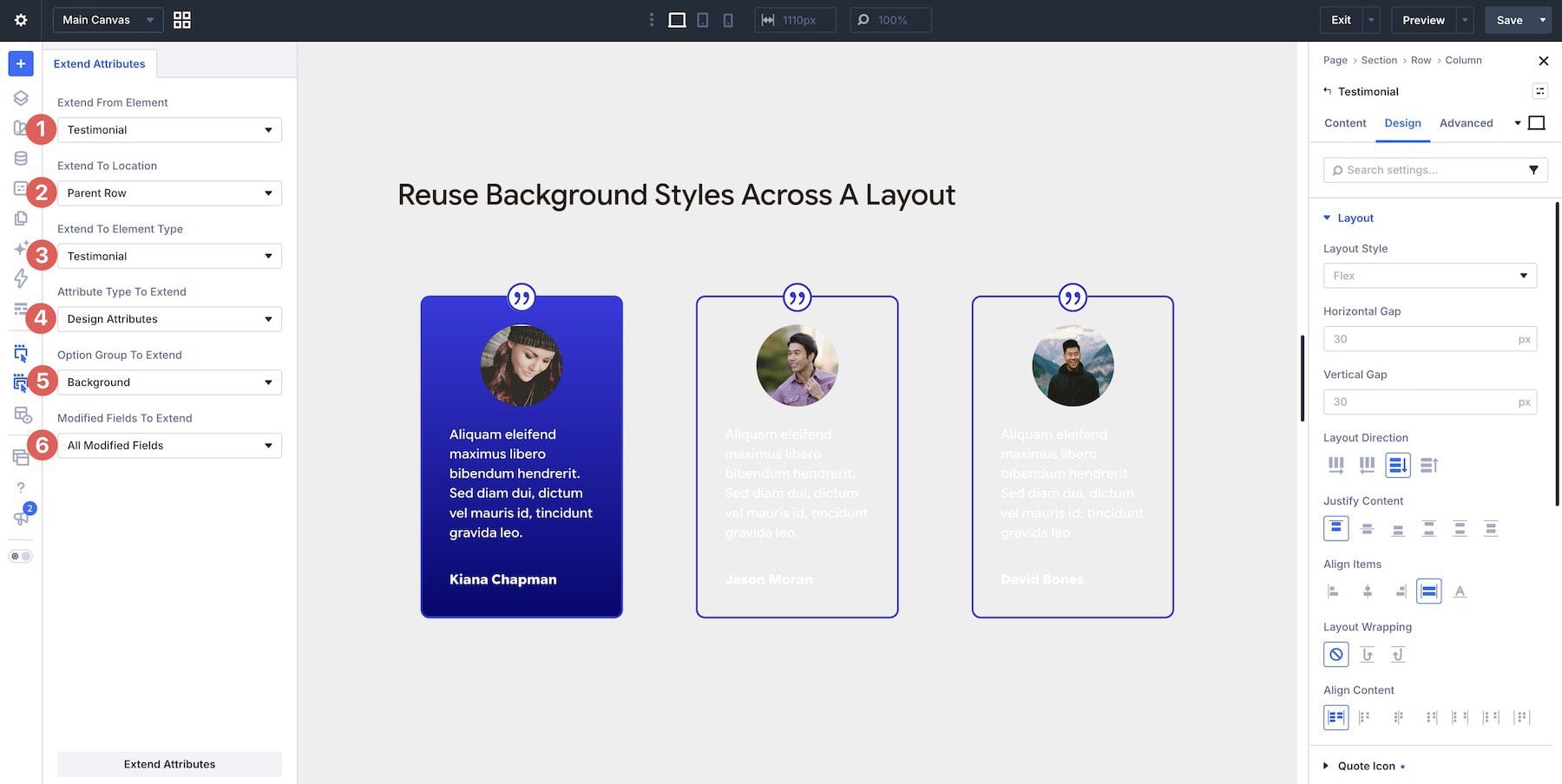
Choosing a limited location is really useful when the background belongs to one house of the design. You’ll be capable of elevate the treatment through that segment without recreating it in each and every element’s settings.
6. Synchronize Flex Settings All through Packing containers
When various containers use a an identical affiliation of parts, matching their alignment and spacing can require many repeated adjustments. This is not unusual in rows of enjoying playing cards or sections that pair transient pieces of content material subject matter with a button.
Get began with a container whose Flex layout already suits the design. Our first pricing column uses Get began alignment and a 20px vertical hollow. Choose Mother or father Row and Column, then lengthen the modified Construction fields beneath Design Attributes to reuse those two settings.
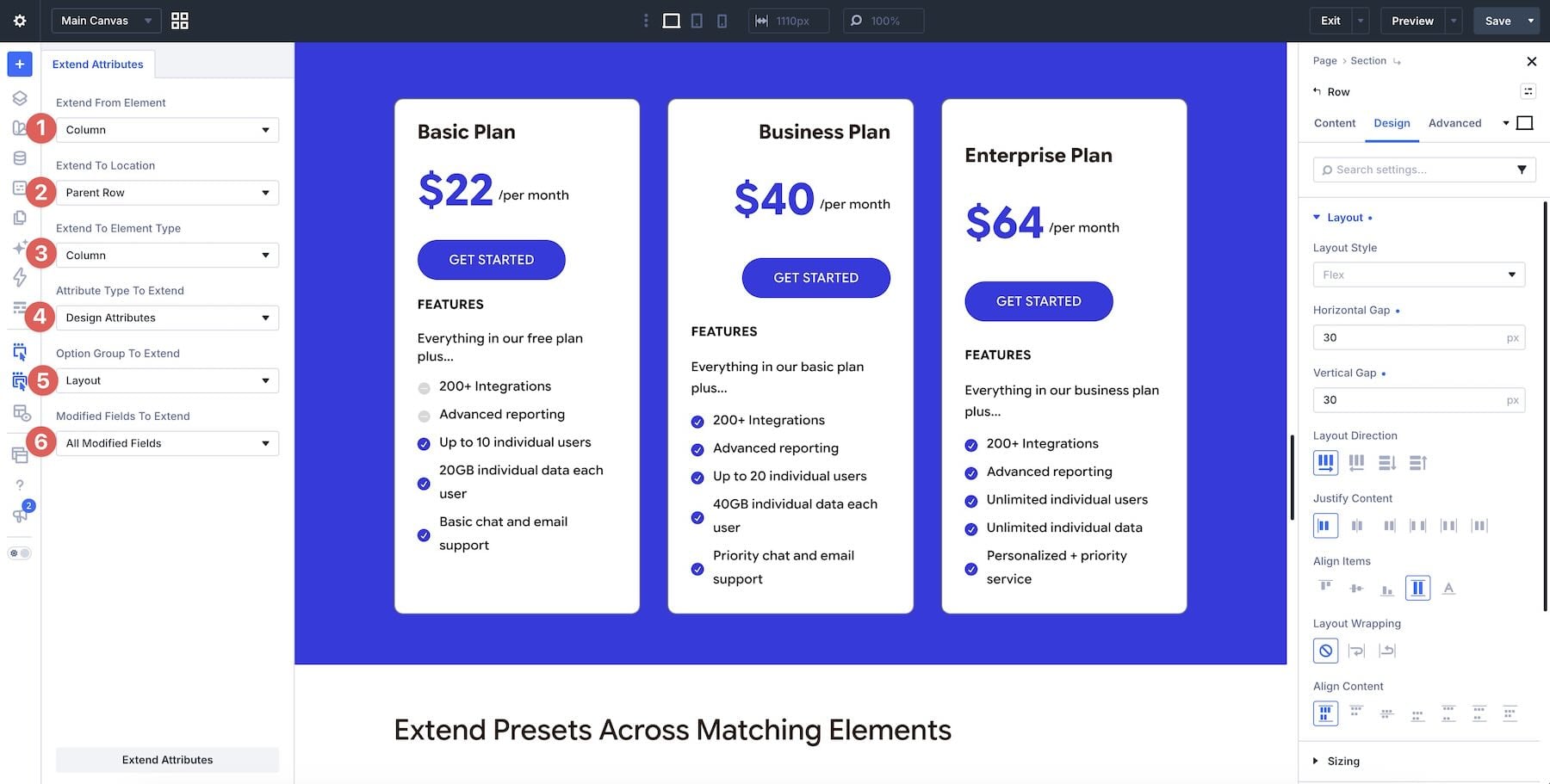
The receiving columns keep settings outdoor that selection. Proper right here, the availability’s modified Construction fields are alignment and vertical hollow, so the objectives retain their present End justification. If the availability has other modified Construction settings, select the best alignment and hollow fields as an alternative. Evaluation smaller widths in a while, since longer content material subject matter would possibly need different wrapping. Our data to Flexbox spacing with hole explains how those values control the gap between kids.
7. Lengthen Presets All through Matching Elements
Presets imply you’ll be able to reuse a design through a shared definition. In this example, the main Blurb module uses an element preset known as Blue Establish Blurb, which comprises its blue heading, typography, and image styling. The other Blurbs give us objectives for that preset.
To offer the other Blurbs the an identical design, right-click the main Blurb and make a choice Lengthen Attributes, the use of it for the reason that provide for the rest of the row.
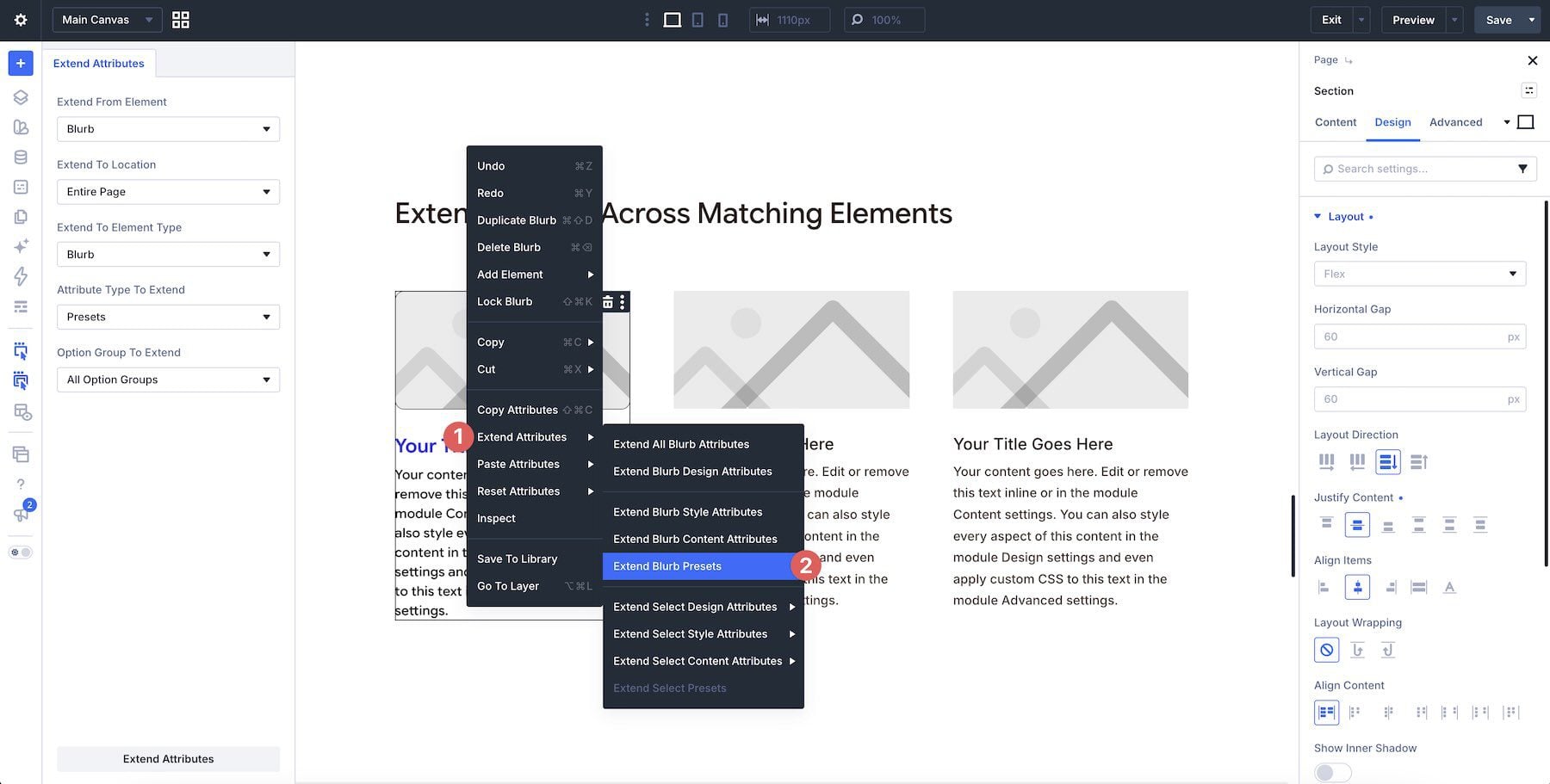
Choose Mother or father Row because the web site and Blurb for the reason that element kind. Set Feature Sort To Lengthen to Design Attributes, with All Selection Groups and All Modified Fields. The an identical controls can function a parent segment or the entire internet web page when those Blurbs should moreover use this design.
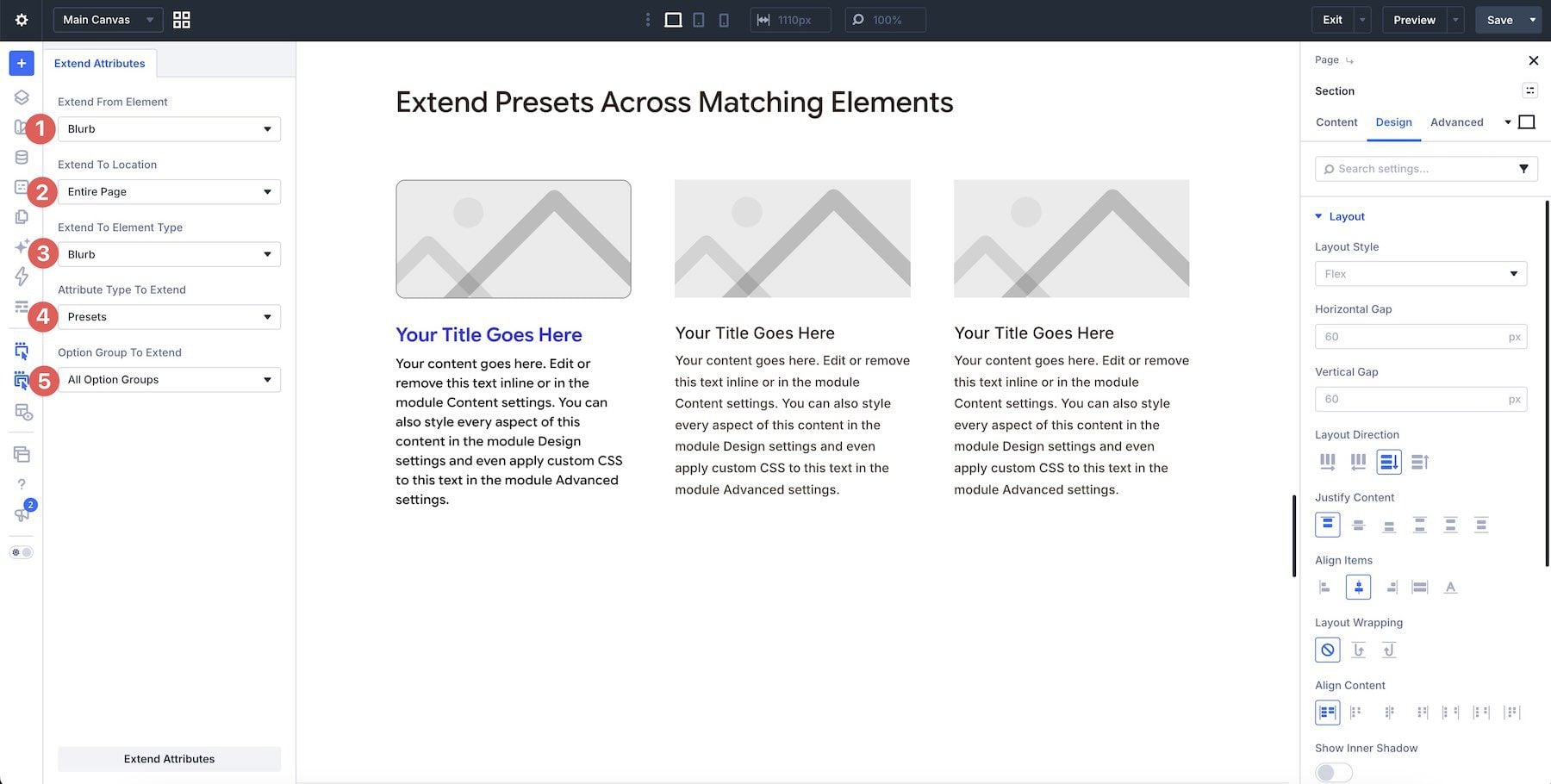
Design Attributes contains the availability’s preset assignments and adjusted varieties, so assessment every previous to extending. For an selection group of workers preset, corresponding to Background, use Presets and select that group of workers. Extending assigns an present preset to the objectives; it does not create a brand spanking new preset definition. Local overrides on the receiving parts can however affect the result.
8. Reuse Content material subject matter Attributes Where Content material subject matter Should Are compatible
The attributes you lengthen can include every content material subject matter and design settings. That’s useful when a internet web page repeats the an identical message right through various calls to movement, corresponding to a reminder a few registration point in time.
Our example makes use of 2 Identify To Movement modules that should display the an identical registration reminder. Right kind-click the CTA with the finished headline and make a choice Lengthen Attributes.
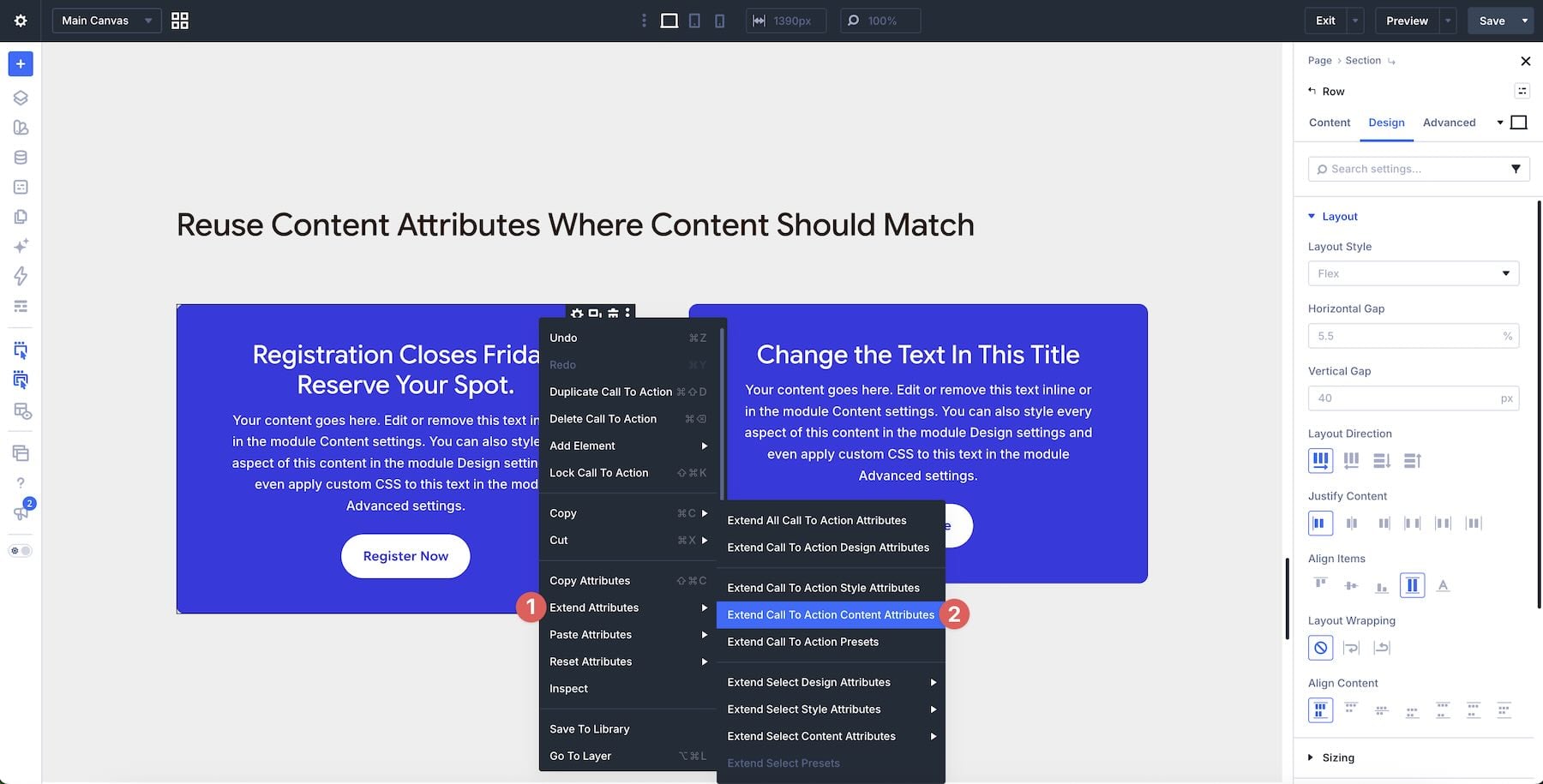
Choose Mother or father Row for the ones two modules, or Complete Internet web page if each matching CTA should download the headline. Make a selection Identify To Movement for the reason that element kind, Content material subject matter Attributes for the reason that feature kind, and Establish as the selection group of workers. Keep the field selection limited to that identify content material subject matter.
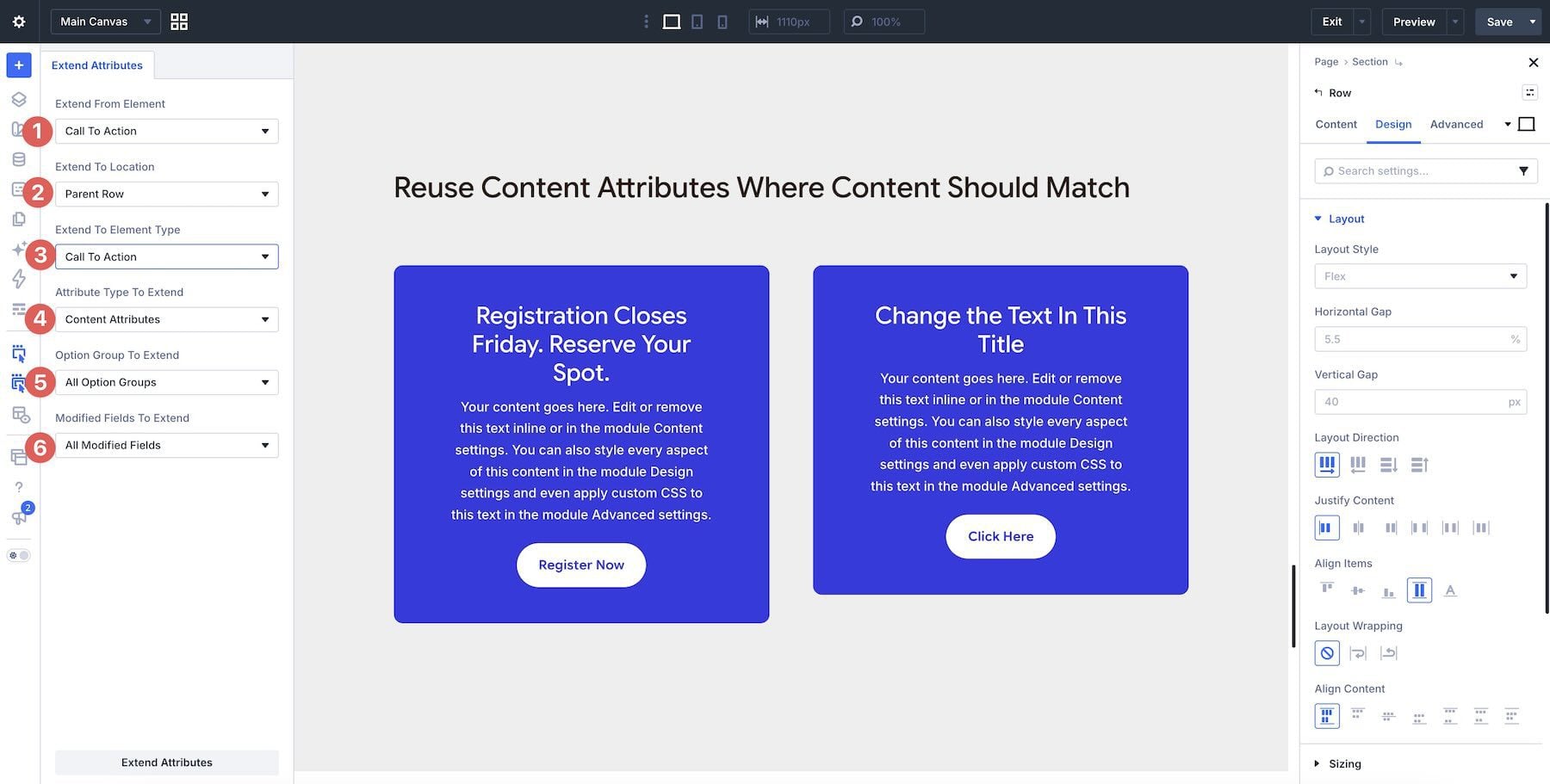
Settling on that field means that you can elevate the headline throughout the chosen modules without converting their other content material subject matter. After extending, check out that every CTAs show the meant message and that their button labels, links, and design however move smartly with their puts.
9. Reuse Become Settings All through Different Module Types
Become settings can connect parts with different functions through a an identical visual treatment. Our example places a Contact Form beside a Blurb and a Identify To Movement module, with the Contact Form supplying the rotation we need to reuse.
The provision form has a Become Rotate price of 355deg on the Z axis, giving it a slight tilt. Choose Mother or father Row, Design Attributes, Become, and All Modified Fields. All Modules reaches a intensive set of objectives, along with nested modules corresponding to form fields. For this design, lengthen to Blurb first, then repeat with Identify To Movement to limit the operation to the two meant module types.
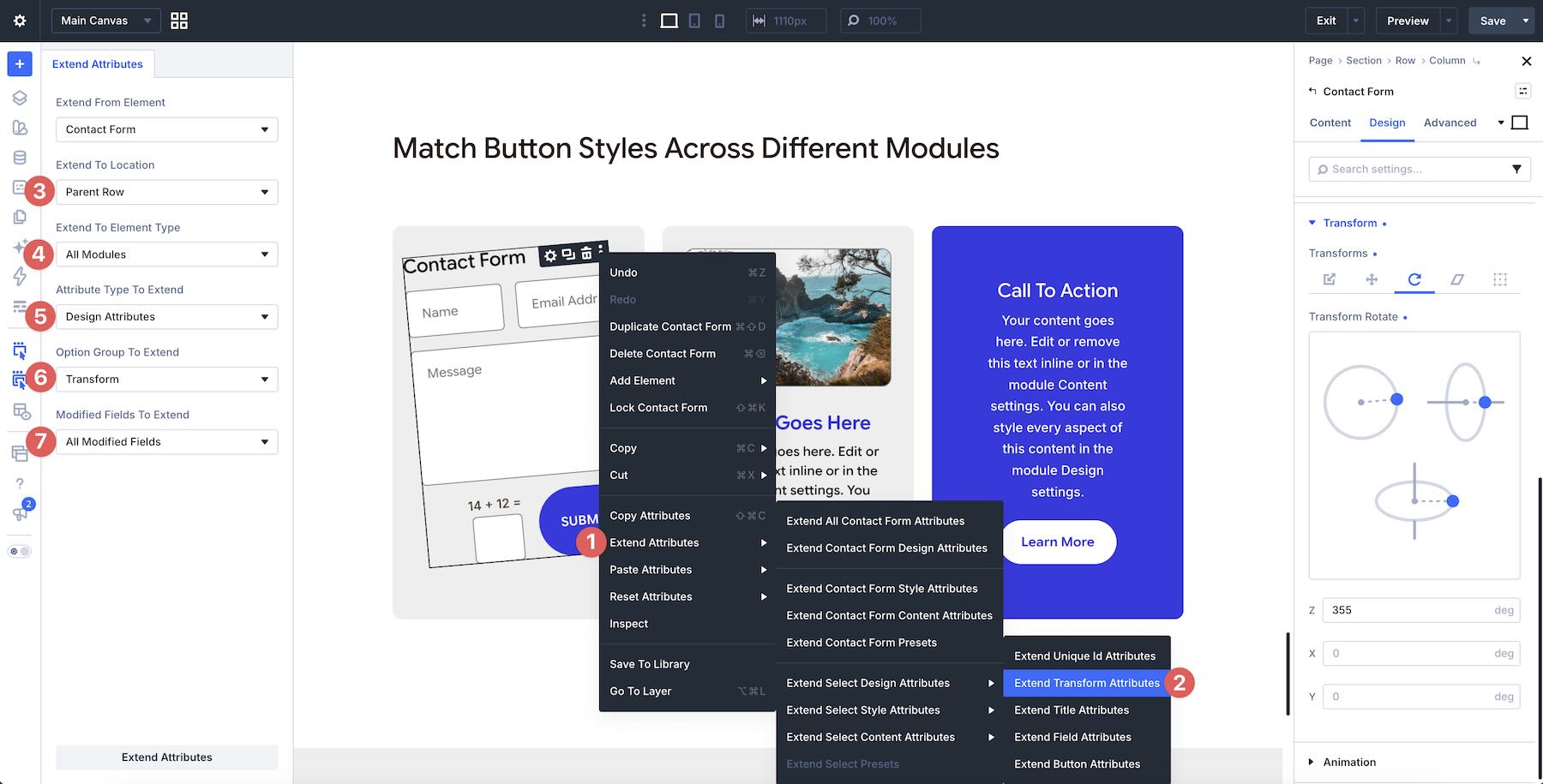
Deciding at the modified Become group of workers carries the rotation’s saved axes together. Evaluation any other modified transform settings on the provide, since they’re built-in too. After extending, take a look at the gap spherical each and every module and try that its text, fields, and buttons keep readable and easy to use.
10. Harmonize Hover Effects
The finishing details on a internet web page include how repeated parts respond to shopper interaction. A number of enjoying playing cards would possibly look alike to begin with, however show different border colors or widths when someone hovers over each and every one.
Use a finished Explicit individual module for the reason that provide. Right kind-click and select Lengthen Attributes, then make a choice Mother or father Row, Explicit individual, and Design Attributes. All Selection Groups and All Modified Fields reproduce the availability’s broader design, along with other modified settings and preset assignments. To test only the border treatment demonstrated appropriate right here, select Border as the selection group of workers and lengthen its modified fields.
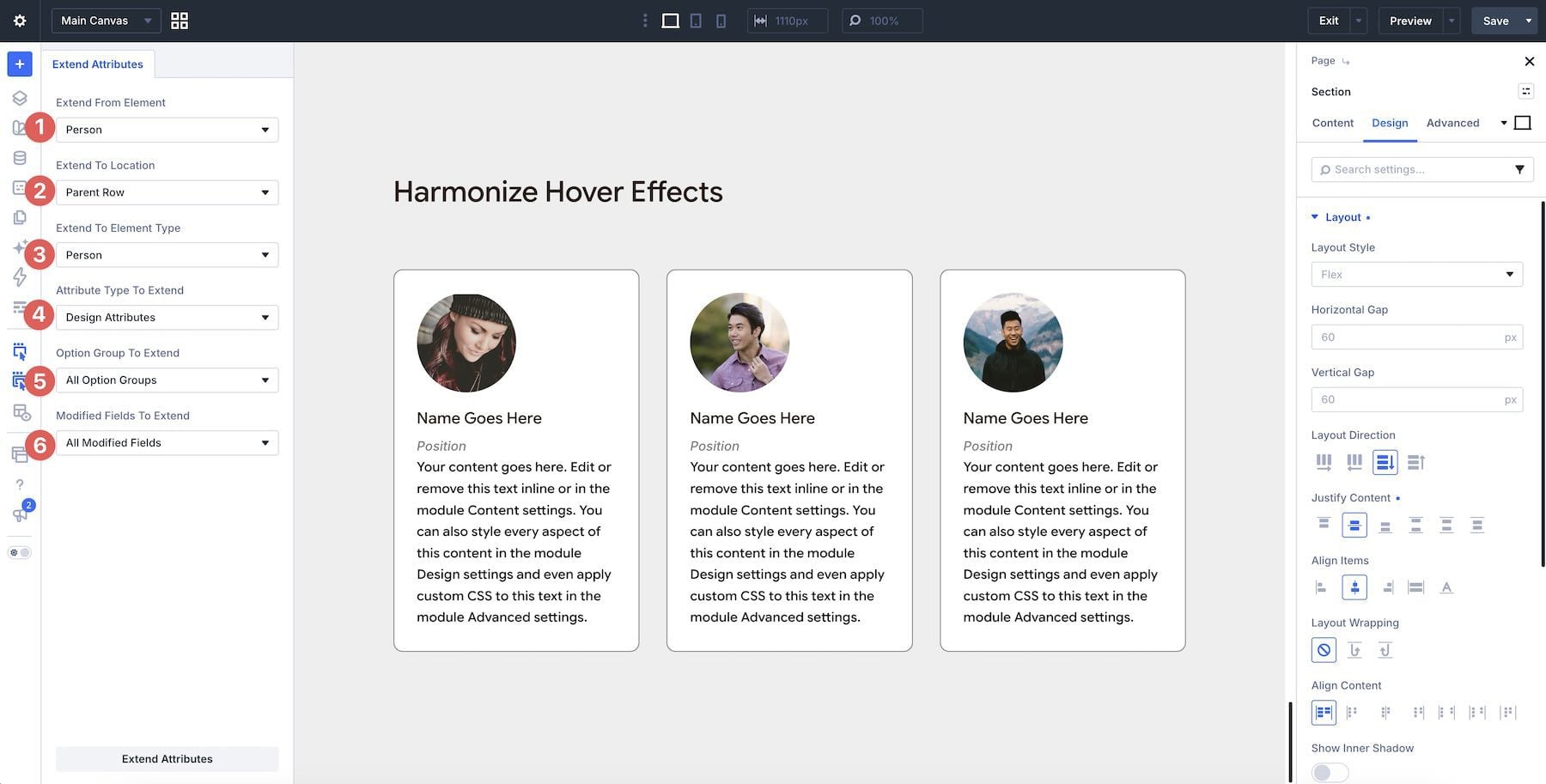
The selected border fields include their saved same old and hover values. Preview each and every receiving card in every states: the example changes from a gray 1px border to a blue 2px border on hover. Background, text, or transform effects require their corresponding selection groups; a Border extension applies the border treatment. Take a look at the enjoying playing cards together prior to creating any person refinements.
Spend A lot much less Time Repeating Design Settings
With Prolong Attributes in Divi 5, you’ll be capable of elevate a finished button design, spacing building, or preset throughout the parts of your internet web page that should use it. Choose individual fields for a focused substitute or a number of settings for a broader design business.
Get began with a single repeated job on your next internet web page, and restrict the extension to a bit of while you get acutely aware of the controls. Evaluation the result, make any changes the individual parts need, and use the an identical means any place the layout calls for it.
Which of the ones uses would save you one of the most time? Let us know throughout the comments.
The post 10 Sudden Tactics Prolong Attributes Saves You Time gave the impression first on Sublime Subject matters Weblog.



0 Comments