

As a designer, each 2d spent taking a look forward to builder actions to load can damage your ingenious float. Speed isn’t just about your site’s visitors. It moreover problems inside of your workflow, specifically when you find yourself getting into the builder, exiting it, or switching between pages all over a assemble session.
For Divi consumers, the Visual Builder has at all times been a powerful and intuitive workspace, then again navigation however comes with overhead. On speedy internet website hosting, those delays would most likely in reality really feel minor. On slower internet website hosting, they can change into a seamless drag on productivity. When that wait repeats over and over all over the day, even a few saved seconds in step with movement may just make the builder in reality really feel dramatically further responsive.
That is exactly what Speculative Prerendering in Divi 5 is designed to support. Divi 5 predicts where you’re navigating next based on your mouse movements and prerenders the holiday spot forward of you click on on. By the time you click on on, the internet web page would most likely already be loaded throughout the background, making navigation in reality really feel at the spot in supported browsers.
In this put up, we can damage down what the function is, how it works, where it’s serving to most, and the way you’ll allow or disable it when sought after.
What Is Speculative Prerendering?
Bring to mind Speculative Prerendering as a head get began for your browser. In Divi 5, it watches for high-intent navigation signs and begins prerendering a almost certainly holiday spot forward of you click on on. That means the browser can get began getting in a position the next internet web page throughout the background so the transition feels so much quicker while you make a decision to the movement.
Against this to simpler loading optimizations that very best fetch knowledge ahead of time, prerendering prepares the holiday spot internet web page itself. In observe, that can make getting into the builder, exiting it, and switching pages in reality really feel dramatically quicker.
Divi 5 uses this as a workflow enhancement, not just a technical trick. It’s aimed in an instant at the repetitive navigation actions that Divi consumers make all day long while construction internet pages.
Underneath The Hood: The Speculation Laws API
This option is powered by the use of the Speculation Laws API, which allows supported browsers to prerender almost certainly next-page navigations throughout the background. Divi 5 uses that capability to scale back the extend between individual intent and the actual internet web page transition.
Divi limits prerendering to places on your own space. That keeps the function centered and surroundings pleasant as an alternative of dropping property on pages you’re probably not to discuss with. The target isn’t to prerender the whole thing. The target is to make the most likely next movement in reality really feel quicker.
Make stronger not too long ago is made up our minds via Chromium-based browsers similar to Chrome, Edge, Opera, Brave, and others. Safari and Firefox don’t not too long ago improve the Speculation Laws API, so consumers at the ones browsers isn’t going to get the prerendering get advantages however. The site however works maximum steadily, then again the instant-feeling navigation have an effect on is particular to supported browsers.
Why This Problems For Designers
This problems because of builder tempo affects momentum. If you end up actively designing, the cost of extend isn’t just measured in seconds. It’s measured in interruptions. Each pause between actions breaks focus a bit of bit, specifically when you find yourself moving between pages, testing edits, opening some other structure, or stepping in and out of the builder over and over.
For a lot of Divi consumers, that roughly navigation happens often. You enter the builder, check out a internet web page, move out to keep an eye on something, open some other internet web page, then leap once more in another time. Even if each movement very best takes a few seconds, the whole overhead supplies up over the method a whole workday.
Crucial get advantages is without end felt on slower internet pages. On most sensible elegance internet website hosting, navigation would most likely already be rapid enough that the succeed in feels delicate. On budget internet website hosting or heavier internet sites, the difference is far more simple to notice. Their example is a site that might most likely take 5 seconds to load the builder. If Divi can get began prerendering about 1.5 seconds forward of the clicking, that still cuts the visible wait by the use of roughly 30%. The entire art work isn’t eliminated, then again the time frame you spend looking at a loading visual display unit is diminished.
Because of this Speculative Prerendering is larger than just a tempo function. This is a workflow function. It’s serving to the builder in reality really feel further reactive, further fast, and less such as you’re often taking a look forward to the interface to catch up.
Integration With Divi 5
Divi 5 uses Speculative Prerendering throughout the places where navigation friction problems most. Necessarily probably the most noticeable improvements happen when getting into the builder, exiting the builder, and switching pages while construction. The function is also integrated into navigation all the way through the Command Center.
- Coming into the builder: As your mouse moves in opposition to the Edit With Divi button throughout the admin bar, Divi can get started prerendering the builder forward of you click on on.
- Exiting the builder: Move out places may also be prerendered too, making it quicker to move once more to the doorway end or the WordPress editor.
- Switching pages: When moving from one internet web page to some other throughout the builder, Divi uses the equivalent solution to cut back the extend between navigation steps.
- The Command Center: Press Cmd + Adequate, get began typing a holiday spot, and as soon as your navigation command is lively, prerendering begins. By the time you press Enter, the holiday spot would most likely already be loaded.
That’s what makes the function smart. It does not are living in some obscure edge case. It goals the correct actions that many Divi consumers repeat all day.
How Speculative Prerendering Works In Divi 5
Speculative Prerendering isn’t a seamless background process that runs towards each imaginable holiday spot. Divi 5 uses it selectively. The browser very best begins prerendering when Divi detects habits that suggests a almost certainly next step.
An example is the short window between moving your cursor in opposition to a purpose and if truth be told clicking it. Despite the fact that that window is brief, it’s without end enough to start getting in a position the holiday spot prematurely. On a snappy site, that may be enough to make the transition in reality really feel at the spot. On a slower site, it would most likely however remove a good portion of the visible wait time.
That’s the core concept at the back of the function. Divi isn’t eliminating all processing. It’s transferring one of the vital necessary art work earlier, into the time merely forward of navigation happens, so that a lot much less art work remains after you click on on.
Because of prerendering is getting in a position a real holiday spot throughout the background, it does create further server requests. Because of this Divi keeps the function constrained. It very best applies the commonsense where intent turns out strong and only for pages on your own space. That stability helps take care of the speed get advantages without turning the function into needless background overhead.
How To Allow And Configure Speculative Prerendering
The good news is that Speculative Prerendering is enabled by the use of default in Divi 5. Most consumers don’t want to configure the remainder to have the good thing about it. In the event you’re using Divi 5 in a supported Chromium-based browser, the function is already working at the back of the scenes.
That said, Divi however gives you regulate over it. If you want to cut back further background requests, troubleshoot a specific issue, or read about potency with and without the function, you’ll be capable of toggle it off manually.
Gaining access to The Speculative Prerendering Toggle
If you wish to disable the function, open the Builder Settings throughout the Visual Builder.

Seek for the ambience that speeds up the builder with prerendering, then toggle it on or off as sought after.

For plenty of consumers, the most suitable option is to leave it on. It’s one of those choices that improves regularly use without requiring any explicit setup.
When To Disable It
For plenty of designers, leaving this enabled is the best switch. However, there are a few instances where turning it off may just make sense.
In the event you’re on a restrictive internet website hosting plan with tight CPU or memory limits, you may make a selection to scale back additional background requests while working. Each prerender is in large part like an extra internet web page discuss with for your site, so it does use server property. If those property are limited and also you most likely can rather avoid that further load, disabling the function is an inexpensive tradeoff.
You may also want to disable it temporarily while debugging. In the event you’re investigating JavaScript habits, navigation issues, or unexpected requests, turning off prerendering can help you isolate what’s going on all over an odd internet web page load.
How To Test It Is Operating
In the event you’re using a Chromium-based browser similar to Chrome or Edge, you’ll be capable of read about prerendering in DevTools.
Open DevTools with Cmd + Selection + I on Mac or Ctrl + Shift + I on House home windows.
Open the Application panel. If it is hidden, click on at the >> overflow menu first.
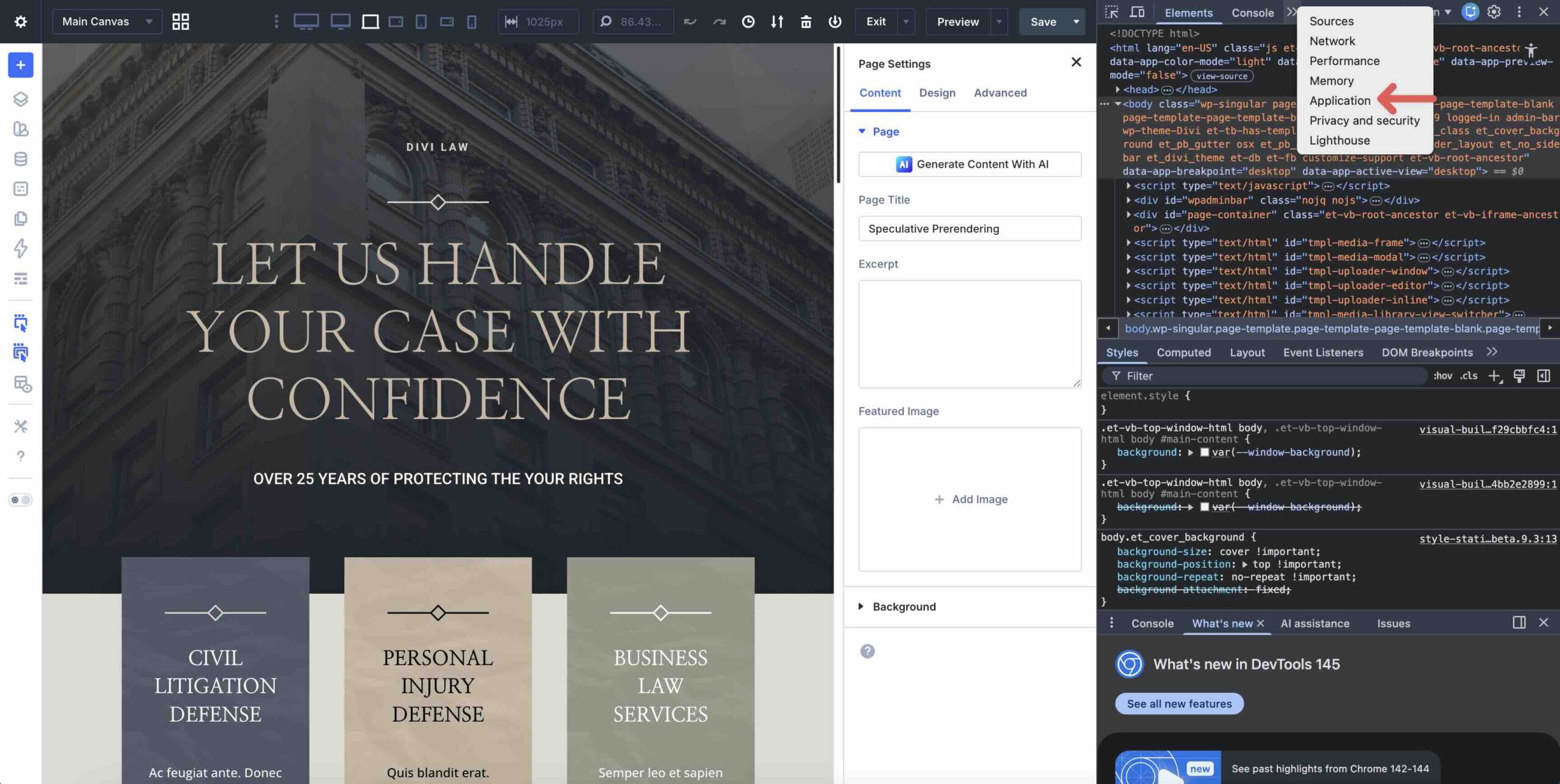
Throughout the left sidebar, transfer to Background services and products > Speculative a lot.
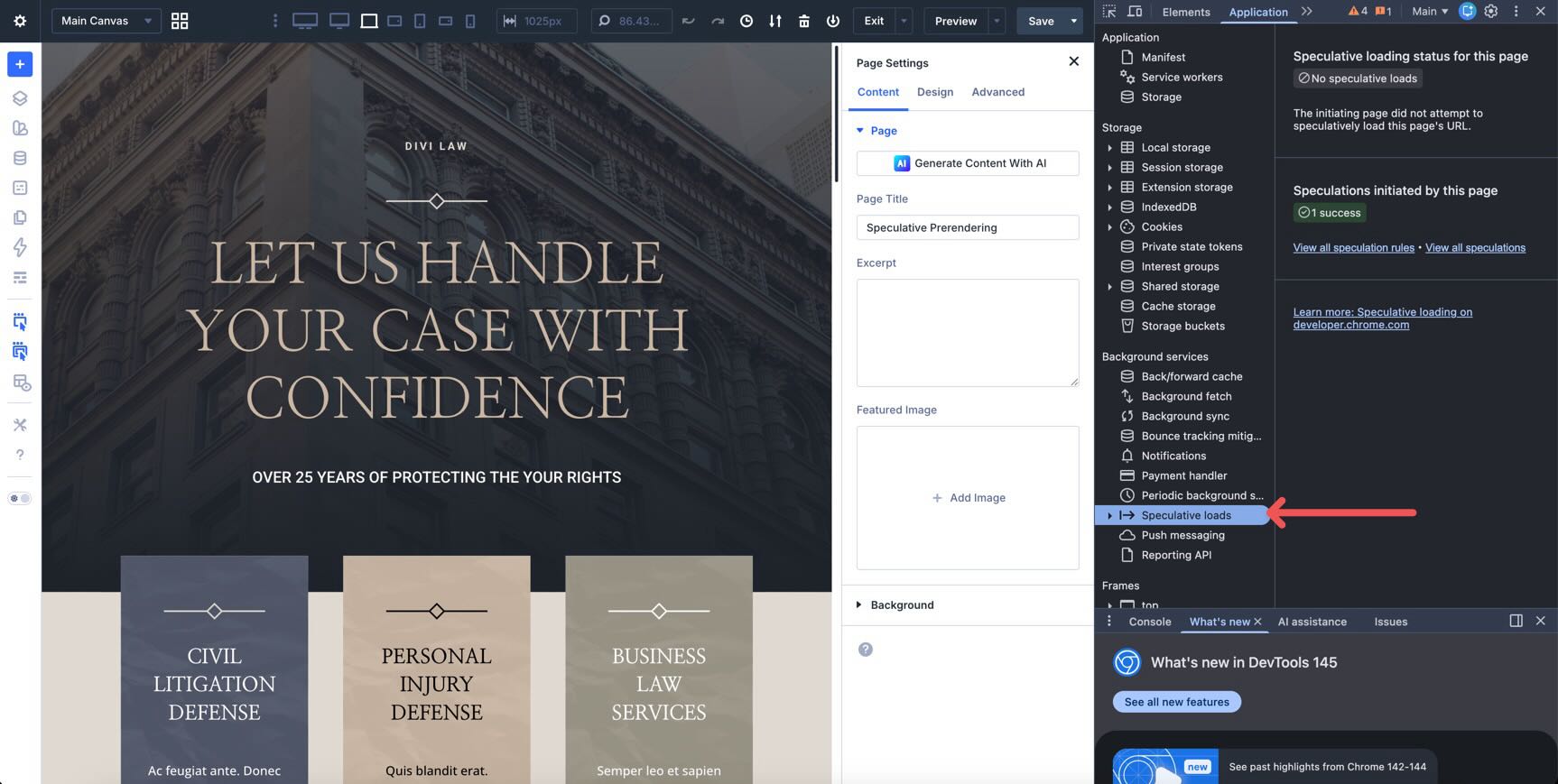
Keep that panel open while you navigate in Divi 5. Check out getting into the builder, exiting it, switching pages, or using the Command Center to navigate. If Speculative Prerendering is lively, you’ll have to see speculative loading procedure change in exact time since the browser prepares eligible places throughout the background.
Get began Building In Divi 5 These days!
Speculative Prerendering is a sensible tempo construction for Divi 5. By way of getting in a position almost certainly places forward of you click on on, Divi reduces the visible in a position time that the majority steadily slows down repeated navigation.
That get advantages is especially noticeable for people who are often getting into and exiting the builder or moving between pages all over a design session. On speedy internet website hosting, it’s serving to the interface in reality really feel further fast. On slower internet website hosting, it would most likely make the builder in reality really feel significantly a lot much less sluggish.
Most importantly, it improves the parts of the workflow that consumers if truth be told perceive. You spend a lot much less time taking a look forward to the builder to catch up and time beyond regulation construction.
While you’ve were given not tested it however, check out Divi 5 in a supported Chromium-based browser and pay attention to how in short now not bizarre navigation actions answer. It’s one of those choices that can quietly support all the improving experience as quickly because it becomes part of your common workflow.
The put up The whole thing You Want To Know About Speculative Prerendering In Divi 5 appeared first on Sublime Issues Weblog.



0 Comments