

Managing a large sturdy of WordPress internet sites maximum continuously requires a large number of clicking to execute repetitive tasks in administrative dashboards.
And as a WordPress administrator for an corporate, automating repetitive tasks can save time. That’s the power of the Kinsta API. You’ll perform the an identical operational tasks generally run inside of MyKinsta without logging in.
Automation seems like code: writing scripts, managing infrastructure, and having the programming revel in to glue the entire thing together. Then again today, with automation tools like Zapier, n8n, and others, that barrier is much lower. You’ll schedule actions, loop by the use of results, add necessities, maintain asynchronous operations, and even ship stories to Slack without writing a single line of code.
This newsletter shows how Zapier can act as a workflow layer on best of the Kinsta API. Once you understand the fashion, you’ll have the ability to apply it to nearly the remainder.
How Zapier works with the Kinsta API
At a simple level, Zapier connects a purpose to numerous actions. A purpose can be something scheduled, like each and every Sunday at 2 a.m. It is going to even be something that happens, like a Slack message, a type submission, or possibly a information button click on on in Zapier.

An movement is what runs after the purpose. In our case, that movement is maximum continuously a call to the Kinsta API.
Zapier has a built-in Webhooks tool that can generate HTTP requests. That means you’ll have the ability to send GET, POST, PUT, or DELETE requests directly to the Kinsta API endpoints.
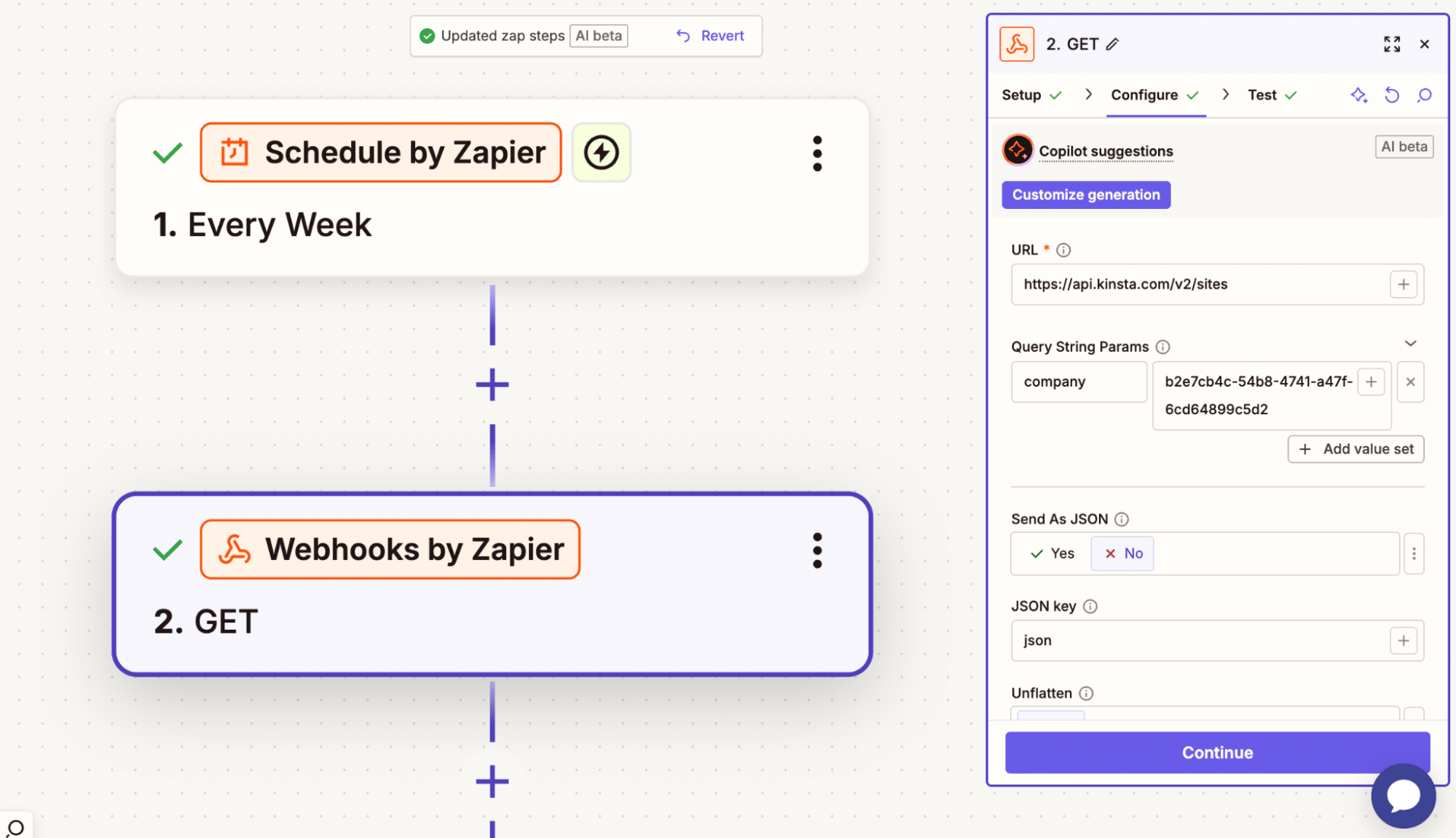
For example, the movement above makes a GET request to the /internet sites endpoint to get a list of all WordPress internet sites in my company account.
You’ll moreover securely go your API key and include the required parameters, related to environment_id, and Zapier handles the request.
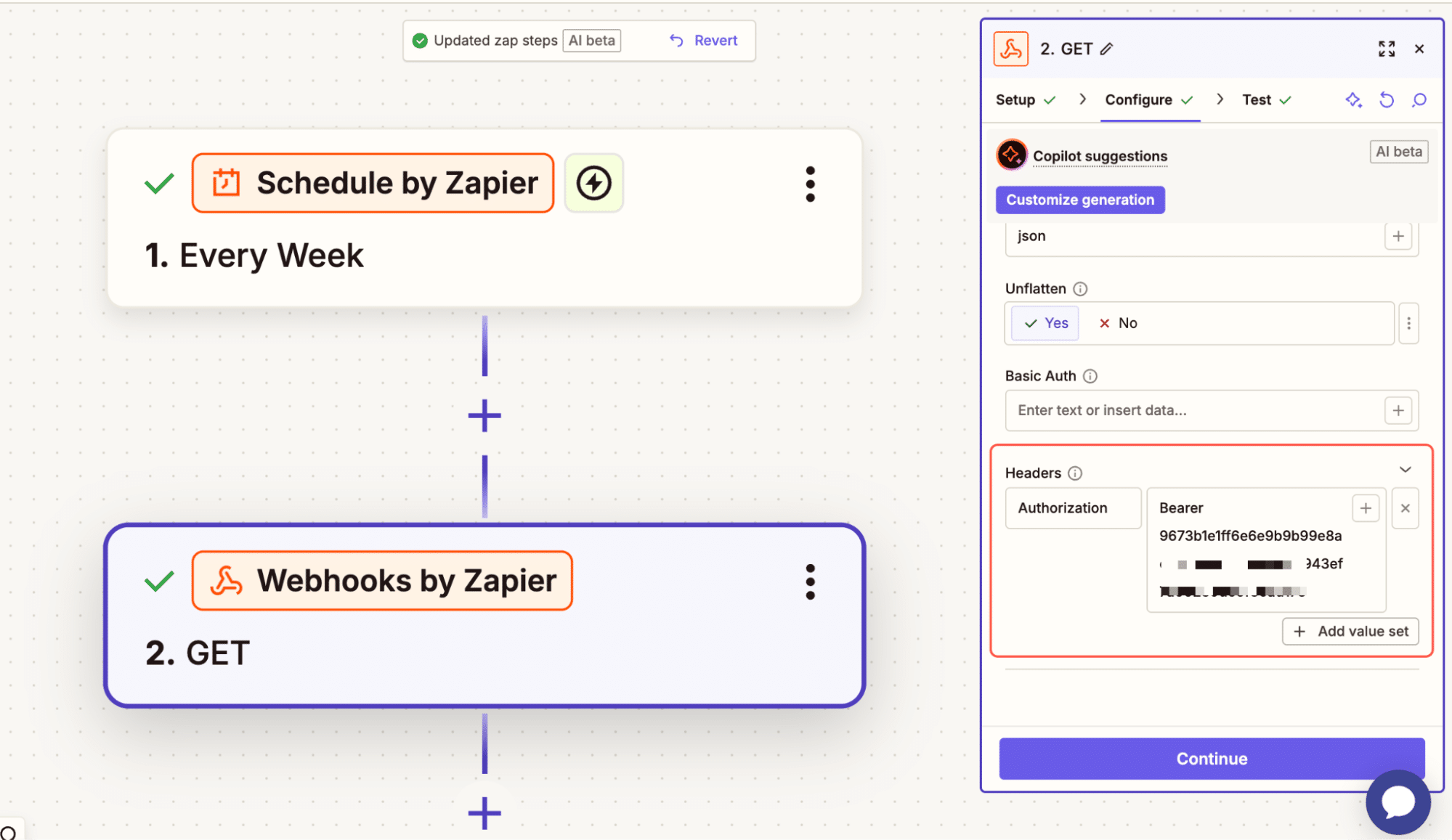
Where it becomes powerful is when you get began combining steps. You’ll fetch all of your internet sites first. Then loop by the use of each and every internet web page.

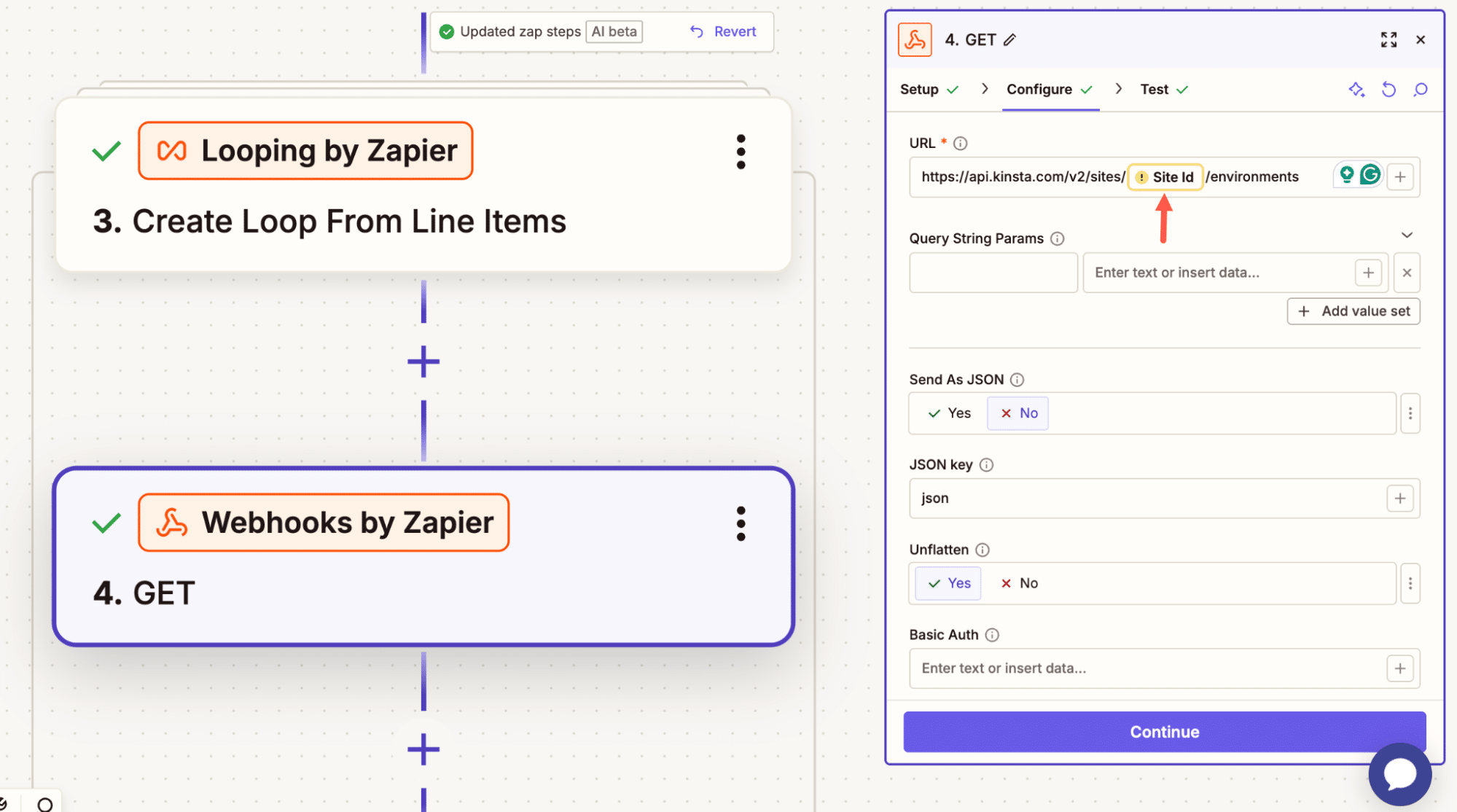
As confirmed inside the image above, we extract the site_id and site_name for each and every internet web page, then go the site_id to fetch environments in every other movement.
Inside the example underneath, after retrieving the internet web page ID, we use other actions to loop by the use of, check out for available plugin updates, and, if updates are available, run them. If not, skip.

This is just one example of what can be carried out with Zapier. You’ll assemble a big workflow without writing any line of code.
Every other benefit is that you just also have get right of entry to to the Zapier AI agent or copilot, a chat interface similar to Claude that allows you to provide an explanation for what you need, share the API endpoints and parameters, and have it maintain the entire thing for you.
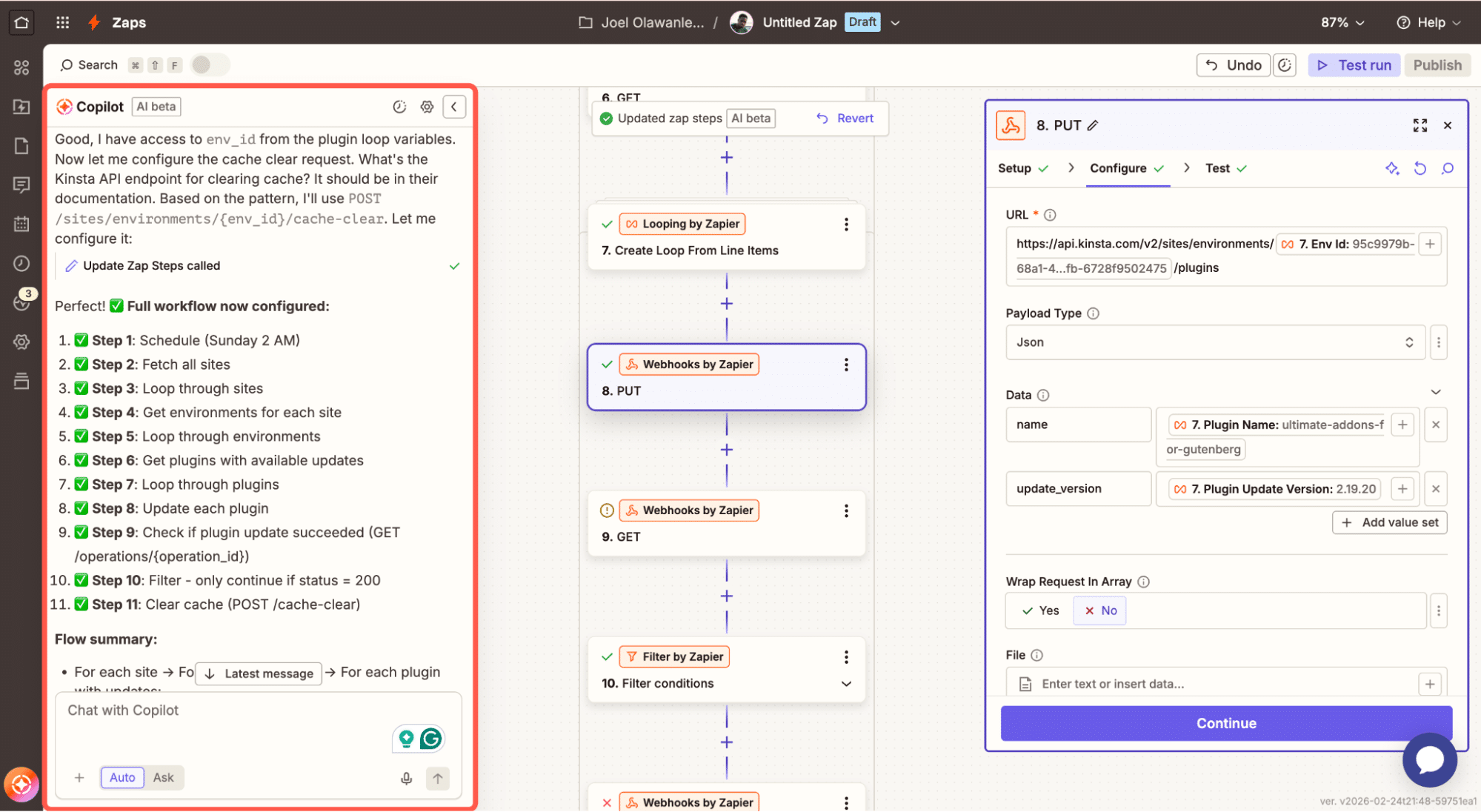
This offers you a big get advantages as an corporate.
Workflows you’ll have the ability to assemble with Zapier and the Kinsta API
If you happen to needless to say Zapier may cause API calls, loop by the use of results, and maintain necessities, you get began seeing precise operational use cases.
Listed here are 4 that make sense in day-to-day corporate artwork.
1. Scheduled upkeep during a couple of internet sites
Plugin updates aren’t tricky, and actually, with MyKinsta, you’ll have the ability to do this inside of your MyKinsta dashboard, even during a couple of internet sites, by means of Bulk Movements.
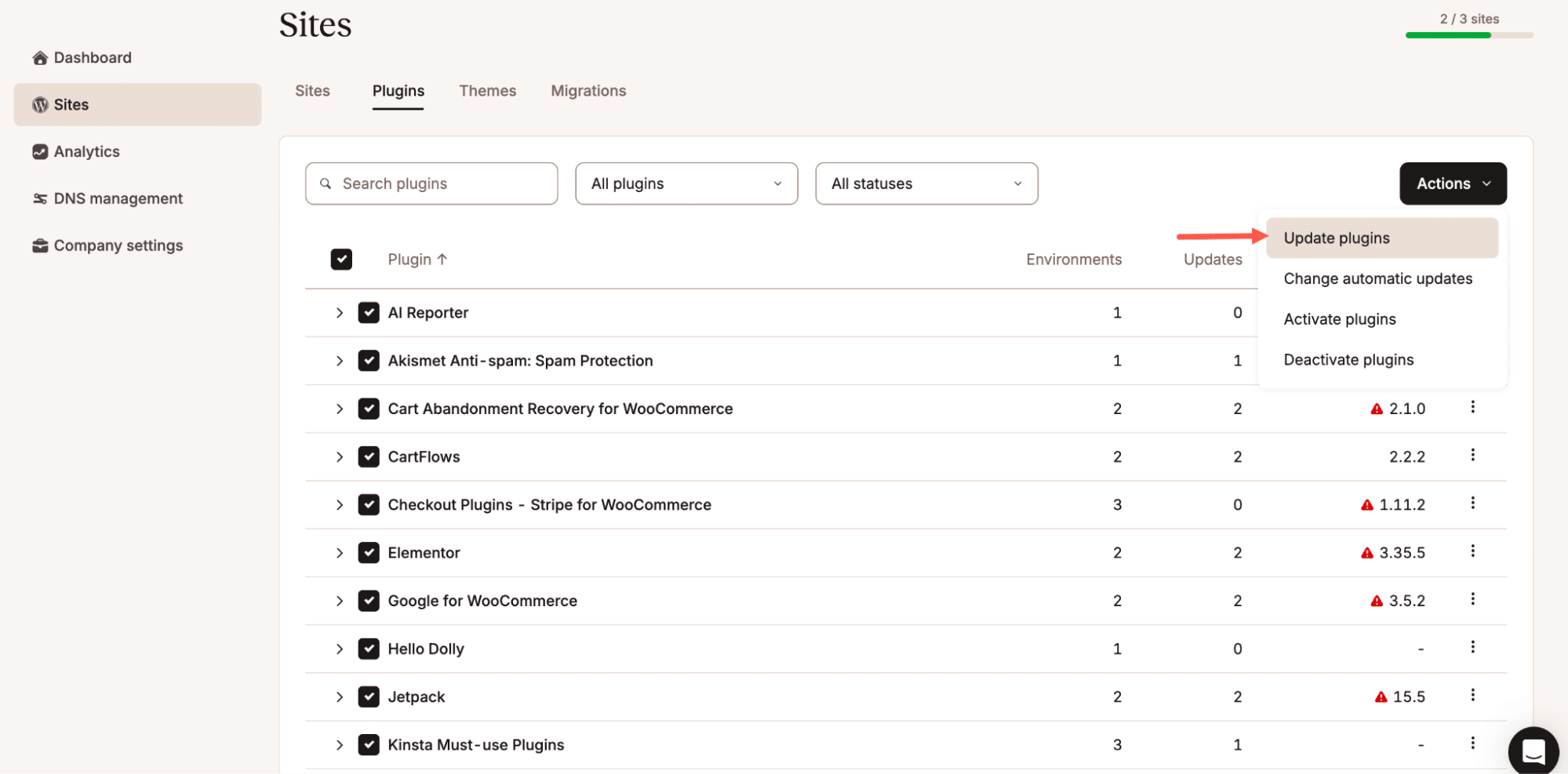
Then again in case you occur to don’t need to log into MyKinsta, or if you want to schedule this movement or attach it to a decided on workflow, Zapier can be in agreement.
With Zapier and the Kinsta API, you’ll have the ability to create a scheduled workflow. For example, Zapier runs mechanically each and every Sunday at 2 a.m. and fetches all of your WordPress internet sites, retrieves their environments, checks which plugins have updates available, and updates only those that do. After each and every substitute, it confirms that the operation completed successfully. Once carried out, it clears the cache to verify changes are reflected straight away.
This way, you move from information checking to structured oversight. And when you multiply that during dozens of internet websites, the time saved becomes necessary.
2. First-response troubleshooting workflow
When a client tales {{that a}} internet web page feels gradual or that something isn’t loading appropriately, most teams apply the an identical first steps: clear the cache, restart PHP, check out the logs, and make sure the internet web page is responding over again.
You’ll do all of this from MyKinsta, and in a number of cases, that is enough. Then again whilst you’re coping with a couple of internet sites and a couple of tickets a day, even the ones small repetitive actions add up.
With Zapier and the Kinsta API, you’ll have the ability to formalize this proper right into a workflow. As an alternative of manually navigating to the internet web page, you’ll have the ability to purpose a Zap that clears cache, restarts PHP, waits for the operation to complete, and then sends a confirmation message to Slack. You’ll even attach this to a support workflow so that the first-response steps run mechanically when a price tag is tagged in a undeniable manner.
The serve as isn’t to interchange investigation. It’s to standardize the initial response so your group does not have to duplicate the an identical information assortment each and every time.
3. Deployment support workflows
If you happen to occur to steadily artwork with staging environments, you almost certainly already have a unlock pattern: take a look at in staging, push to are living, clear cache, and make sure the entire thing works.
All of this is available in MyKinsta. Then again if you want to attach it to a broader process, related to a scheduled unlock window or a Slack-triggered deployment, Zapier can act for the reason that glue.
Using the Kinsta API, you’ll have the ability to create a workflow that pushes staging to reside and even specify which information to push, merely as in MyKinsta.
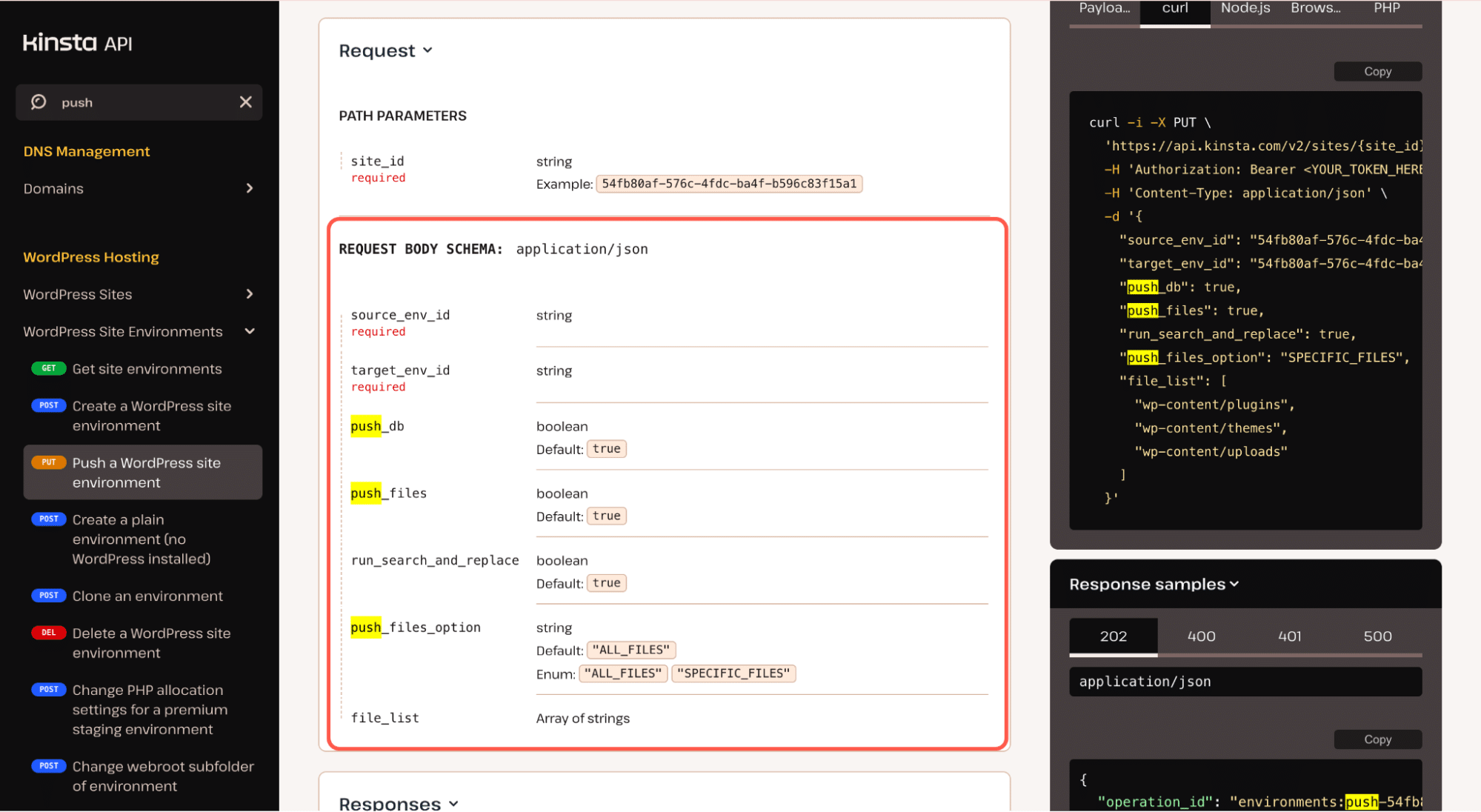
You’ll then stay up for confirmation that the operation completed, clear the cache mechanically, and then notify the group that the deployment is done.
You’re essentially turning your unlock checklist proper right into a structured workflow. It removes the need to keep in mind each and every step. It moreover offers you a report of when and the way in which the movement was performed.
4. Client onboarding support
When onboarding a brand spanking new shopper, the setup steps are maximum continuously the an identical: create the internet web page, organize staging, invite group people, and make sure get right of entry to.
You’ll maintain all of this manually in MyKinsta, and that works neatly. Then again if you’re onboarding shoppers ceaselessly, the time required even for small setup tasks can add up.
Using Zapier and the Kinsta API, you’ll have the ability to automate parts of this process. A purpose, related to a price a success from Stripe, can get problems started, as confirmed underneath.
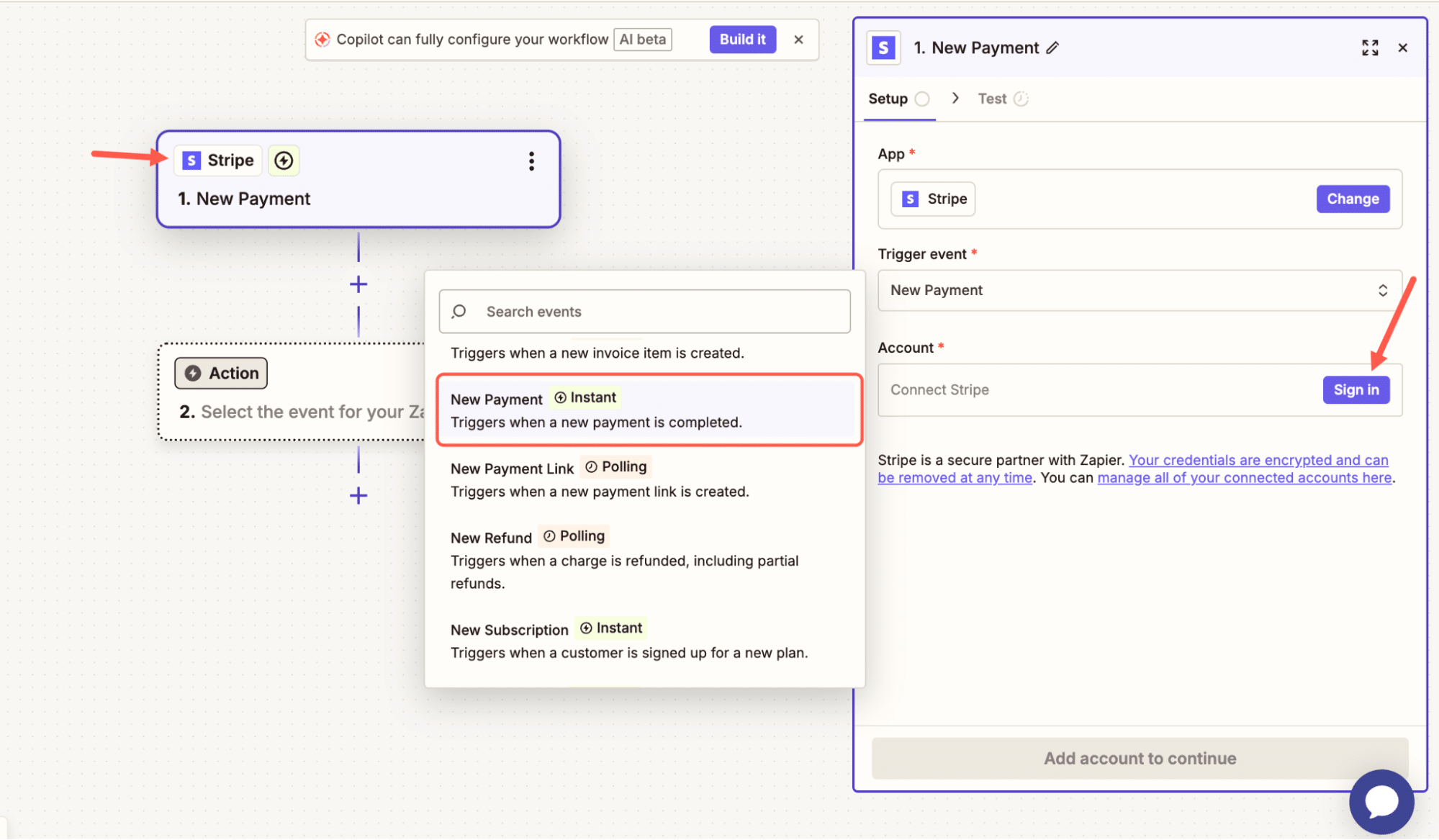
Then you definitely for sure start internet web page creation and environment setup. Once complete, Zapier can send a confirmation for your group so they can know the ground setup is able.
You still analysis the internet web page manually where sought after. Then again you are taking away the repetitive setup steps that don’t require decision-making.
Making your internet web hosting environment programmable
For a lot of companies, internet web hosting is something you place up. Then again each time you get began the use of the Kinsta API together with Zapier, internet web hosting becomes something you orchestrate.
The an identical actions you perform in MyKinsta can now be led to on a schedule, attached to a support workflow, or connected to a broader operational process. Zapier serves for the reason that workflow layer, and the Kinsta API provides operational controls.
If you happen to’re managing a couple of shopper internet sites and on the lookout for ways to standardize, scale, and reduce operational overhead, it can be price exploring how Kinsta is helping companies additional broadly.
Our Company Spouse Program is easiest for teams managing a couple of internet sites who want trustworthy support, expansion benefits, and long-term collaboration.
If you want to know how this may occasionally fit your workflow, succeed in out to our gross sales crew and have an instantaneous conversation about your setup and targets.
The post Automate your Kinsta workflows with Zapier and the Kinsta API appeared first on Kinsta®.




0 Comments