

Divi AI brokers let you assemble and edit internet websites through conversation. Available inside Divi 5, they art work alongside your internet web page inside the Visible Builder and can make changes to the construction when you watch.
Paste in a screenshot of a internet web page you like and ask for a similar construction. The agent builds with sections, rows, and modules you’ll open, restyle, and keep improving by the use of hand. The new characteristic uses Divi-specific apparatus to art work with the builder’s building and settings. It moreover is helping made up our minds on WordPress tasks outside the builder, similar to managing pages, posts, and menus.
That offers you a lot of ways to use it: growing a number one draft, updating an provide internet web page, organizing varieties, or getting lend a hand with a Divi environment. In this post, we’ll connect a internet website and uncover the ones workflows, at the side of the controls that mean you can data and analysis the art work.
Where To To find Divi AI agents
Open a internet web page inside the Visual Builder and take a look on the left sidebar. Click on at the agent icon to open the chat panel beside your internet web page. Previous than sending your first request, you’ll need to connect your account and have an available agent steadiness.
Get right of entry to is built-in with Divi AI and Divi Professional, so an provide Skilled subscription offers you get right of entry to to Divi AI agents. Agent requests use a metered steadiness, which we’ll take a look at beneath.
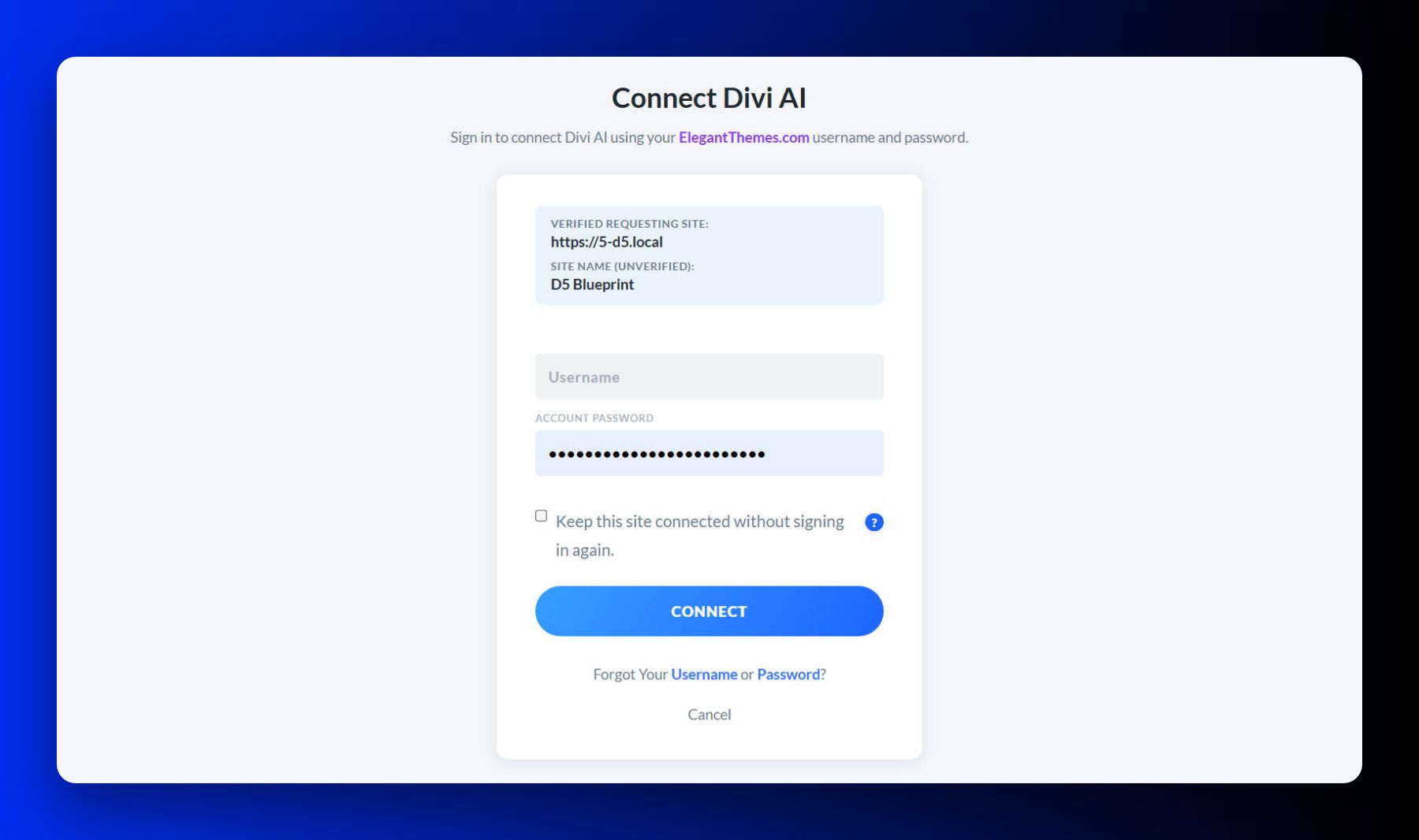
The main time you open the agent on a internet website, it asks you to test in along side your Elegant Subjects membership account. This connects the internet website on your account so its requests can use your agent steadiness. Whole this connection on each internet website where you need to use the function.
The sign-in show displays the requesting internet website’s handle and establish, so that you’ll take a look at them forward of approving the connection. Select Keep this internet website attached without signing in over again if you want to retain the connection for longer term classes.
Previous than you ask it to change the remainder, understand the two modes. Ask mode can take a look at your internet web page, Design Variables, Presets, and Divi’s knowledge base to help you understand a environment or plan a change. Switching to Assemble mode lets in the agent to carry out the art work on your internet web page.
In Assemble mode, the agent works in visible steps. As it processes the request and calls apparatus, you’ll stick with the expansion inside the chat. The art work report offers you a readable document of the actions taken, which is useful when a request involves a lot of changes.
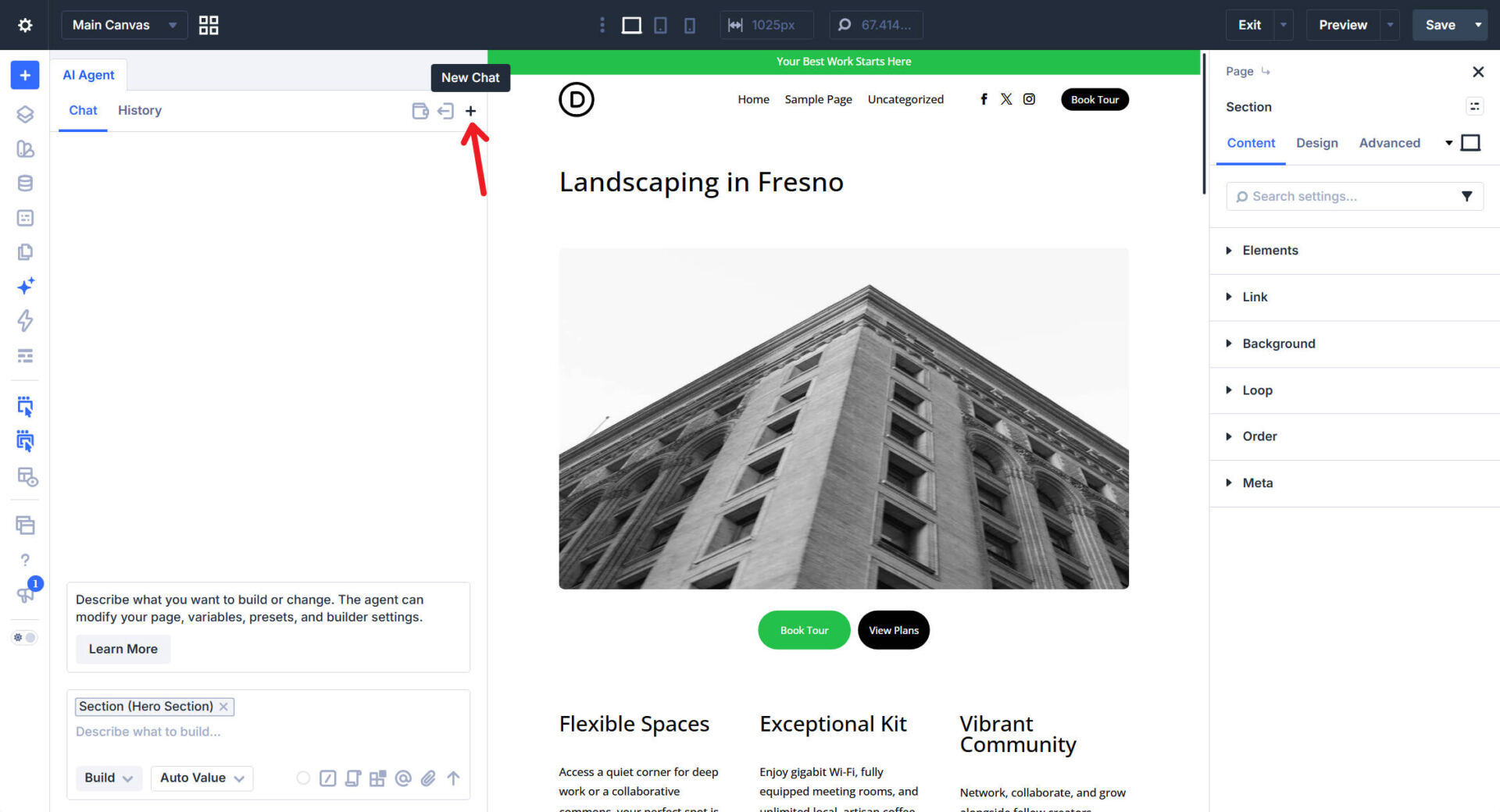
You’ll keep tasks in separate chat classes. When you’re transferring to every other job or want to start with fresh conversation context, click on on New Chat. This gives the next request its non-public conversation as an alternative of continuing the previous thread.
Use the Fund Your AI Wallet icon inside the top-right corner of the agent panel to view your provide steadiness and add price range.

Proper right here, you’ll see your available steadiness and any complimentary price range from your Divi AI or Divi Skilled subscription. If you wish to have additional price range, you’ll achieve them further down the internet web page. This is also where you’ll take a look at what’s available forward of starting a larger process.

With the internet website attached and a steadiness in place, you’re able to offer the agent its first instruction. Assemble mode tales its expansion throughout the chat, along side the steps it takes and the apparatus it calls. The example beneath shows a urged, art work report, added media, and process tick list.

1) Client Prompt, 2) Agent Artwork Report, 3) Media Added, 4) Agent Procedure Tick list, 5) Further Building Updates
Assemble A Construction From A Description, A Screenshot, Or A URL
There are 4 main ways to start out a brand spanking new construction, and each produces a Divi internet web page you’ll continue improving with or without the agent. Divi AI agents art work with native sections, rows, modules, and design settings, so the end result remains part of your same old builder workflow. You’ll take a look at the development and refine individual settings after the initial construction is built.
You’ll get began:
- From an summary. Tell it what the internet web page is for and what it is going to have to come back with. As an example, request a pricing internet web page with 3 tiers and a comparison table, or a services and products and merchandise internet web page for a landscaping company with a hero, 4 service taking part in playing cards, and a marginally section. A specific brief supplies the agent a clearer position to start out.
- From a screenshot or mockup. Paste or attach the image to the chat and ask the agent to build from it. Give an explanation for whether or not or no longer you need to stick with the full construction, particular sections, or the visual style, and indicate any content material subject matter that should change.
- From a reside URL. Stage it at a webpage and explain what you need to use as a reference. The agent can take a look at the internet web page and art work from its content material subject matter and design.
- From reference footage. Attach a lot of footage and ask for a construction that shares their style. Use them to keep up a correspondence a direction for the colors, typography, imagery, or composition.
You’ll moreover combine the ones inputs. A screenshot might provide the construction, while a written brief supplies the content material subject matter and logo must haves. The sort you choose will have to enhance the varieties of input you provide.
Right here’s the screenshot path in stick to. Throughout the recorded example, one large image of a internet web page construction, working on Auto Deep Price, produced 9 sections with a reported value of about $0.10. That decide applies to this example; costs vary with the kind and process.
Then again you get began, the canvas incorporates native Divi building: sections, rows, modules, content material subject matter, and kinds that you just’ll open and change in the usual settings panels. You’ll keep operating through chat, edit the end result manually, or use each and every approaches as you refine the internet web page.
Edit An Provide Internet web page
You won’t at all times be starting from an empty canvas. You’ll have a internet website that desires a brand spanking new design direction, up-to-the-minute content material subject matter, or a few adjustments forward of handoff. Divi AI agents can art work with that provide construction, making them useful for ongoing art work on internet sites you prepare.
Ask the agent to redesign a hero, rearrange the modules in a work, rewrite the reproduction, or restore inconsistent spacing. Describe what you need to achieve and decide the sector to change. You don’t need to establish each environment involved, on the other hand a clear request makes the end result easier to review.
One example is updating a internet web page first of all in-built Divi 4 after opening it in Divi 5. If you want to convert its rows from Block to Flex, the column spacing needs attention too. Spacing up to now applied through margins would perhaps need to become horizontal or vertical gaps. The following request explains each and every changes:
Convert all Rows with a Block Construction to have a Flex Construction. Know that Block Layouts apply a margin on the columns for spacing, whilst Flex Layouts need the spacing applied as a horizontal and now and again vertical hollow. Retain other visual spacing possible choices, on the other hand make sure they art work within the new flex construction paradigm.
This updates the construction building slightly than appearing an entire internet website migration. Assessment the reworked rows at different show sizes to check that their alignment and spacing however art work.
Referencing an element instantly is often easier than describing its position. Click on on it on the internet web page and add it as context so the agent has a decided on function. You’ll moreover discuss with a module by the use of its content material subject matter, such for the reason that text in a heading, to lend a hand it in finding the best phase.
The agent can take a look at the internet web page building, how parts are nested, and their module settings forward of constructing a change. That context helps it art work with the construction already on the internet web page.
Artwork Within Divi’s Design Device
Presets and Design Variables lend a hand keep a Divi internet website consistent and maintainable. Divi AI agents can art work inside that gadget, using provide Presets and variables when you ask them to. Include those must haves on your urged so new styling follows the internet website’s conventions and remains editable through Divi’s settings.
You’ll moreover art work inside the other direction. Stage the agent at a construction produced from individual values and ask it to turn repeated values into Design Variables or repeated styling appropriate right into a Preset. It is going to include colors, fonts, gradients, footage, and sizes. Ask it to tick list its pointers first so that you’ll choose which ones to make use of. The example beneath makes a speciality of converting static values into global Amount Variables.
You don’t need to decide each inconsistency yourself forward of soliciting for lend a hand. Get began in Ask mode with a urged similar to “What’s inconsistent on this internet web page?” and analysis the guidelines. You’ll moreover give it additional focused tasks:
- To find missing image alt text and suggest descriptions.
- Trade inconsistent colors with appropriate global colors.
- Standardize typography, spacing, and buttons.
- Assessment how the internet web page behaves all over breakpoints.
- Right kind spelling, grammar, and capitalization.
- Assessment the calls to movement across the internet web page.
- To find oversized footage.
- Assessment custom designed CSS that can’t be sought after.
After reviewing the guidelines, make a decision which changes to make use of in Assemble mode. For shared varieties, ask the agent to use the most efficient variable or Preset so the exchange remains manageable across the parts that use it.
How To Ask For What You Want
A few habits mean you can give clearer instructions and make the results easier to check:
- Be explicit regarding the finish end result. “Make this section upper” leaves such a lot open to interpretation. “Tighten the spacing appropriate right here and make the heading the equivalent period as the one above it” identifies each and every the change and its reference.
- Keep the scope manageable. A single change is discreet to check. Upper requests are useful too, on the other hand include enough part and smash the art work into levels when you need to review possible choices along the best way by which.
- Show it when a visual would lend a hand. Paste a screenshot or mockup when it explains the construction or style additional clearly than a longer description. Add a sentence about which parts of the reference matter.
- Give it constraints along with a function. Tell it which variables to use, which conventions to stick with, and what is going to have to stick unchanged. Saved Laws imply you’ll reuse this guidance all over tasks.
- Know when to edit manually. Some adjustments are sooner and more economical to make yourself. Use the agent where it’s serving to with the art work, and use the builder controls instantly when that’s the better selection.
Assessment Questions And Confirmations
The agent can ask for rationalization when a request is missing very important details. It should perhaps moreover pause for approval forward of harmful or high-impact actions.
When it asks a follow-up question, give you the missing wisdom forward of continuing. For a larger request, you’ll explicitly ask it to outline a plan first. This offers you a chance to check its interpretation forward of it begins changing the internet web page.
Be informed confirmation requests carefully after they comprise deleting a template, trashing a internet web page, removing a menu, or changing shared settings. If a menu location already has an process, take a look at what’s going to happen to that process forward of approving a replace. Throughout the screenshot beneath, the agent pauses for approval forward of saving changes to global variables.

If You Do Not Like The Finish end result
Previous messages provide a restore selection for returning the internet web page to an earlier checkpoint. Click on at the restore icon beside the comparable message, then analysis the Restore to This Stage dialog forward of confirming. This allows you to return to the construction state associated with that point inside the conversation.
Restoring rewinds the internet web page slightly than selectively reversing one edit. Guide changes you made to that construction after the selected stage are removed at the side of the agent’s subsequent changes. Check what you’ve completed since that checkpoint, in particular should you’ve been improving by the use of hand alongside the agent.
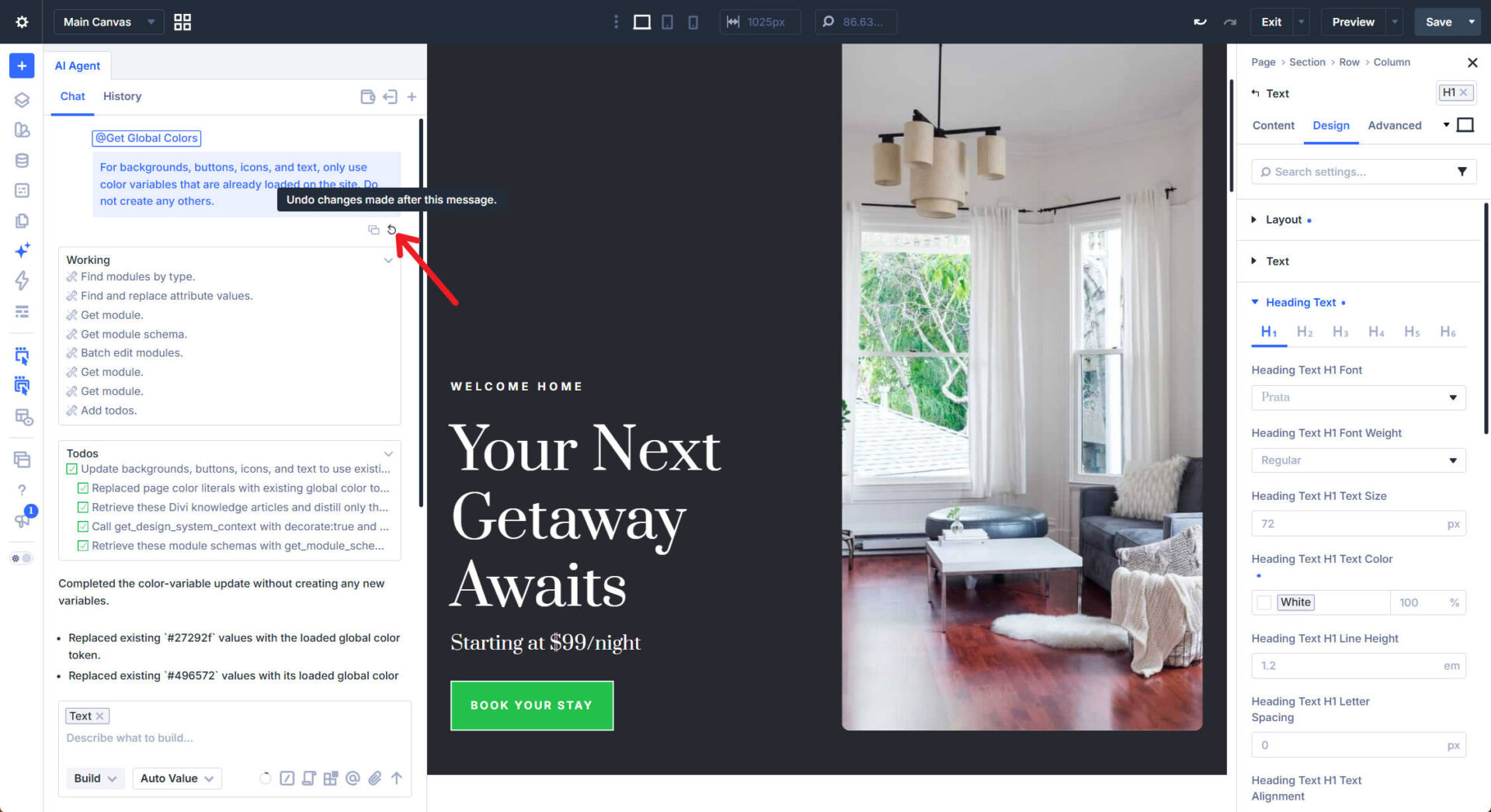
Small, checkable steps make this easier to keep an eye on. For many who analysis a single section change forward of transferring on, you’ve gotten a clearer checkpoint to return to. A restore after a larger redesign would perhaps undo considerably additional art work, along side later adjustments you wanted to stick.
Give The Agent Context, Laws, Directions, And Apparatus
The chat panel comprises more than a urged field. Context supplies references, Laws save guidance, Directions let you repeat tasks, and Apparatus divulge the actions the agent can use while operating.
Add Context From Your Internet web page
Click on on an element and add it on your request to show the agent exactly the position to point of interest. You’ll moreover reference every other internet web page on your internet website, which is useful when you need a brand spanking new section to stick with a design you’ve already licensed elsewhere.
Save Laws For Your Website
Laws are saved instructions that the agent can use when associated with a task on your internet website. They can describe your logo voice, construction conventions, or which variables and Presets to use with particular modules. This gives ordinary must haves a place outside individual chat messages.
While you’re typing the equivalent guidance over and over, imagine saving it as a Rule. As an example, specify the prevailing variables to use for headings and backgrounds. Keep Laws up-to-the-minute for the reason that internet website’s design gadget or content material subject matter must haves change.
Turn Repeated Turns on Into Directions
When you often run the equivalent request, put it aside as a Command. You’ll then invoke it from the chat by the use of typing / and choosing the saved Command, as an alternative of writing out the instructions over again.
Very good candidates include the evaluations you run forward of a internet web page goes reside: an accessibility take a look at, a responsive construction analysis, a design gadget audit, or a final content material subject matter take a look at. Describe what to take a look at and whether or not or no longer you need pointers or changes. Reusing the Command helps you keep those requests consistent all over pages.
Directions describe jobs you need completed, while Laws data how those jobs must be carried out. You’ll include the comparable Laws as context for a Command, so a repeated process follows the internet website’s must haves.
Uncover The Apparatus Button
The Apparatus button opens a searchable tick list of actions the agent can use. Some take a look at wisdom, similar to internet web page building, modules, or global colors. Others make changes to supported Divi settings or perform WordPress tasks outside the builder.
Deciding on a tool lets you reference it on your urged when you need to direct the agent in opposition to a selected movement. You’ll moreover see software calls inside the expansion log because it in point of fact works.
We’ll duvet the entire tick list and explain each software’s function in a separate post. For now, this panel offers you a useful view of the actions in the back of the conversation.
Ask It How Divi Works
The agent can search the recommendation of Divi’s documentation and knowledge articles to lend a hand solution questions. With comparable internet web page or internet website context, it might moreover mean you can read about a decided on issue, similar to a Theme Builder template that isn’t applying, slightly than most straightforward explaining the function principally.
Questions to ask include:
- Should this section use Flexbox or CSS Grid?
- Should I assign Design Variables to these settings or use a Preset for the shared styling?
- Why isn’t my Theme Builder template applying to this internet web page?
- How do the facet ratio possible choices behave?
Once you recognize the advisable solution, you’ll ask the agent to make use of it in Assemble mode. This helps to keep the explanation and the follow-up art work within the equivalent conversation.
Ask mode is the starting point when you need to find settings or plan a change without improving the construction. Be informed the answer, ask follow-up questions, and switch to Assemble when you’re able to act on it.
Select The Kind For The Activity
Different AI models produce other strengths, speeds, and costs, so Divi AI agents aren’t tied to a single sort. Choose from plenty of supported models or use an automatic selection selection. This allows you to keep an eye on the kind to the obligation as an alternative of using the equivalent one for each request.
A additional capable sort would perhaps pass neatly with design art work and longer tasks with a lot of dependent steps. A sooner, less expensive sort is also enough for simple proofreading. For art work involving screenshots or image descriptions, choose a sort that is helping image input. Your variety affects usage costs, so the kind selector is worth getting acutely aware of.
The agent can also create sub-agents to run impartial art work in parallel and assign a sort to each. This allows separate parts of a larger process to use different models. It can be useful for dividing the art work, even though the total value however is determined by the models made up our minds on and the requests they process.
Divi AI agents Are Integrated With Divi AI
Divi AI agents come with Divi AI and in addition are part of Divi Skilled. Your subscription can be used round the internet sites you assemble, and each and every plans nowadays include $5 in complimentary agent usage each month.
Get right of entry to and usage are separate: agent requests are metered in keeping with the kind and the quantity of input and output processed. You’ll add price range when you wish to have more than the built-in allowance. Divi AI’s endless generation choices aren’t making agent usage endless. Check the Divi AI brokers web page for provide pricing details.
Get began with one internet web page. Open it in Ask mode, ask what’s inconsistent in a selected section, and analysis the response. Select a change to make use of in Assemble mode, then take a look at the end result on the canvas. That offers you a wise first process without delivering an entire redesign.
As you’re hired, save useful instructions as Laws and repeated requests as Directions. You’ll build up a collection of workflows for the tasks you do most often, from refining a internet web page’s design to reviewing its content material subject matter forward of publishing.
#faqsu-faq-list {
background: #F0F4F8;
border-radius: 5px;
padding: 15px;
}
#faqsu-faq-list .faqsu-faq-single {
background: #fff;
padding: 15px 15px 20px;
box-shadow: 0px 0px 10px #d1d8dd, 0px 0px 40px #ffffff;
border-radius: 5px;
margin-bottom: 1rem;
}
#faqsu-faq-list .faqsu-faq-single:last-child {
margin-bottom: 0;
}
#faqsu-faq-list .faqsu-faq-question {
border-bottom: 1px forged #F0F4F8;
padding-bottom: 0.825rem;
margin-bottom: 0.825rem;
position: relative;
padding-right: 40px;
}
#faqsu-faq-list .faqsu-faq-question:after {
content material subject matter: “?”;
position: absolute;
right kind: 0;
height: 0;
width: 30px;
line-height: 30px;
text-align: center;
color: #c6d0db;
background: #F0F4F8;
border-radius: 40px;
font-size: 20px;
}
What’s the Divi AI Agent?
Does the Divi AI Agent most straightforward assemble new pages, or can it edit provide ones?
Does the Divi AI Agent art work in Divi 4?
Can I undo what the Divi AI Agent does?
Which AI models can the Divi AI Agent use?
The post Exploring Divi 5’s AI Brokers seemed first on Sublime Topics Weblog.



0 Comments