


Testimonials are an very important type of social evidence for companies. Even with out attempting, companies get opinions on their Google Industry Profile, Fb web page, and directories like Yelp. As great as it’s to have testimonials and opinions scattered around the internet, additionally it is really nice so to show them to your site. A carousel is the very best method to try this.
Divi 5 presented the Group Carousel Module. It’s one in every of our maximum versatile modules and is easiest for making a testimonial carousel. Beneath, we’ll stroll you thru every step wanted to make use of this module. No longer simplest that, however I’ll come up with a rundown of the other ways in which you’ll retailer your testimonial content material to your WordPress website online.
How To Construct A Testimonial Carousel In Divi 5
All of it begins with Divi 5 and its new Crew Carousel Module.
Subscribe To Our Youtube Channel
1. Use The Crew Carousel Module
Considered one of Divi’s latest modules is the Crew Carousel Module. It’s one in every of our maximum versatile and customizable modules ever and is perfect for exhibiting testimonials.
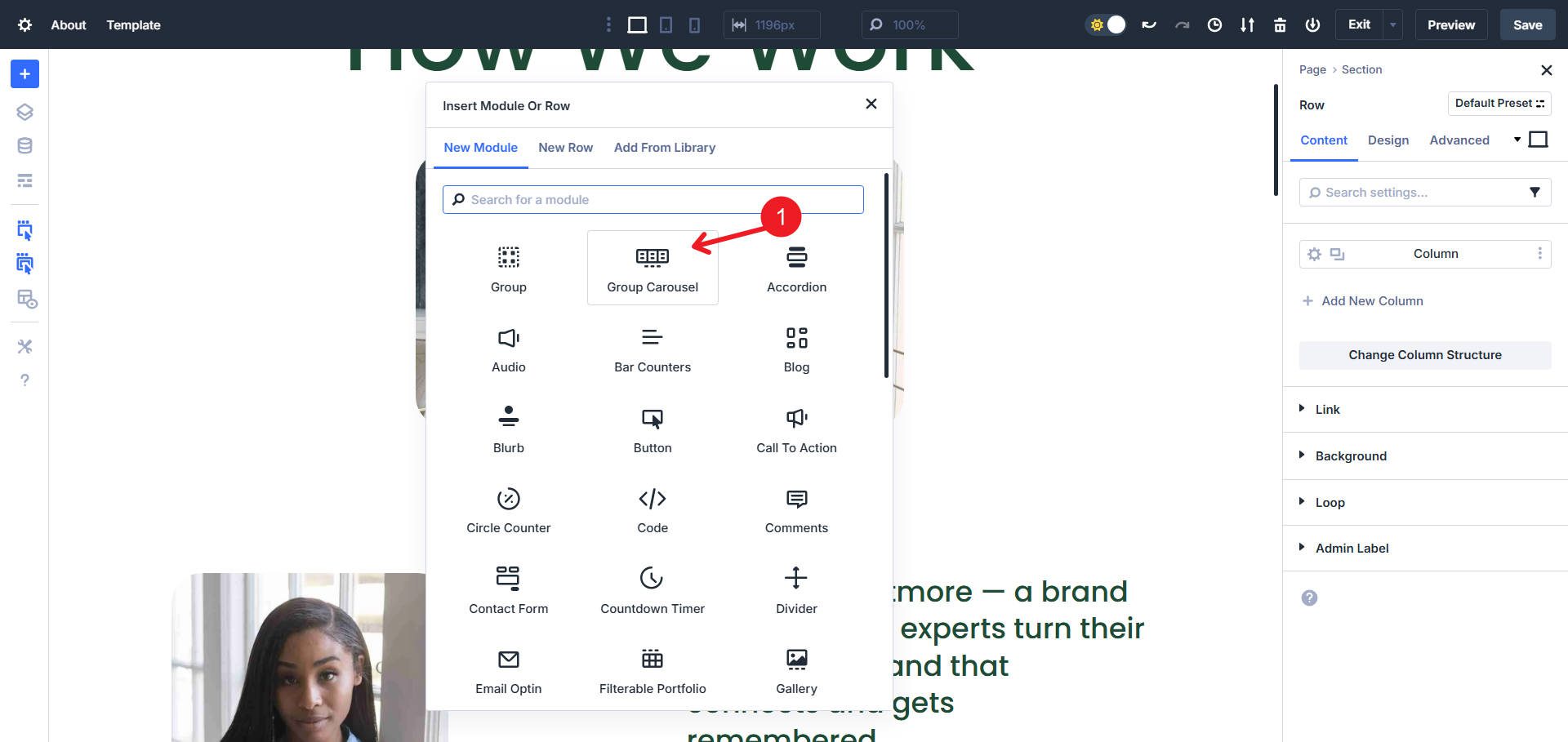
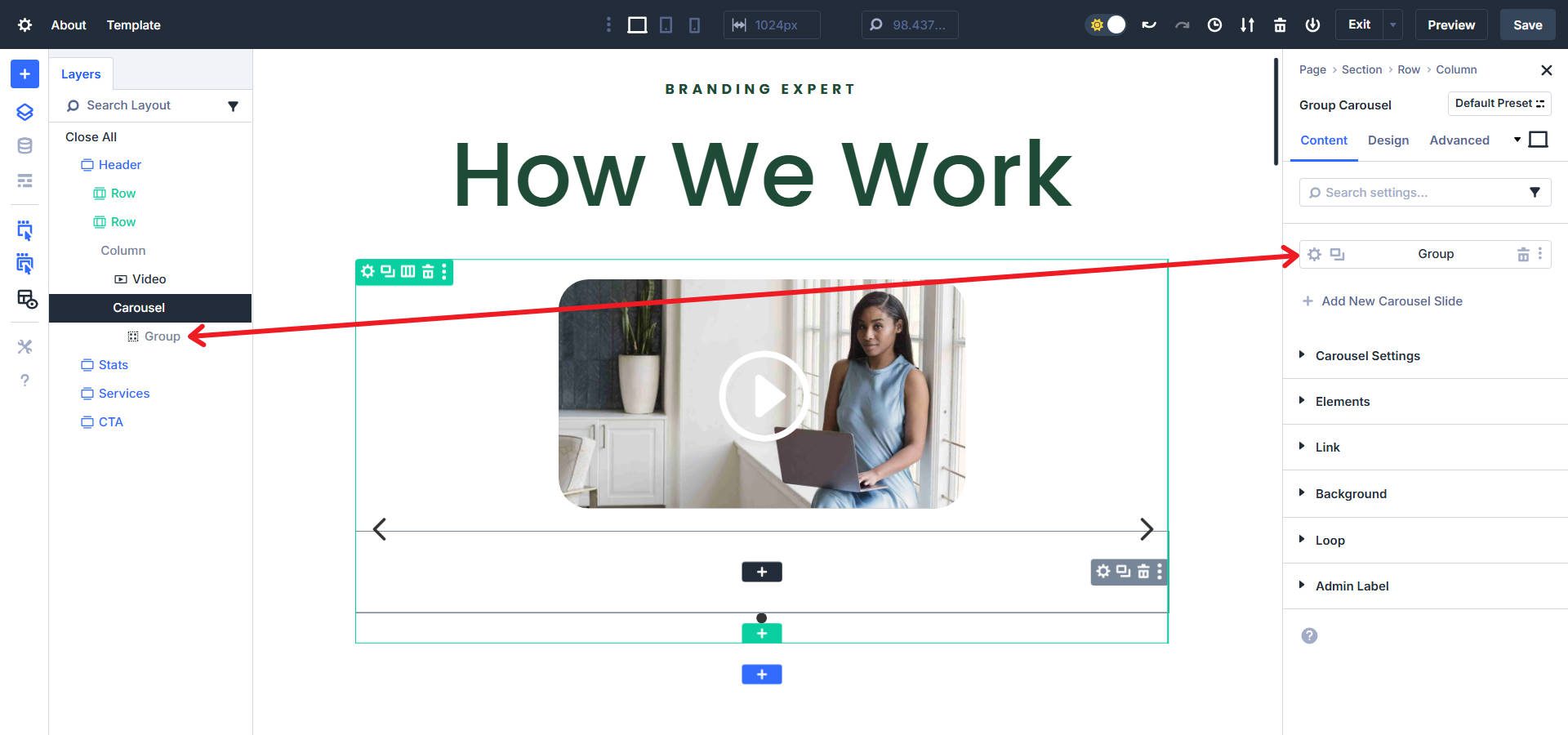
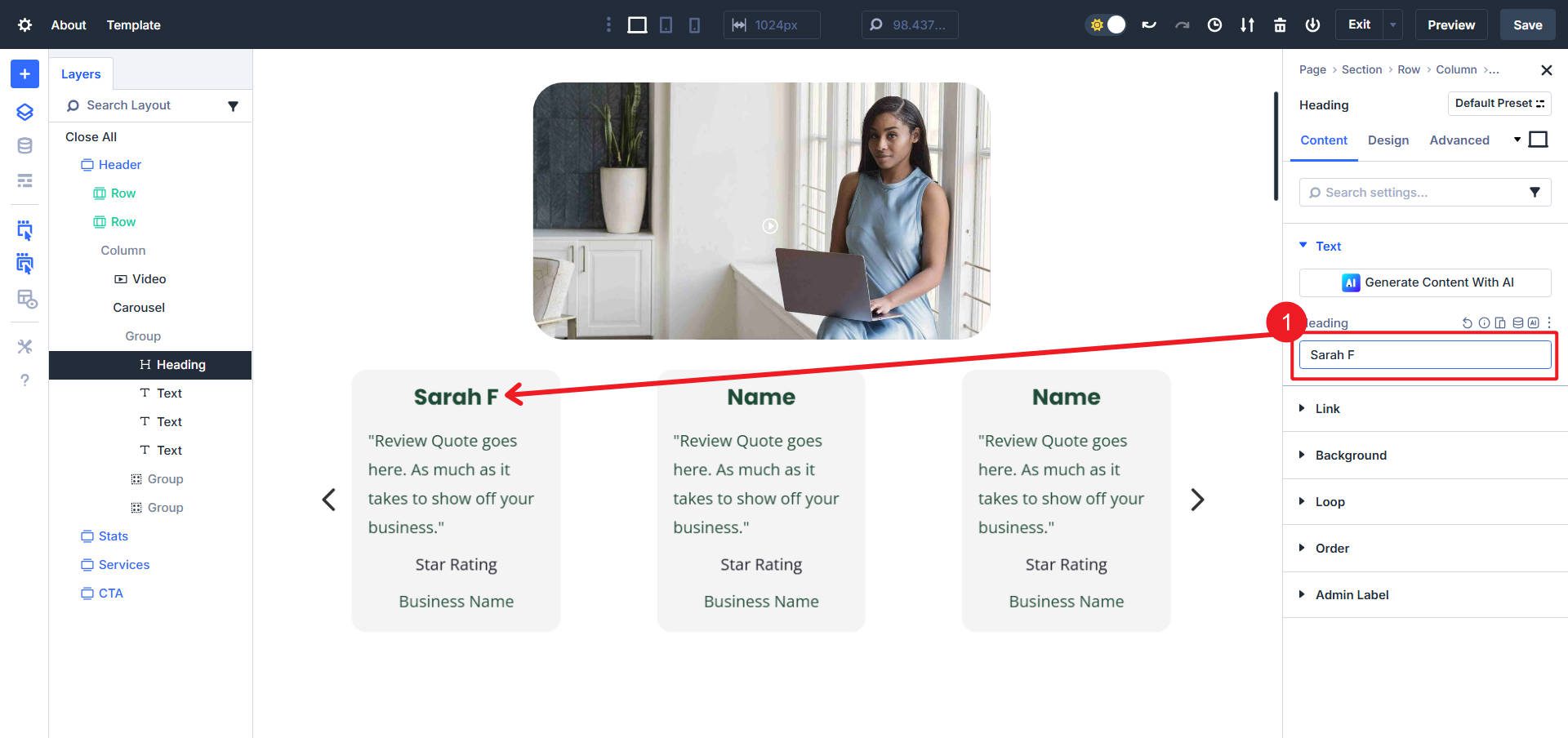
Whilst you upload it for your web page, it additionally provides a kid Crew Module within it. Every “slide” or “card” of your carousel will probably be constructed throughout the Crew. Presently, we’ll center of attention simplest on developing the primary slide/card/staff and ensuring it’s designed and set as much as your wishes.
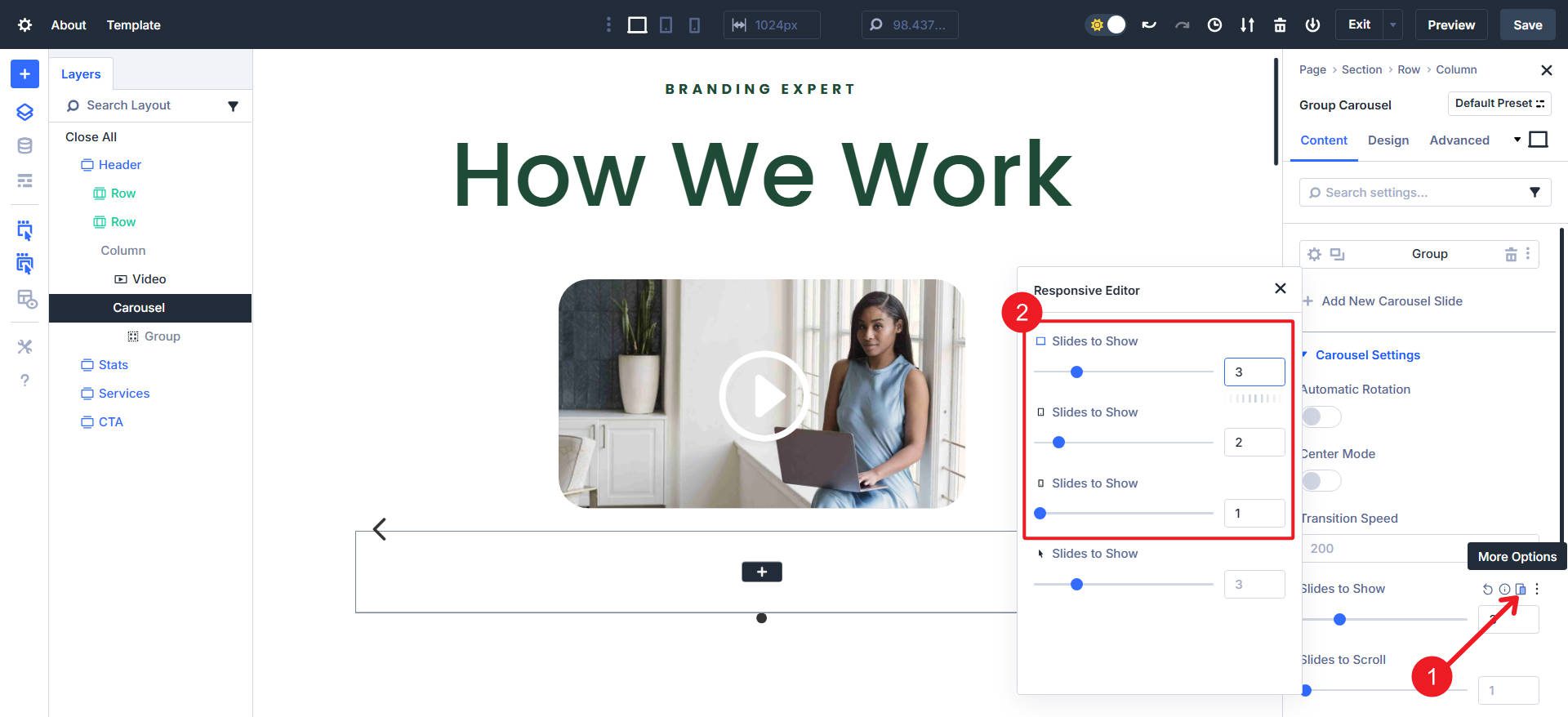
At this level, have a look at the Carousel settings for what number of carousel teams you need to show at a time. This will likely impact how you need to design every staff. Additionally, alternate the choice of teams proven at every breakpoint. For this case, 3 teams are proven on desktop, two on pill, and one on cellular. Understand how simple this used to be to do with Divi’s new Responsive Editing options.
2. Prepare Testimonial Pieces Within The Carousel Crew
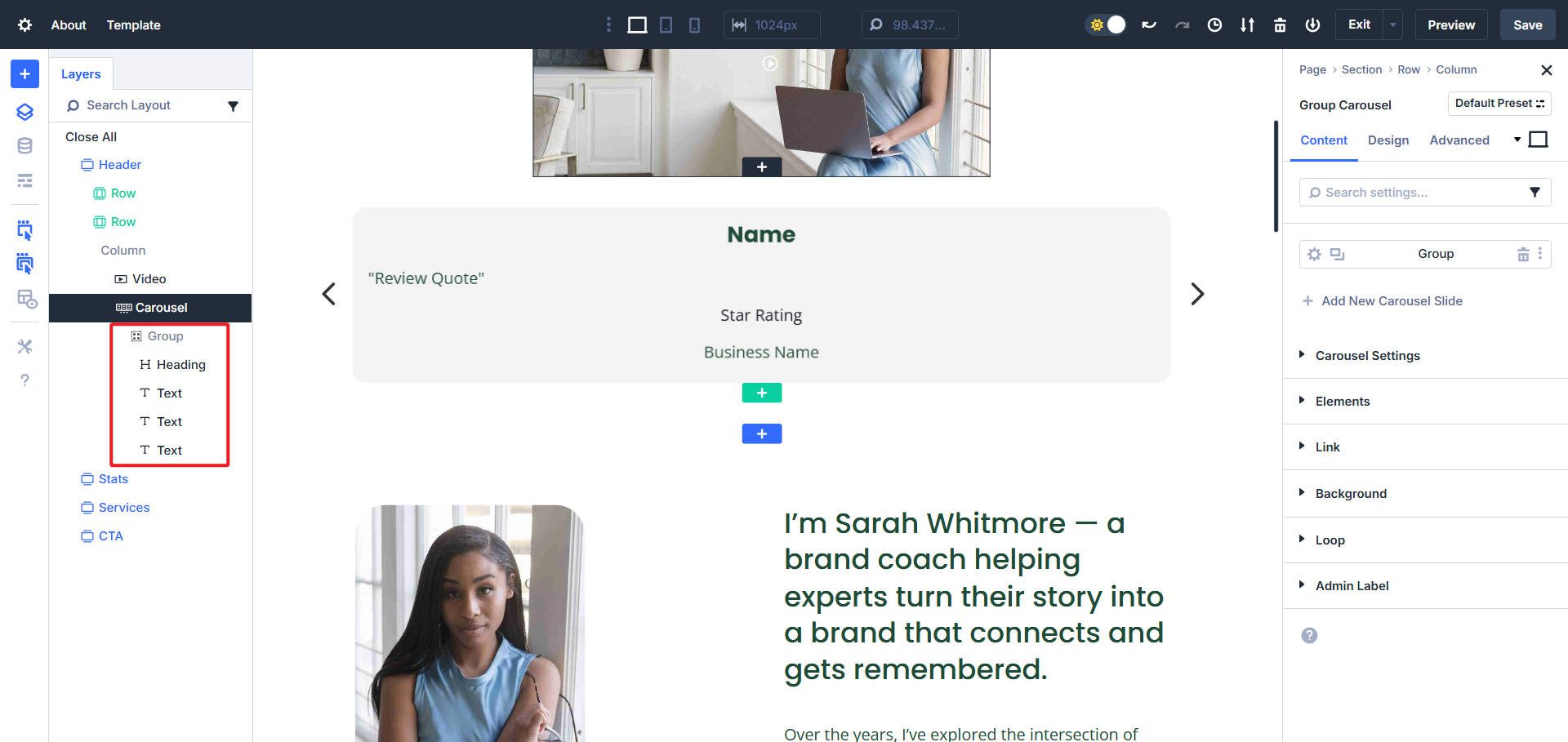
For the reason that Crew Carousel Module makes use of a Crew Module inside of it, you’ll upload another Divi Module throughout the staff. You aren’t limited to preconfigured fields/components to show to your carousel. You’ll make a choice precisely what you need in it. Set a contrasting background colour so you’ll obviously see every slide. Then, I upload the supporting modules and a few placeholder content material.
You even have entire structure keep watch over the usage of Divi’s flexbox container structure settings. Modify those settings at the Crew stage to resolve how your entire modules throughout the staff get laid out.
3. Reproduction The Crew Merchandise Or Set Up A Loop
Whilst you create your first absolutely designed staff, you’ll simply create others to fill the carousel. The video above presentations duplicating every Crew to fill out the carousel. That is excellent if you’re going to be manually coming into your testimonial knowledge.
However there’s a extra scalable method if you’re prepared to create a Customized Put up Sort in your testimonials. This has a couple of benefits:
- Use testimonials throughout your website online in numerous Question Loops
- Create/retailer/edit all testimonials in a single position
- Save time on manually coming into testimonial entries into Divi you probably have numerous testimonials to turn (it’s quicker than CPT and even an Choice Web page with a Repeater box).
If you have already got a testimonial CPT arrange, Divi’s Loop Builder is a herbal have compatibility. As an alternative of duplicating your first Crew, you’ll permit a loop on that Crew.
As soon as the loop is created, we’re in a position to attach every piece of placeholder textual content to dynamic knowledge inside of that loop. Once more, this assumes you could have a submit sort created for those; extra on that later.
4. Carousel Settings
With the Carousel slides/playing cards now populated with content material (both from a handbook access or by means of the Loop Builder), we will be able to put the overall touches at the Carousel.
You’ll activate auto-rotate, alter its velocity, and the rate of the transition impact. There’s even a Heart mode for outstanding exhibiting the focused slide.
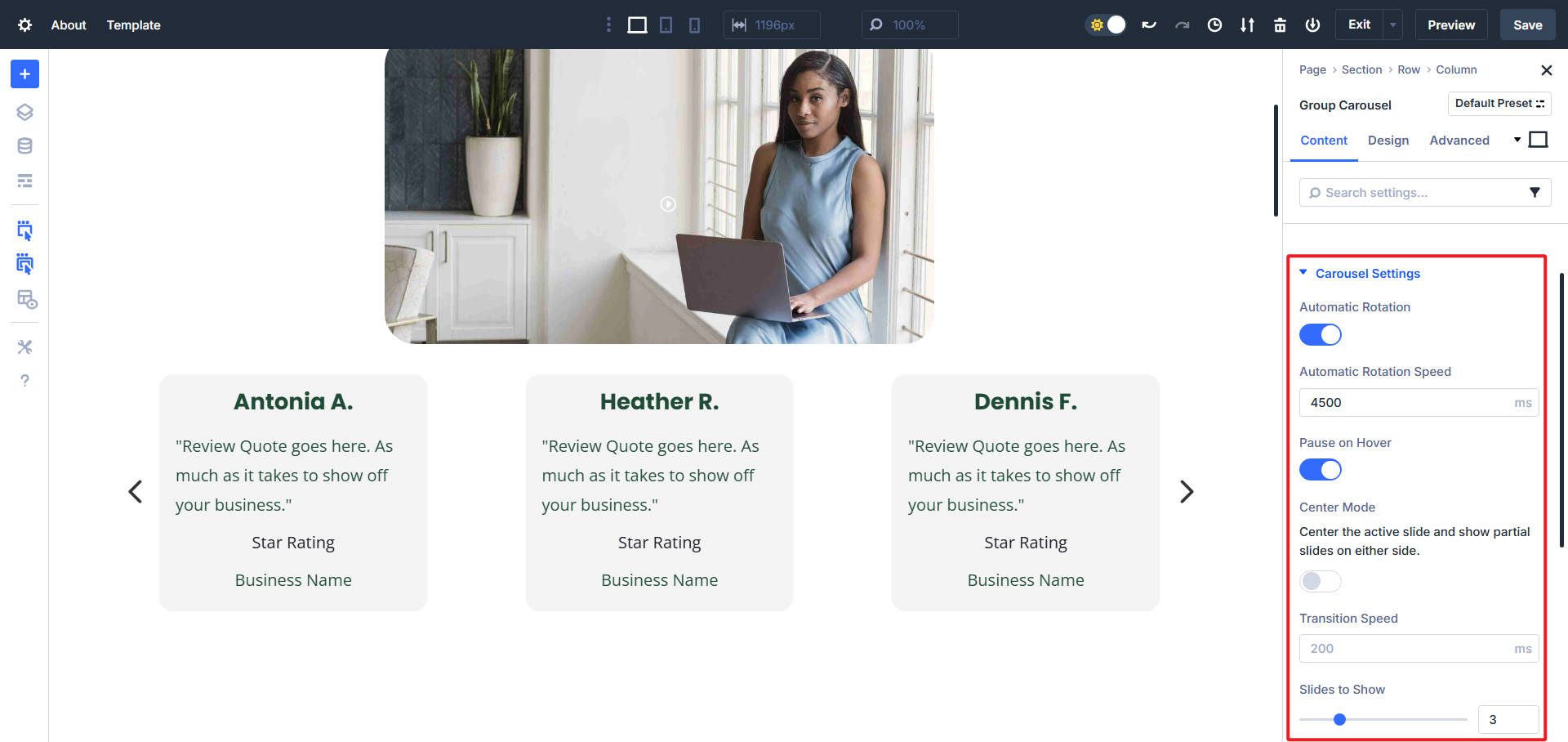
Divi’s Crew Carousel Module comes with some navigation choices. You’ll permit arrows at the aspects so the consumer can manually transfer them. A dot navigation may be on the backside (default) to do the similar. Each may also be custom designed within the Design settings.
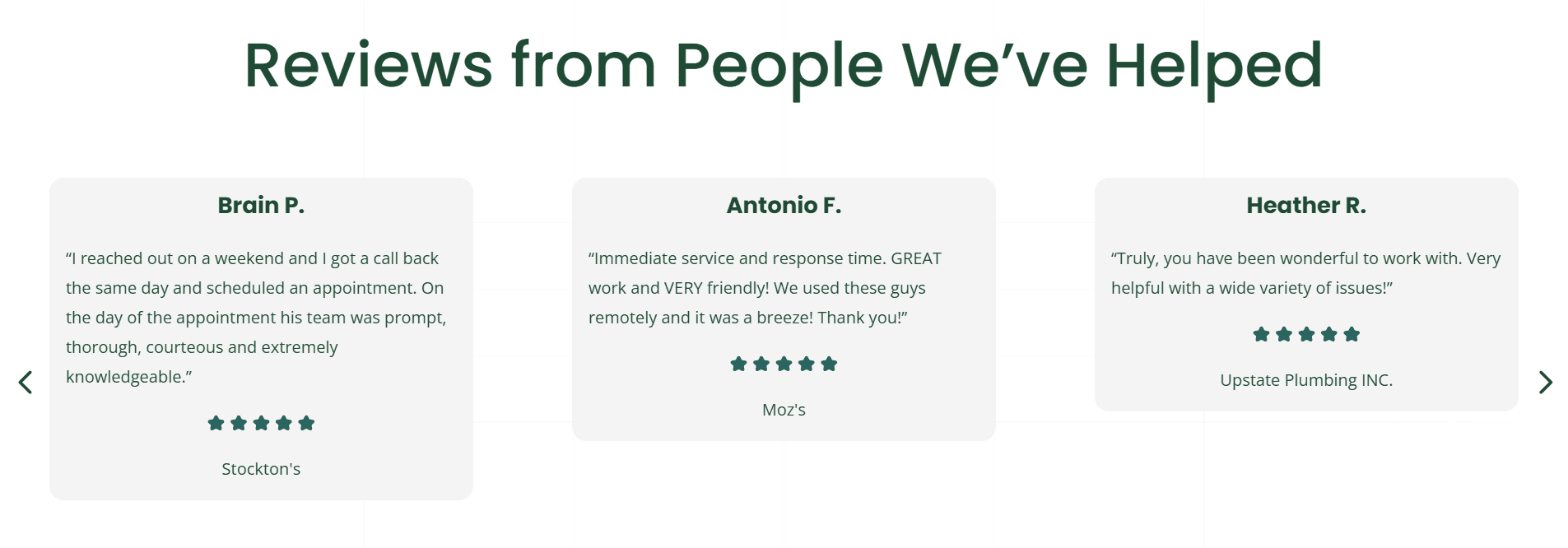
Testimonial Content material Structure
Liable to overexplaining learn how to assemble a testimonial card, there are alternative ways to move about it. The trail it’s possible you’ll make a choice is dependent upon whether or not you propose on updating those testimonials steadily and what kind of paintings you need to do up entrance.
Loop Via Testimonials In A CPT
Customized Put up Varieties be offering a technique to create buckets of several types of content material. They are ideal for the usage of your Divi site to its fullest attainable.
You’ll create a CPT with PHP, a CPT plugin (like ACF, ACPT, or PODS), or a devoted plugin that connects with Evaluate services and products by means of API to tug knowledge without delay for your site. Making a CPT with a plugin is the lowest-cost and most straightforward setup approach.
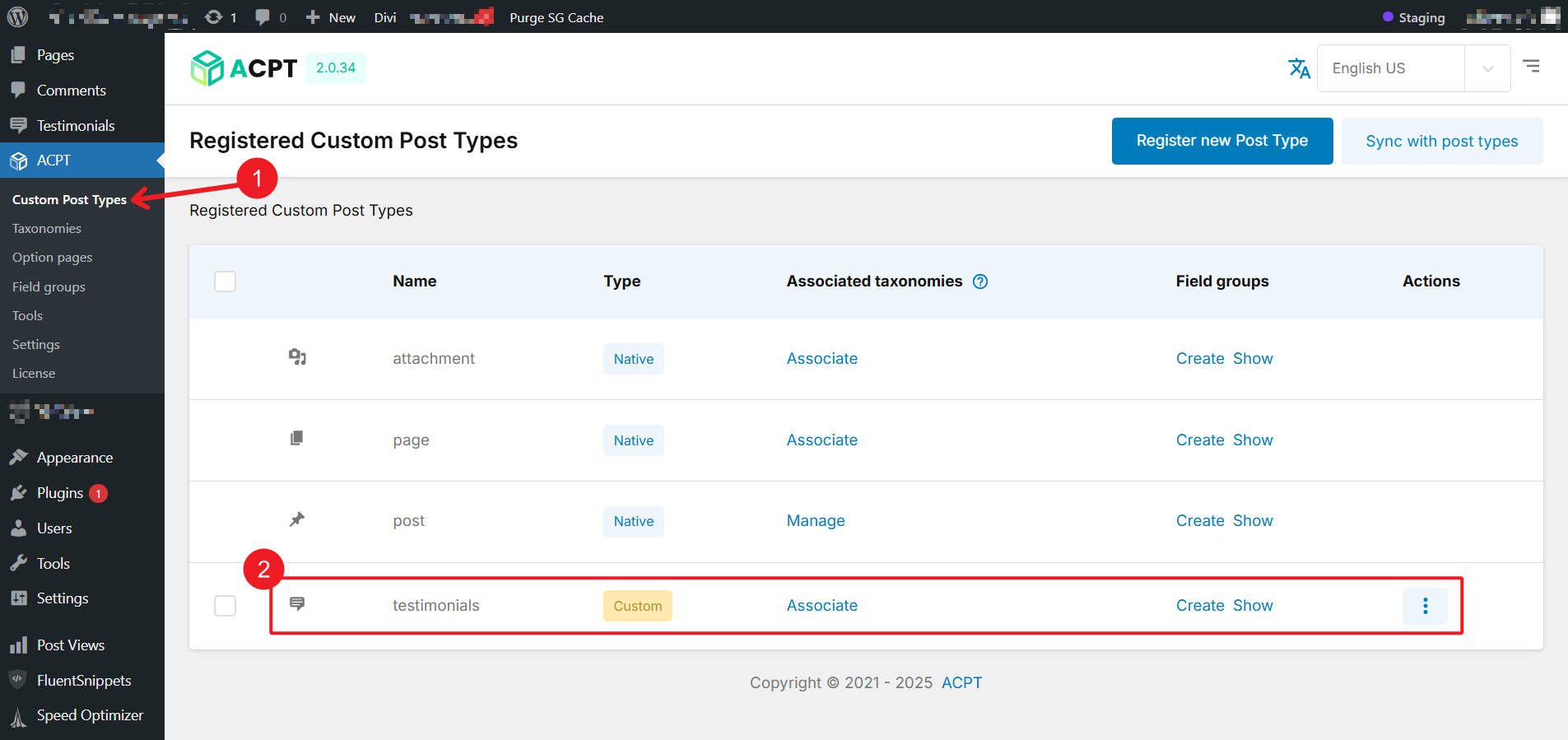
Whilst you create a Testimonial Put up sort, you’ll wish to upload a box staff to the CPT. This box staff will come with such things as the reviewer’s identify and/or industry, superstar rankings, and perhaps a URL for customers to get admission to the unique location of the evaluate. That is as much as you, however it’s all very usable inside of Divi’s Loop Builder.
Whilst you’ve created your content material structure for the CPT, fill in a few posts’ value of knowledge (or dummy knowledge in case you don’t have it but). After that, soar again into Divi, create the loop at the Crew Carousel Module’s kid Crew (like we confirmed you within the above steps).
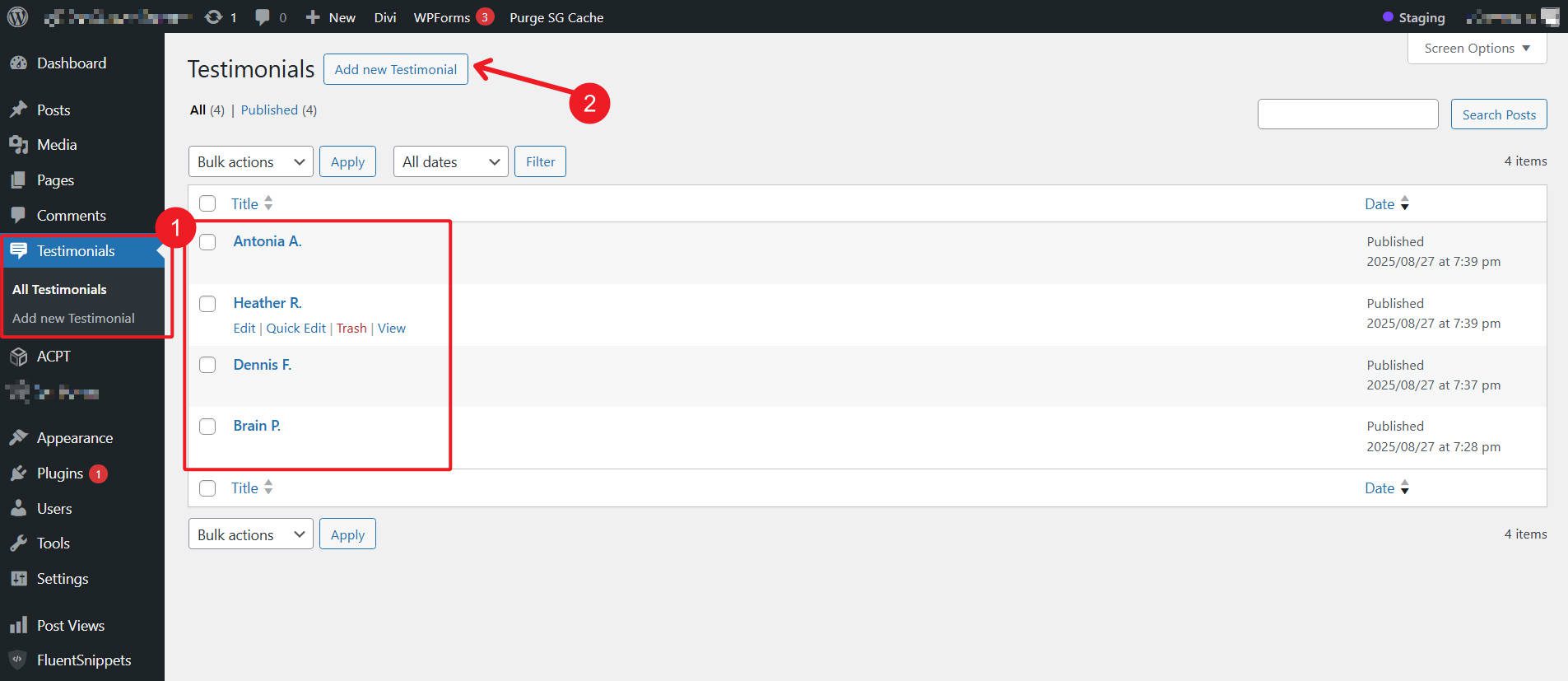
Now, every time you upload a brand new submit to that CPT, it is going to replace your testimonial carousel. It is a nice technique to stay your displayed testimonials up-to-the-minute!
Obtain The Format Used In This Put up
You’ll obtain the phase structure used on this submit through signing up underneath. To make use of the phase to your site, navigate to Divi > Divi Library and click on the import/export button on the peak.
@media simplest display screen and ( max-width: 767px ) {.et_bloom .et_bloom_optin_1 .carrot_edge.et_bloom_form_right .et_bloom_form_content:ahead of { border-top-color: #ffffff !necessary; border-left-color: clear !necessary; }.et_bloom .et_bloom_optin_1 .carrot_edge.et_bloom_form_left .et_bloom_form_content:after { border-bottom-color: #ffffff !necessary; border-left-color: clear !necessary; }
}.et_bloom .et_bloom_optin_1 .et_bloom_form_content button { background-color: #f92c8b !necessary; } .et_bloom .et_bloom_optin_1 .et_bloom_form_content .et_bloom_fields i { colour: #f92c8b !necessary; } .et_bloom .et_bloom_optin_1 .et_bloom_form_content .et_bloom_custom_field_radio i:ahead of { background: #f92c8b !necessary; } .et_bloom .et_bloom_optin_1 .et_bloom_border_solid { border-color: #f7f9fb !necessary } .et_bloom .et_bloom_optin_1 .et_bloom_form_content button { background-color: #f92c8b !necessary; } .et_bloom .et_bloom_optin_1 .et_bloom_form_container h2, .et_bloom .et_bloom_optin_1 .et_bloom_form_container h2 span, .et_bloom .et_bloom_optin_1 .et_bloom_form_container h2 robust { font-family: “Open Sans”, Helvetica, Arial, Lucida, sans-serif; }.et_bloom .et_bloom_optin_1 .et_bloom_form_container p, .et_bloom .et_bloom_optin_1 .et_bloom_form_container p span, .et_bloom .et_bloom_optin_1 .et_bloom_form_container p robust, .et_bloom .et_bloom_optin_1 .et_bloom_form_container shape enter, .et_bloom .et_bloom_optin_1 .et_bloom_form_container shape button span { font-family: “Open Sans”, Helvetica, Arial, Lucida, sans-serif; } p.et_bloom_popup_input { padding-bottom: 0 !necessary;}

Obtain For Unfastened
Sign up for the Divi E-newsletter and we will be able to electronic mail you a replica of without equal Divi Touchdown Web page Format Pack, plus heaps of different wonderful and loose Divi sources, pointers and methods. Apply alongside and you’re going to be a Divi grasp very quickly. In case you are already subscribed merely sort to your electronic mail deal with underneath and click on obtain to get admission to the structure pack.
You have got effectively subscribed. Please test your electronic mail deal with to verify your subscription and get get admission to to loose weekly Divi structure packs!
Take a look at The Crew Carousel Module In Divi 5 Nowadays
We all know that Divi’s growth bogged down for some time there. However that used to be as a result of we had been development the brand new infrastructure for Divi 5. Now that it’s in position, we’ve been in a position to create so much in an overly quick time frame.
We’re happy that the Group Carousel Module dropped (and, on the similar time, the Lottie Module and Icon List Module!) and know that you’ll do a lot more with it. When you’ve gotten used to it, you’ll marvel how you were given on with out it.
This isn’t the one factor that has introduced in Divi 5 lately. To get the entire revel in, you simply have to take a look at it for your self. Divi 5 is to be had for brand spanking new site builds, and we actually have a demo site to be had for you to take a look at (without a setup paintings).
The submit How To Build A Testimonial Carousel In Divi 5 gave the impression first on Elegant Themes Blog.



0 Comments