

Most WordPress potency problems get traced once more to the web website hosting setting, which is each and every so frequently the right kind research. Then again, third-party dependencies purpose the equivalent alarm bells, however are living outdoor the host’s keep an eye on.
Timed-out cost gateways, unresponsive shipping APIs, and sluggish analytics scripts are all failures you’ll be capable of highest implement hurt keep an eye on for. Then again, this depends on your web website hosting infrastructure and what you’ll be capable of do at the tool level to stick your website functioning when dependencies fail.
Why third-party dependencies create cascading WordPress failures
A modern WordPress website rarely runs in isolation. As an example, believe what a WooCommerce checkout glide depends on at a given moment:
- Price gateways process the transaction.
- Supply APIs calculate are living fees.
- Tax services take care of compliance.
Other internet sites would most likely load an analytics tracker, a CRM sync script, a are living chat widget, and a variety of other dependencies, each and every hosted on a novel external server.
When any of the ones slows down or stops responding, the have an effect on doesn’t stay contained to that exact feature. Instead, it spreads all over the PHP execution layer and creates a subject that can affect all of the website. This is because, when WordPress serves a internet web page that desires an external API response, a thread waits previous to it completes the request.
So, a price gateway that events out after 30 seconds ties up one thread for all of the period and can’t process the remaining throughout the duration in-between. If quite a few visitors reach that sluggish checkout right away, quite a few threads can prolong internet web page such a lot for all of the chain. With shared web website hosting, internet sites share a pool of threads.
The visibility hollow: internal vs external potency issues
As such, it doesn’t take many concurrent timeouts to exhaust a shared pool absolutely. Once that happens, the outside API events out, and your final visitors download timeout-related mistakes, comparable to 502 or 504, while taking a look ahead to a free thread.
Then again, a 504 error appears to be exactly the equivalent regardless of beginning position. For a few of these error responses, you most often read about CPU, memory, and infrastructure metrics first. This may seem to be web website hosting is the problem, even though the true issue is an external dependency.
How Kinsta’s container construction limits third-party failure impact
Kinsta runs each WordPress website in its non-public remoted container, which determines the ‘blast radius’ when a third-party supplier fails.
Each container has its non-public trustworthy pool of PHP threads that other internet sites on the platform can’t get admission to. This means PHP thread exhaustion stays inside of your container without affecting other internet sites on the equivalent infrastructure. Moreover, when external API calls occupy all of your container’s PHP threads, incoming requests queue inside of Nginx and PHP-FPM fairly than in an instant returning errors.
In practice, a price gateway outage that can take down each website on a shared server highest affects your container on Kinsta. The thread pool inside of your container comes beneath drive, then again neighboring internet sites are totally unaffected.
Request timeout limits prevent indefinite blockading
When left unchecked, a PHP thread would possibly dangle a connection to a failing external API for an extended length. To counter this, Kinsta gadgets max_execution_time to a 300-second default, which limits how long a PHP script can actively execute.
There’s a separate HTTP timeout that determines when the browser-to-server connection gives up and returns a 504 error to the client, which on Kinsta fires after 180 seconds.
Together, the ones limits indicate your worst-case state of affairs has a defined endpoint from the client’s point of view. Then again, neither limit reliably cuts off a blocked outbound API title on its own. On Linux, PHP’s execution timer does not rely time spent in a position on motion operations, which is what an outbound HTTP request by the use of WordPress’s HTTP API is.
A thread blocked on a price gateway response accumulates just about no execution time from PHP’s point of view, so the 300-second ceiling provides a lot much less protection proper right here than it’s going to appear. Because of this setting specific timeouts inside of plugins by way of http_request_timeout is largely probably the most loyal solution to end a hanging external title at the tool level.
When a request events out, the thread frees up, and the container begins a recovery that most often takes a couple of minutes.
The usage of Kinsta APM to tell apart web website hosting from third-party bottlenecks
Kinsta’s APM software captures timestamped wisdom on PHP processes, MySQL queries, and external HTTP calls. It’s the easiest way to look at the potency hollow between your web website hosting and third-party dependencies.

You allow APM from the APM phase in MyKinsta, then choose a monitoring window from 4 preset possible choices between two and 24 hours. Given that Kinsta APM uses additional server assets, the right kind manner is to allow it when you suspect a subject matter is occurring or can be reproduced.
As quickly because the APM is operating, you’ll be in a position to check out quite a few charts, graphs, and displays all through 4 sections: Transactions, WordPress, Database, and External. The latter is necessary to understanding where bottlenecks occur.
The usage of the External show in Kinsta APM
The External tab lists each external HTTP request your website makes, in conjunction with calls initiated by way of plugins and subjects for value processing, shipping calculations, CRM integrations, and analytics. Each get entry to shows the entire, maximum, and affordable durations, in conjunction with the request fee in keeping with minute.
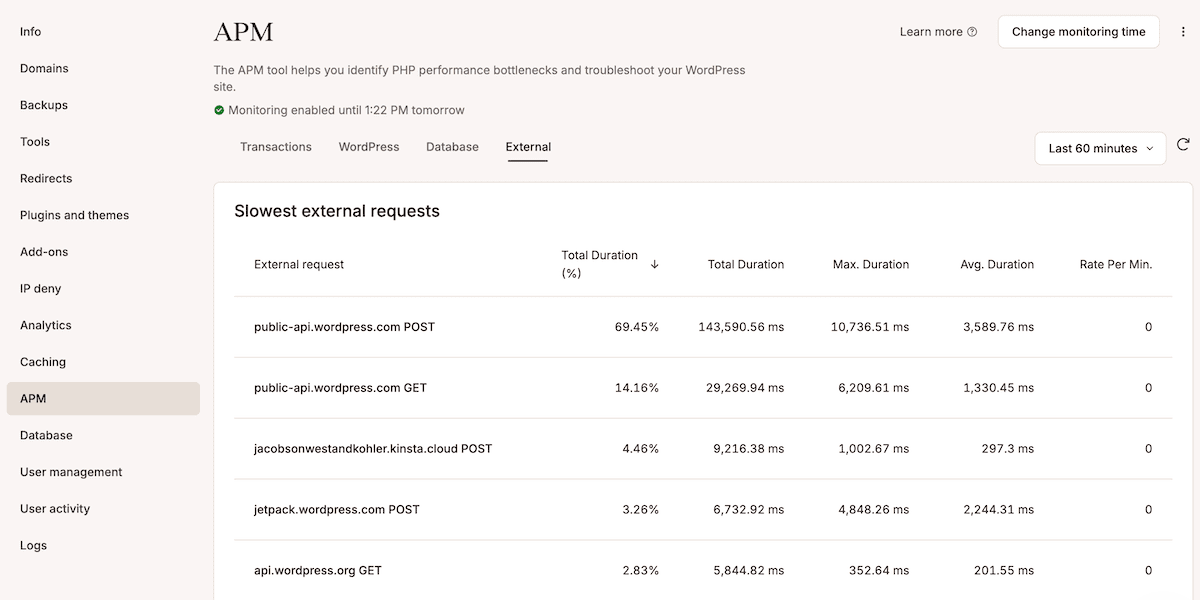
For example, a price API appearing on the most efficient of the tick list, with a maximum period measured in a few seconds, clearly implies that the gateway is the availability of the problem.
Transaction tracing
Clicking on a request URL throughout the External tab opens a listing of transaction samples. Selecting a specific development then opens the transaction trace timeline, which shows a whole breakdown of each process that occurred, with each and every process confirmed as a timed span.
Spans consuming more than 5% of the entire transaction time appear in orange; those consuming more than 25% appear in purple.

Strains can help you prioritize which dependencies to optimize or trade first. As an example, if an external HTTP title to a price API occupies 5 seconds of a 5.5-second transaction, the web website hosting infrastructure handled everything else partly a second.
To use the Kinsta APM all over a suspected issue, the workflow runs as follows:
- Permit APM monitoring and choose a period that covers the problem window.
- Reproduce the issue if it isn’t at the moment occurring (or stay up for the tool to clutch are living wisdom).
- Let wisdom acquire, then open the External tab, click on on into any external request to open the transaction trace, and browse concerning the span durations.
If external HTTP calls appear on the most efficient of the effects with durations that account for a lot of the transaction time, you’ll have the ideas you wish to have to begin to restore the problem.
Operational strategies for managing third-party dependencies
Container isolation limits the wear and tear from external failures, then again so does the best way you load and phone external services. Even with well-architected web website hosting underneath you, third-party dependencies need proactive keep an eye on at the tool level.
Asynchronous loading patterns for non-critical scripts
WordPress so much scripts synchronously by way of default, as a result of this a script throughout the file head blocks the browser from appearing content material subject material until it finishes downloading and executing. For analytics scripts, heat mapping equipment, and promoting and advertising and marketing automation, that means a steady third-party server holds up all your internet web page.
The dignity to take hold of right here’s that loading by the use of sync and async produces different effects when an external server is sluggish:
- Synchronous (blockading) loading halts HTML parsing until the script downloads and runs. If the outside server is beneath load, your internet web page waits.
- Asynchronous loading lets the browser continue parsing HTML and rendering content material subject material while the script such a lot throughout the background. If the outside server is sluggish, your internet web page renders anyway.
WordPress has local reinforce for async and defer loading strategies by the use of wp_enqueue_script(). Every prevent non-critical scripts from blockading internet web page rendering, then again they behave differently: defer executes scripts in order (so it’s very good for scripts with dependencies), while async executes scripts when they load, regardless of order.
The usage of async is absolute best for standalone trackers where execution order doesn’t matter.
add_action( 'wp_enqueue_scripts', function() {
    // Analytics — deferred so it does no longer block the intense path.
    wp_enqueue_script(
        'google-analytics',
        'https://www.googletagmanager.com/gtag/js?identification=G-XXXXXXXX',
        [],
        null,
        [ 'strategy' => 'defer', 'in_footer' => false ]
    );

    // Promoting and advertising and marketing script — async on account of execution order does no longer matter.
    wp_enqueue_script(
        'hotjar',
        'https://static.hotjar.com/c/hotjar-XXXXXX.js',
        [],
        null,
        [ 'strategy' => 'async', 'in_footer' => false ]
    );
} );
Then again, checkout-critical scripts incessantly need further wary loading behavior than analytics or promoting and advertising and marketing tags, and a couple of value integrations may need to keep blocked or ordered to avoid breaking checkout. In short, non-critical scripts that can fail without breaking the internet web page get async or defer; scripts that the individual needs to complete a transaction don’t.
Timeout configuration for external API calls
Kinsta’s default max_execution_time is long enough for classy operations, then again a ways too long to stick an individual in a position. As such, a plugin making external API calls should set its non-public timeout ceiling fairly than falling once more on the server-level limit.
WordPress defaults to a 5-second HTTP timeout for external requests till a plugin or filter out overrides it. If a plugin needs a novel limit, WordPress supplies a clear out for this: http_request_timeout. It runs previous to a request is made and accepts each and every the existing timeout price and the target URL, so that you’ll be capable of set different limits for more than a few services:
add_filter( 'http_request_timeout', function( $timeout, $url ) {
    if ( str_contains( $url, 'api.example.com' ) ) {
        return 10; // Don't wait longer than 10 seconds.
    }
    return $timeout;
}, 10, 2 );
This sort of ceiling manner a failing supplier returns an error for your particular person rapid, fairly than occupying a PHP thread. Retaining plugin-level timeouts correctly underneath the server ceiling is what stops a single sluggish API from consuming a thread for an unreasonable time frame.
Then again, increasing timeout values doesn’t restore sluggish APIs then again prevents premature failures when a supplier is working then again beneath load. The fitting manner is a short lived timeout that fails rapid and arms off to a fallback.
Fallback mechanisms and swish degradation
Fallbacks keep your website helpful all over external failures fairly than appearing an error. The advance uses WordPress transients to cache a good fortune API responses, then serves cached wisdom when a are living title fails.
Proper right here’s an example:
function get_shipping_rates_with_fallback( $bundle deal ) {
    $cache_key  = 'live_shipping_rates_' . md5( serialize( $bundle deal ) );
    $backup_key = 'backup_shipping_rates_' . md5( serialize( $bundle deal ) );
    // Return contemporary cached fees if they're available.
    $cached = get_transient( $cache_key );
    if ( $cached !== false ) {
        return $cached;
    }
    // Take a look at the are living API title with a short lived timeout.
    $response = wp_remote_post( 'https://api.example.com/fees', [
        'timeout' => 8,
        'body'    => [
            'destination' => $package['destination'],
            'weight'      => $bundle deal['contents_weight'],
        ],
    ] );
    // On excellent fortune: cache the outcome and substitute the longer-lived backup.
    if ( ! is_wp_error( $response ) && wp_remote_retrieve_response_code( $response ) === 200 ) {
        $fees = json_decode( wp_remote_retrieve_body( $response ), true );
        set_transient( $cache_key, $fees, HOUR_IN_SECONDS );
        set_transient( $backup_key, $fees, DAY_IN_SECONDS );
        return $fees;
    }

    // On failure: serve stale backup fees fairly than an error.
    $backup = get_transient( $backup_key );
    if ( $backup !== false ) {
        return $backup;
    }
    // No cached wisdom the least bit: return a flat-rate fallback.
    return [
        [ 'id' => 'fallback_flat', 'label' => 'Standard Shipping', 'cost' => 9.99 ],
    ];
}
The one-hour transient handles common caching to prevent pointless API calls. The 24-hour transient updates highest when the are living API returns a a good fortune response, which allows your website to fall once more to the newest a good fortune response. When the API is happening, your website serves the previous day’s shipping fees as a substitute of an error.
Graceful degradation keeps your core capacity operating even though external services are unavailable. It in reality works very best alongside a web website hosting infrastructure that restricts failures to the container level, so one dependency drawback received’t consume assets.
Your web website hosting should do more than give your website tempo
Third-party failures are part of operating a WordPress website with real-world dependencies. What you’ll be capable of keep an eye on is how numerous your website goes with them, which is made up our minds by way of how your web website hosting setting responds.
The usage of an infrastructure that implements container isolation, a loyal PHP thread pool, built-in timeout limits, and software tracking lets you understand a web website hosting drawback from a dependency drawback.
Will have to you’re in a position to see how Kinsta’s infrastructure handles this to your WordPress internet sites, uncover Kinsta’s internet hosting plans. Alternatively, discuss to the workforce about how Kinsta can receive advantages your specific setup.
The publish How WordPress internet hosting handles partial disasters (APIs, CDNs, and third-party scripts) gave the impression first on Kinsta®.




0 Comments