Get the fireworks in a position! With 7.0, WordPress enters a bold new era.
It’s almost certainly the platform’s biggest leap lately. Now, you’ll be able to collaborate in conjunction with your group of workers in authentic time—just like with Google Docs—and leverage an “agentic construction” in a position to interact with Massive Language Models (LLMs).
Then again that’s just the beginning. At the side of real-time collaboration, WordPress 7.0 refines the admin interface and introduces new blocks and developer equipment, such since the iframed publish editor and PHP-only blocks.
Make yourself a cup of coffee and get at ease because of this is going to be a prolonged and exciting study.
With 7.0, WordPress has taken an important evolutionary leap. Forget the operating a weblog platform of its early days. At the moment, WordPress is a collaborative platform natively in a position for artificial intelligence.
This bold challenge aimed to supply a reliable, secure infrastructure enabling WordPress shoppers and plugin developers to interact with Massive Language Models (LLMs) in a standardized means.
The new architectural paradigm paves one of the simplest ways for “agentic WordPress”. It’s a shift towards agentic usability where WordPress is natively ready to interacting with external AI Agents by means of standardized, machine-friendly interfaces.
There’s such a lot to say, then again previous to coming into the details of the AI integration, listed here are some preliminary definitions.
WordPress AI construction: Basic concepts
To clutch the AI construction of WordPress 7.0, you will need to to identify 4 very important portions.
AI Client: A provider-agnostic AI infrastructure that provides a standardized means for WordPress PHP and JS code to interact with generative AI models. For the reason that AI Client is provider-agnostic, the mechanical device can serve as independently of any particular AI carrier.
AI Provider: The entity or company that develops, owns, and manages Massive Language Models (LLMs), harking back to Anthropic, Google, and OpenAI.
Abilities API: A brand spanking new useful interface designed to allow plugins, problems, and WordPress core to turn their options in every human- and machine-readable formats, enabling AI agents to interact with WordPress choices (e.g., growing posts or together with an excerpt) in a structured means. That’s what makes WordPress 7.0 natively agentic.
Connectors show in WordPress 7.0.
Connectors
Previous permutations of WordPress required a plugin for each AI carrier you wanted to use for your website online. WordPress 7.0 introduces a unified interface for managing AI Connectors beneath Settings > Connectors.
You not need to paste your API keys in multiple places. Enter your keys once on the Connectors show, and all appropriate plugins can use that connection all over the AI Consumer.
Additionally, the new interface permits you to switch between AI providers from a single location without risking breaking the rest.
Inside the Connectors interface, click on at the Arrange button for your AI carrier and enter your API key. Save your settings, and likewise you’re in a position to interact with the AI carrier for your WordPress website online.
Together with an API key throughout the Connectors interface
For many who’re not certain where to start out, arrange and switch at the AI Experiments plugin. This plugin permits you to add AI-generated featured pictures, alt text, excerpts, and additional.
AI Experiments plugin settings
The new AI integration not only introduces a brand spanking new particular person interface however as well as lets in developers to test in new AI providers by means of the Connectors API.
Developers can now test in and organize connectors using the new core classes and strategies. After being registered, each connector turns out as a card on the Connectors show.
The new API moreover provides 3 public functions.
wp_is_connector_registered(): Checks if a connector is registered.
wp_get_connector(): Retrieves a single connector’s information.
wp_get_connectors(): Retrieves all registered connectors.
In addition to, the new movement hook wp_connectors_init permits you to override the metadata of registered connectors.
Construction with the AI Client
The Connectors show provides the AI interface. The AI Consumer is the engine underneath the hood—a unified abstraction layer that standardizes how WordPress interacts with AI. Whether or not or no longer it’s OpenAI, Anthropic, or Google Gemini, your code remains the an identical. WordPress handles the translation, allowing you to be aware of your tool’s excellent judgment.
$ai_response = wp_ai_client_prompt( "Create an authorized publish about WordPress" )
	->generate_text();

if ( is_wp_error( $ai_response ) ) {
	wp_die( $ai_response->get_error_message() );
}

echo wp_kses_post( $ai_response );
The following example shows the way in which you define the response schema to make the guidelines in a position to use.
$taxonomy_schema = array(
	'sort'       => 'object',
	'houses' => array(
		'category' => array( 'sort' => 'string' ),
		'tags'     => array(
			'sort'  => 'array',
			'items' => array( 'sort' => 'string' )
		),
	),
	'required'   => array( 'category', 'tags' ),
);

$post_body = "Operating from a small tavern in Crete was once as soon as a game-changer. I realized that Greece is becoming the ultimate hub for far flung staff in 2026.";

$json = wp_ai_client_prompt( "Consistent with this article, recommend one of the vital appropriate category and 3-5 comparable tags: $post_body" )
	->using_temperature( 0.1 )
	->as_json_response( $taxonomy_schema )
	->generate_text();

if ( is_wp_error( $json ) ) {
	return $json;
}

$suggested_taxonomies = json_decode( $json, true );
In this code,
With as_json_response(), WordPress promises the output is herbal JSON that conforms to the specified schema ($taxonomy_schema).
using_temperature() controls the AI’s response, making it more or less deterministic (or random). A low temperature (0.1) yields better precision, while a over the top temperature encourages a additional creative response.
The $suggested_taxonomies array provides the kinds and tags generated by means of the AI. You’ll be able to routinely assign the ones in your publish.
A structured output promises predictable results and gives a very good format for use with the Abilities API. For instance, the code above could be used to routinely create a publish with the specified category and tags.
The API doesn’t merely beef up text. As a result of the generate_image() means, the AI Client can also generate pictures.
You’ll be able to request multiple results with a single title. For instance, you’ll be able to request 3 text or image possible choices by means of passing a numeric value to the generate_text() or generate_image() methods: calling generate_image( 3 ) returns 3 variations of the an identical image.
The API moreover provides a choice of methods that return additional info. The ones methods return a GenerativeAiResult object containing rich metadata, harking back to token usage, the carrier, and the manner that spoke back to the prompt:
generate_text_result()
generate_image_result()
convert_text_to_speech_result()
generate_speech_result()
generate_video_result()
As you’ll be able to see, the ones methods offer a number of additional choices, in conjunction with beef up for text-to-speech, speech, and video conversion.
Other API methods include:
using_max_tokens(): Limit the period of the response (e.g. ->using_max_tokens( 500 ))
using_model_preference(): Set a selected taste (e.g. ->using_model_preference( 'gemini-2.5-flash' ))
For a more in-depth analysis and additional code examples, talk over with the WP AI Consumer GitHub challenge internet web page and the changes made in preparation for WordPress 7.0.
Exact-time collaboration throughout the Block Editor
Exact-time collaboration (RTC) throughout the Block Editor is one of the most eagerly awaited choices coming to the core. WordPress 7.0 introduces the power to edit the an identical publish or internet web page synchronously with multiple shoppers, similar to a Google Document.
In essence, WordPress 7.0 transitions from a single-user platform to a multi-user one. This represents a elementary shift for editorial teams working with WordPress.
Allow real-time collaboration on content material subject material, in conjunction with posts, pages, and templates.
Allow offline enhancing and data synchronization.
Provide an optimized development experience so developers won’t have to worry about collaborative enhancing, since the information is collaborative and synced by means of default.
This initial implementation introduces quite a lot of new choices affecting every editor shoppers and developers. Let’s dive in.
Exact-time collaboration throughout the Block Editor: What’s new for purchasers
For many who artwork in a group of workers, you not should wait for your colleague to move out the editor to test content material subject material or make changes, because of you’ll be able to now collaborate in authentic time on content material subject material production.
To start, make sure that the Allow real-time collaboration selection is checked in Writing settings.
Allow real-time collaboration in WordPress 7.0.
Next, open the publish editor with other folks of your group of workers, or open multiple classes with different shoppers, and get began exploring.
The ones are the necessary factor problems with collaborative enhancing.
Awareness
When multiple shoppers collaborate on the an identical publish or internet web page, the avatars of the other shoppers appear inside of essentially the most good toolbar of the block editor.
Collaborator avatars appear at the top of the editor.
Changes made by means of each collaborator could be noticed to the rest of the group of workers in as regards to real-time. When an individual is working on a text part, their avatar will also appear throughout the block toolbar and switch together with the cursor.
Every other particular person is enhancing a Paragraph block.Every other particular person is enhancing an Image block.
In addition to, when an individual supplies a brand spanking new block, it will be highlighted with a colored border.
An image block added by means of every other particular person turns out with a colored border.
Sync with the backend
As a result of Yjs integration, the mechanical device handles conflicts intelligently using CRDT. If two shoppers artwork on the an identical block or write the an identical bear in mind at the an identical time, the mechanical device simply synchronizes the changes. Changes to block houses, harking back to colors and fonts, are also handled seamlessly.
Improving block style settings in collaboration in WordPress 7.0.
Offline enhancing and data syncing
The mechanical device works simply even whilst you’re offline. So, in case you are working in areas with gradual connections or pass offline for a few minutes, you’ll be able to nevertheless write. When the signal returns, your changes could be merged with others’ changes, and there could be no unwanted overwrites.
Undoing an operation (Cmd+Z) will only undo your latest changes, not those made by means of your colleagues a second earlier.
You won’t have to worry about time and again saving your artwork to share it with others. Synchronization occurs nearly in authentic time. Other shoppers who are connected and working on the an identical content material subject material will see your changes nearly in an instant.
Exact-time collaboration throughout the Block Editor: An creation for developers
The new WordPress’ real-time collaboration machine is according to Yjs, “a high-performance CRDT for building collaborative methods that sync routinely.”
Yjs is a JavaScript library for managing information, harking back to WordPress content material subject material, that should be edited similtaneously by means of multiple people in authentic time. It is the sync engine for real-time collaboration throughout the editor.
It exposes its inside CRDT taste as shared information varieties that can be manipulated similtaneously. Shared varieties are similar to no longer abnormal information varieties like Map and Array. They are able to be manipulated, fireside events when changes happen, and routinely merge without merge conflicts.
Quicker than WordPress 7.0, posts had been stored as a single, static HTML string. Yjs uses the Delta Construction to give an explanation for the content material subject material and changes made by means of each contributor. Deltas are an information layout that describes bureaucracy without the complexity of HTML, in conjunction with formatting wisdom.
As an example, imagine the text “Hello WordPress.” The following JSON object describes a change in font weight:
[
	{ "retain": 6 }, // Skip "Hello " (6 characters)
	{ "retain": 9, "attributes": { "bold": true } } // Apply bold to the next 9 characters
]
If an individual supplies “7.0” to the end of the string, the following JSON object is as follows:
[
	{ "retain": 15 },
	{ "insert": " 7.0" }
]
The usage of Yjs and implementing the Delta Construction supplies an a variety of benefits:
It prevents all sorts of conflicts. If multiple shoppers are enhancing the an identical paragraph or even the an identical bear in mind, WordPress can decide who wrote each letter. This allows for granular revisions and paves one of the simplest ways for block-level revision restores.
It promises surgical precision and speedy synchronization. For many who edit a single bear in mind in a 20,000-word article, only that small industry is registered. This permits speedy synchronization of content material subject material for all connected shoppers.
The an identical way allows block settings (harking back to colors or structure possible choices) to be synchronized as shared map attributes.
Infrastructure and data transport: Why your host problems
Having multiple shoppers artwork similtaneously on the WordPress backend can force your website online’s belongings, so it’s important to clutch what happens behind the scenes all over collaborative enhancing.
As mentioned earlier, the editor interface and the Yjs engine provide the foundation for real-time collaboration. On the other hand, we haven’t however outlined how information is carried between shoppers. This process is managed by means of the Delivery Layer, which transmits your changes from your browser to the server and then to other shoppers enhancing the an identical piece of content material subject material.
HTTP Polling is valued for its not unusual beef up — it truly works on every PHP server and shared website online internet hosting setting without additional setup — then again it is a lot much less setting pleasant on account of the over the top overhead of continuing HTTP requests.
WebSockets excel at helpful useful resource efficiency and low latency, with changes appearing in an instant, then again they require specialized software that is not available on basic hosts.
WebRTC could be very setting pleasant for small groups of consumers because of browsers send information without delay to one another and no longer the use of a central server for synchronization. On the other hand, it is thought to be unreliable.
In the end, the decision was once as soon as made to put in force the HTTP Polling answer. While this promises collaboration on any server, it comes with higher overhead and is the least “real-time” selection. WordPress is designed to run at the entirety from entry-level shared website online internet hosting to massive undertaking infrastructures, which is why this solution was once as soon as decided on.
On the other hand, the transport layer is designed to get replaced or prolonged. Web internet hosting providers or specialized plugins can change the default polling mechanical device with a high-performance WebSocket carrier.
New blocks and design equipment
WordPress 7.0 introduces new blocks and design equipment that can significantly beef up the enhancing experience. Proper right here’s what’s new and the way in which your creative workflows industry.
New Breadcrumbs block
WordPress 7.0 introduces a brand spanking new Breadcrumbs block that presentations the internet web page’s displayed hierarchy.
At its core, the new block includes a dynamic element that queries the WordPress information building to routinely decide the existing location of website online target audience based on the internet web page hierarchy (mother or father/child) or publish taxonomy words.
Inside the image underneath, the Breadcrumbs block shows the category hierarchy of a regular blog publish.
The Breadcrumbs block shows the publish’s category hierarchy.
The Breadcrumbs block moreover is helping the Query Loop. Whilst you add a Breadcrumbs block to a Query Loop block, the block shows the paths of explicit particular person posts extracted from the query.
The Breadcrumbs block has some configuration possible choices that display you :
Show/quilt the link to the home internet web page as the place to begin of navigation.
Show/quilt the existing breadcrumb.
Exchange the breadcrumb separator.
Show breadcrumbs on the area internet web page.
Make a selection publish hierarchy (default) or taxonomy period of time hierarchy.
The Breadcrumbs block is helping Gutenberg design equipment and introduces two filters that allow developers to programmatically keep an eye on breadcrumbs.
The new block_core_breadcrumbs_post_type_settings filter allows developers to specify which taxonomy and period of time should be used in breadcrumbs when a publish has multiple taxonomies or words.
Inside the following example, the filter is used to turn tags as an alternative of lessons:
The block_core_breadcrumbs_items filter shall we developers keep an eye on, add, or remove items from the overall breadcrumb trail previous to it is rendered. Listed below are some use cases:
Trade the Area icon with an image (an SVG, your company logo, and so forth.) to save some space or make the block output additional in line with your website online’s branding.
Shorten the title of a publish throughout the breadcrumbs if it’s too long.
Inject custom lessons or words, as an example, by means of forcing a step into the breadcrumb trail.
The following code uses the new filter to truncate breadcrumb labels when the period exceeds 20 characters:
add_filter( 'block_core_breadcrumbs_items', function( $items ) {
	foreach ( $items as $key => $products ) {
		if ( mb_strlen( $products['label'] ) > 20 ) {
			// Truncate the string to 17 characters and append '...'
			$items[$key]['label'] = mb_strimwidth( $products['label'], 0, 17, '...' );
		}
	}
	return $items;
}, 10, 1 );
For a deeper evaluate of Breadcrumbs block filters and other code examples, see the dev word.
New Icon block
A brand spanking new Icon block permits you to add SVG icons into your content material subject material. The new block objectives to supply a local same old answer for managing markup and ensuring accessibility consistency, without requiring the arrange of third-party plugins merely so that you can upload a few icons.
In recent years, the new Icon block comes with a default set from which you’ll be able to choose your icons. On the other hand, there are plans so that you can upload the power for purchasers to test in third-party icon gadgets someday.
The Icon library in WordPress 7.0
The block is based on a brand spanking new server-side SVG Icon Registration API. This promises that updates to the icon registry are propagated to all shoppers without errors. The arrival of the new Icon block is paired with a brand spanking new /wp/v2/icons API endpoint.
Together with icons in your content material subject material is beautiful easy with the new core Icon block.
Customizable navigation overlays
Quicker than WordPress 7.0, cell navigation menus had been fastened, and likewise you couldn’t industry the design, structure, or default content material subject material. WordPress 7.0 introduces customizable Navigation Overlays, giving you entire keep an eye on over your navigation menus. You’ll be able to create a menu overlay using blocks and patterns, and a brand spanking new Navigation Overlay Close block so that you can upload an intensive button any place throughout the navigation overlay.
Technically, navigation overlays are template parts, and whilst you’ve created yours, you’ll find it throughout the Patterns phase of the Internet web page Editor sidebar. Each overlay is assigned to a Navigation block, then again you’ll be able to assign multiple Navigation blocks to the an identical overlay.
Basically, they’re a block canvas that can grasp any type of block. You’ll be able to add a Navigation block, but it surely’s utterly up to you which of them blocks you add. They could be social icons, a search field, your website online logo, and much more.
Navigation overlays can only be used throughout the Navigation block. To prevent accidental use in numerous parts of a template, they are excluded from the block inserter.
Create a Navigation Overlay in WordPress 7.0.
You’ll be able to create a practice navigation overlay from the Overlays phase throughout the Navigation block sidebar throughout the Internet web page Editor.
When you select the Navigation block, the template section sidebar shows the Navigation Overlay settings divided into two sections. The Content material subject material phase shows the block varieties included throughout the overlay, while the Design phase supplies a number of predefined designs.
Navigation Overlay template section settings.
The block sidebar is divided into two tabs, one for settings and the other for sorts for the Navigation Overlay template section.
Configuring blocks in a Navigation Overlay.
The Sorts tab of the Navigation Overlay block tab is where you’ll be able to customize the illusion of your overlay by means of setting colors, background image, typography, size, border, and shadow.
Navigation Overlay style settings
Theme developers can merely add pre-built navigation overlays to their problems. You’ll be able to provide every a default overlay template section (the overlay itself) and a choice of overlay patterns (pre-built designs that appear when enhancing a navigation overlay).
The Designs phase of the Template Segment sidebar provides a choice of pre-built patterns.
For a more in-depth evaluate and code examples, talk over with the original dev word and this pull request.
Navigation Overlay Close block settings.
Improvements to the Paragraph block
Numerous new additions to the Paragraph block offer better flexibility in text styling.
First, a brand spanking new selection throughout the Typography settings permits you to set the first-line indent.
Line indent keep an eye on in WordPress 7.0
You’ll be able to keep an eye on text indent for explicit particular person paragraphs, or you’ll be able to apply it to all paragraphs by means of the Global Style settings beneath Editor > Sorts > Blocks > Paragraph.
Line indent keep an eye on in Global Sorts
Theme developers can allow/disable and granularly keep an eye on line indent throughout the theme.json document using the new textIndent assets.
The Paragraph block now moreover is helping extensive and entire alignment. The following image shows the new Align keep an eye on.
The Paragraph block now is helping in depth and whole alignment.
Every other useful addition to the Paragraph block is the fortify of textual content columns. This new selection is available beneath the Typography settings throughout the block sidebar.
The Paragraph block now is helping text columns.
Embedded background motion pictures for the Cover Block
With WordPress 7.0, you’ll be able to use embedded motion pictures, harking back to those from YouTube or Vimeo, as background movies for the Quilt block. Prior to now, you might want to only use uploaded motion pictures.
So that you can upload a hosted video, click on on Add Media throughout the Cover block toolbar, then choose Embed Video from URL.
Enter video URL for the Cover block.
You will then be asked to enter the video URL.
Embedded video as background video for the Cover Block.
Your embedded video will appear since the background video for your Cover block, every throughout the editor and on the frontend.
Responsive Grid block
The Grid block has been up-to-the-minute to be natively responsive. In previous permutations of WordPress, shoppers might simply only choose between Auto and Guide modes. In Auto mode, you might want to set the minimum column width to make the block responsive. In Guide mode, you might want to set the choice of columns, which remained fastened.
Grid block settings in WordPress 6.9.
Starting with WordPress 7.0, the Grid block is natively responsive. The choice of columns now behaves as the maximum, and you’ll be able to fine-tune the minimum column size and the maximum choice of columns while protecting the block responsive.
The Grid block on a large show.The Grid block on a small show.
Custom designed CSS beef up for explicit particular person blocks
Custom designed CSS beef up for explicit particular person blocks in WordPress 7.0.
Whilst you add custom sorts to a block, WordPress routinely supplies the has-custom-css class. For many who take a look at the block throughout the code editor, you’ll be able to see a block of code similar to the following:
The custom style so much after every WordPress defaults and Global Sorts, ensuring that changes you are making isn’t going to affect the illusion of other instances of the an identical block.
Block visibility based on the viewport
In WordPress 7.0, you’ll be able to cover or display blocks individually depending on whether or not or no longer the individual is on a cell software, tablet, or desktop.
This number one iteration supplies the new viewport belongings to blockVisibility.
You’ll be able to allow visibility keep an eye on by means of together with the JSON object above to the block without delay throughout the Code editor or by means of the Command palette.
Allow the block visibility keep an eye on from the command palette.
Upon getting enabled block visibility keep an eye on, you’ll be able to get right of entry to the block visibility possible choices by means of opening the modal from the block toolbar, the block inspector sidebar, or the command palette.
The block visibility modal in WordPress 7.0
Long run releases should include configurable breakpoints and integration with theme.json for block visibility.
Styling possible choices for the Math block
Quicker than WordPress 7.0, shoppers might simply not customize the illusion of the Math block. The new WordPress style supplies Color, Typography, Dimensions, and Border styling choices for the Math block.
The following image provides an example of Math block styling:
Styling possible choices for the Math block.
HTML block updates
The HTML block has been totally redesigned. Now, whilst you insert an HTML block into your content material subject material, a modal window turns out with 3 separate tabs for entering your HTML, CSS, and JavaScript.
Together with code to the HTML block in WordPress 7.0.
If you wish to have extra space, a button throughout the upper-right corner of the modal window signifies that you’ll be able to allow or disable full-screen mode.
The HTML block’s modal in full-screen mode.
Image block improvements
The image block has been up-to-the-minute with quite a lot of improvements that supply better customization possible choices.
The Image block now is helping Side ratio regulate for in depth and whole alignment (PR #74519). This new function is available throughout the Sorts tab of the block settings sidebar.
Facet ratio keep an eye on for the Image block in WordPress 7.0.
Every other useful addition is the focal point keep an eye on. With this new function, you’ll be able to keep an eye on the noticed portion of an image when it is cropped. (PR #73115)
Image focal point keep an eye on in WordPress 7.0.
The in-editor image cropper component has been moved to a selected package, and now it can be used across the app, and not only throughout the block editor (PR #73277)
Enhanced admin experience
With the release of WordPress 7.0, the WordPress admin area has been redesigned and modernized. It’s a substantial enlargement to the admin experience aimed toward making the website online’s navigation smoother, additional consistent, and visually attention-grabbing.
Visual improvements
Whilst you open the WordPress 7.0 admin panel, you’ll immediately understand how different the interface portions look. The ones changes have been extensively mentioned and feature been deemed necessary to modernize the dashboard’s glance and reduce inconsistencies between the old-fashioned dashboard and the block editor.
The serve as is to modernize the admin’s glance, reduce inconsistencies between old-fashioned screens and the newer block editor / website online editor screens, and better align it with the WordPress design mechanical device as a whole.
The seen redesign occupied with a chain of core portions that appear all over the WordPress admin area. As Fabian Kaegy known, the ones are purely seen changes and not using a architectural or helpful updates.
You’ll be able to uncover the new menus, buttons, and transitions in WordPress 7.0 throughout the original WordPress Design Gadget on Figma.
Revisions nowadays are presented as previews in an editor-like interface that highlights seen permutations. You not need to study the entire article to see what has changed, because of permutations between permutations of the an identical content material subject material nowadays are highlighted at the block level. The mechanical device moreover identifies style changes, making it easy to spot adjustments to the color palette, typography, dimensions, and so on.
Revisions now offer a visual preview of changes at the block level.
Yellow highlights a block or text that has been modified.
Crimson highlights a block or text that has been deleted.
Green identifies a block or text that has been added.
With revisions, you’ll be able to see the entire power of Yjs because of when restoring a previous style, the mechanical device restores only the changes made to the document on a per-block basis, not the entire content material subject material.
The mechanical device is anticipated to be stepped ahead with long run updates, and we will expect new, tough choices. For a additional detailed evaluate of what has been performed and what we should see someday, check out this submit via Mathias Ventura from 2023, along with issues #60096 and #61161.
View Transitions
With WordPress 7.0, the boot package—the component answerable for initializing the editor and managing transitions between different admin screens—receives a important improve. As a result of this new infrastructure, navigating between dashboard screens not requires abrupt internet web page reloads, then again choices elegant transitions that significantly beef up the admin experience.
Technically speaking, by means of implementing the View Transitions API throughout the boot package, WordPress can now orchestrate zoom and slide animations all over state changes. This avoids remounting the canvas on trail changes, ensuring a fluid transition for root navigation.
Changes for developers
WordPress 7.0 is bigger than just a seen exchange; it introduces structural changes that significantly simplify the development workflow. Key highlights include decreased custom CSS on account of a additional tough theme.json, additional predictable structure keep an eye on all over the expanded use of iframes, and new declarative equipment for admin interfaces, with stepped ahead DataViews, DataForm, and Field API, and a brand spanking new Client-side Abilities API that provides a standardized option to expose and engage with tool options by means of JavaScript.
For many who’re a developer, listed here are one of the vital necessary technical changes coming with WordPress 7.0 you should learn about.
Pseudo-class beef up in theme.json
Great data for theme developers. Starting with WordPress 7.0, you’ll be able to use pseudo-class selectors (:hover, :focus, :focus-visible, and :full of life) without delay for your blocks and style variations for your theme.json.
Quicker than WordPress 7.0, pseudo-classes had been supported only for HTML portions like buttons and links, and their use at the block level was once as soon as only imaginable in custom CSS.
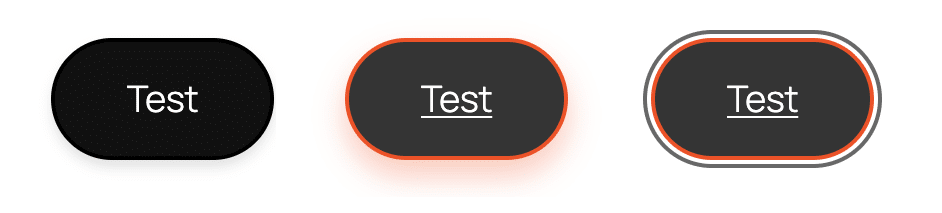
To use pseudo-classes at the block level, you wish to have to upload your taste configuration throughout the sorts phase of your theme.json document. Proper right here is a simple example of using pseudo-classes for a Button block (see moreover PR #71418):
Starting with WordPress 7.0, the submit editor is loaded in an iframe if the content material subject material incorporates only blocks that use Block API model 3 or upper. Quicker than 7.0, the publish editor was once as soon as only iframed if all registered blocks (even those not included throughout the content material subject material) used Block API v3+.
The principle benefit of loading the editor in an iframe is that it isolates the editor’s UI sorts from the theme’s content material subject material sorts. Without an iframe, the editor and theme stylesheets coexist within the an identical document, which perpetually ends up in compatibility issues and makes it difficult for developers to succeed in seen consistency between the backend and frontend.
Key benefits of the iframed publish editor include:
Style isolation
No CSS bleeding: The iframe prevents WordPress admin sorts from “bleeding” into the editor canvas and vice versa, ensuring that block appearances keep unaffected by means of the encompassing UI.
No need for CSS reset: Developers not need to manually reset WordPress admin CSS rules to make the editor content material subject material are compatible the frontend glance.
No prefixing: Theme developers not need to add prefixes or high-specificity selectors to their CSS rules to avoid breaking the admin interface.
Construction Consistency
Viewport-relative units: Without iframes, units like vw (viewport width) and vh (viewport top) talk over with the entire admin internet web page (in conjunction with the sidebar); they should be used solely at the editor canvas.
Native Media Queries: Media queries artwork natively throughout the iframe, reflecting the editor canvas size reasonably than the entire browser window.
Developer experience
Simplified workflow: Theme and plugin authors can “raise over” frontend sorts to the editor with minimal or no changes.
Chronic possible choices: Iframes keep the selection throughout the editor (e.g., determined on text) noticed although the individual interacts with UI portions, harking back to sidebar controls.
Predictability: The iframed editor moreover solves the problem of seen inconsistency, fighting the editor from all of a sudden switching modes based on installed plugins.
Backward compatibility
If a publish incorporates a block using older API permutations, the iframe is routinely removed to make sure backward compatibility. To benefit from the ones improvements, block developers are impressed to interchange their blocks to Block API style 3+.
PHP-only block registration
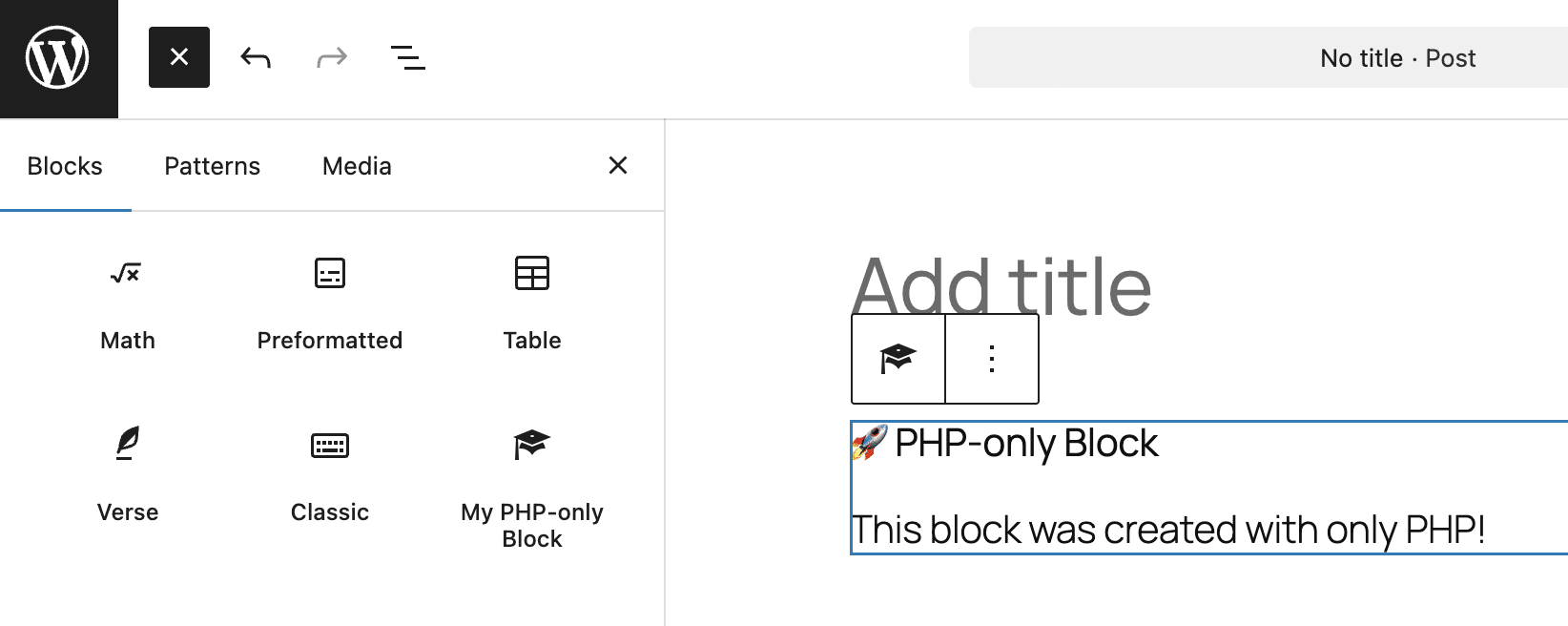
WordPress 7.0 introduces the power to check in blocks solely by way of PHP with routinely generated inspector controls. This addition streamlines developers’ workflows and encourages web pages that use hybrid problems or legacy PHP functions and shortcodes to adopt and enlarge on the block editor. That is an example of a block registered by means of PHP:
/**
 * Render callback (frontend and editor)
 */
function my_php_only_block_render( $attributes ) {
	return '
		🚀 PHP-only Block
		This block was once as soon as created with only PHP!
	';
}

/**
 * Take a look at within the block on the 'init' hook.
 */
add_action( 'init', function() {
	register_block_type( 'my-plugin/php-only-test-block', array(
		'title'		   => 'My PHP-only Block',
		'icon'			=> 'welcome-learn-more',
		'category'		=> 'text',
		'render_callback' => 'my_php_only_block_render',
		'is helping'		=> array(
			// Robotically registers the block throughout the Editor JS (in the past auto_ssr)
			'auto_register' => true,
		),
	) );
});
At the time of this writing, PHP-only blocks are not dynamic and can only use explicit configuration controls. Then again there are nevertheless many use cases to find. As a result of this, we’ve now published an educational masking only PHP-only blocks. In case you are a PHP developer, it is value taking a look.
A simple PHP-only block
DataViews, DataForm, and Field API improvements
WordPress 7.0 introduces quite a lot of improvements to DataViews, marking a decisive step against a additional trendy, modular administrative interface. This exchange transforms information keep an eye on appropriate into a very customizable experience with a declarative way. Developers can now create sophisticated custom interfaces by means of simply defining their rules in JSON format, allowing the core to generate the interface.
New additions include:
Wisdom visualization improvements (DataViews): The new Task structure uses an activity-feed-timeline style. There may be a brand spanking new compact view mode for lists.
Form improvements (DataForm): The new Details structure is now available, together with edit icons for the Panel structure. The ones icons can be configured to look only when sought after.
Wisdom keep an eye on improvements (Field API): Computerized field validation is available, together with new formatting customization possible choices for numeric and date field varieties.
The following is an example of the way to define a view that groups and shows information in a compact mode:
For an intensive evaluate of the DataViews, DataForm, and Field API improvements, please talk over with the dev word.
Client-side Abilities API
WordPress 6.9 introduced the Skills API, a brand spanking new helpful interface that provides a standardized registry for plugins, problems, and WordPress core to interact with WordPress by means of exposing their options in every human- and machine-readable formats.
Now, WordPress 7.0 introduces a JavaScript API that permits you to enforce client-side choices like navigating or together with blocks in your content material subject material without delay from JavaScript, in a secure and standardized means.
The new Client-side Abilities API is divided into two methods.
@wordpress/core-abilities: If your plugin should get right of entry to the server’s registered talents, you’ll need to hook into the @wordpress/core-abilities package. This package retrieves all of the registered talents and lessons by means of the REST API and stores them throughout the @wordpress/talents store.
@wordpress/talents: This package provides the talents store without loading the talents registered on the server. If your plugin only should test in client-side options and does not require get right of entry to to server-registered options, it must enqueue @wordpress/talents.
Visit the developer observe for an intensive analysis of the new Consumer-side Skills API and a number of other different code examples.
Interactivity API changes
The Interactivity API is a WordPress-native API that permits developers so that you can upload interactivity to their internet websites in a standardized means. WordPress 7.0 improves the Interactivity API with a brand spanking new watch() function that permits you to programmatically observe state changes. Prior to now, it was once as soon as only imaginable to use the data-wp-watch directive to react to state changes.
Other changes made in WordPress 7.0 relate to the core/router store.
For a additional detailed description of the changes to the Interactivity API, please talk over with the dev word.
Other changes for developers
Listed below are a few other changes for developers value citing:
Unsynced patterns and template parts nowadays are set to contentOnly via default. Consumers will see controls for enhancing text and media first, without risking unintentionally breaking the block building. When you’ve got built custom blocks and want them to stick editable, you will want to set "place": "contentOnly" throughout the block.json document. Developers can make a choice out of this option by means of PHP using the block_editor_settings_all filter, or by means of JavaScript by means of setting disableContentOnlyForUnsyncedPatterns to true.
The Dimensions block beef up mechanical device has been significantly stepped ahead. You’ll be able to use width and top as usual block is helping beneath dimensions in block.json, and problems can define measurement size presets in their theme.json.
Taking a look ahead: 7.0 marks a brand spanking new era for WordPress
WordPress 7.0 isn’t just an exchange; it represents a watershed 2nd for every shoppers and developers. As a result of AI integration and the Abilities API, AI can now navigate the dashboard, create new content material subject material, edit present posts, and collaborate with other folks in authentic time. We in fact truly really feel we are standing at a historical turning point, and we will’t wait to find the ones AI-powered equipment and get began growing something utterly new ourselves.
Then again WordPress 7.0 is additional than just AI and RTC. The enhancing experience has been utterly reimagined, that incorporates real-time collaboration, a brand spanking new block-level revision construction, new core blocks, and necessary updates to the design mechanical device.
Previous AI integration, developers will have the benefit of enhancements that streamline the development workflow and unlock in the past unseen chances. From the iframed editor and pseudo-class beef up in theme.json to the Client-side Abilities API and PHP-only blocks, WordPress 7.0 provides a large number of substances to build increasingly tough web pages and methods.
To fully leverage the potential of WordPress 7.0, you wish to have a state of the art website online internet hosting provider optimized for capability and protection. At Kinsta, you’ll find everything you wish to have to push WordPress to its maximum possible. Take a look at our plans and find the one that absolute best conceivable fits your website online’s needs.










0 Comments